MagIT – IT Conference WordPress Elementor Theme WordPress Theme
Antivirus scan
Powered by ClamAV
✅ Verified clean
This product file has passed our security filters.
Want to run a fresh ClamAV scan right now? Takes a few seconds and shows scanner version, signature DB and live result.
This can take 5 to 30 seconds.
Clean file Threat detected
No threats detected in this file.
- File
- Size
- Scanned
- ClamAV
- Signature database
⚡ Powered by ClamAV
Scan could not be completed
Report product
If you detected an issue (broken file, malware, inappropriate content, etc.) let us know and we'll review it ASAP.
Sign in to report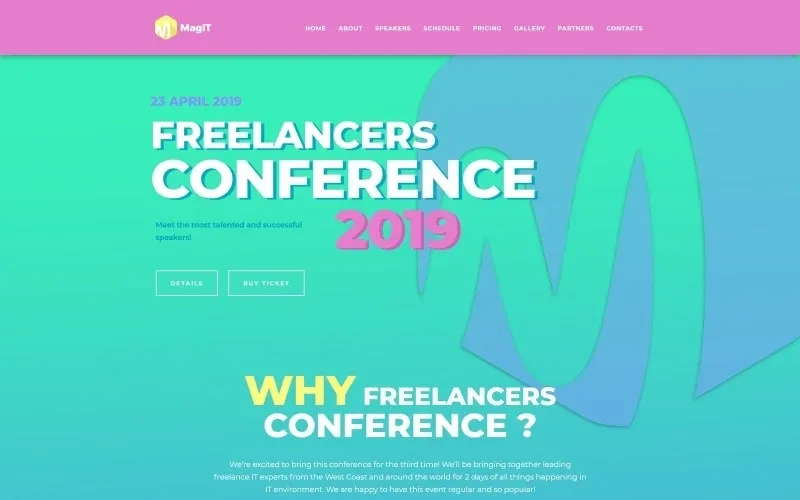
About MagIT – IT Conference WordPress Elementor Theme WordPress Theme
A conference website has an expiry date, and MagIT is built around that
Building a conference website often ends with a homepage that hides the date, a schedule in a PDF nobody opens on a phone and a ticket button that shows up too late. MagIT is an Elementor theme aimed at technology events: it brings together on a single page what an attendee needs to decide whether to go.
An event website only really pays off in the weeks before it. Once the date has passed, it sells nothing. That is why well-ordered, clear content matters more than any design detail. A theme with the structure already thought out saves you from deciding what goes where, and lets you spend your time on what convinces people: who is speaking and what will be covered.
Speakers and schedule: what MagIT puts in front of the attendee
The demo is laid out as one long page with a menu pointing to Home, About, Speakers, Schedule, Pricing, Gallery, Partners and Contacts. It is the classic conference structure and fits without reinventing anything.
- Speakers: profiles with name, company or role and a line summing up their career. It is what convinces a professional to pay to attend.
- Schedule: a table with time, content and speakers for each talk, including coffee and meal breaks.
- Event introduction: a block with the date and the reason to attend, before getting into the details.
One practical note: the times in the demo are written incorrectly (they mix AM and PM incoherently). They are just sample text, so check them when you load your real schedule.
Three ticket levels and an offer for early buyers
Throughout the page there are repeated buy buttons, a discount notice for people who sign up early and a table with three ticket levels (Basic, Standard and Premium) that grow in people, days and band performances. It is useful if your event mixes talks with a social atmosphere or if you want to sell group tickets.
The page is completed by a photo gallery, a block for partners and sponsors and a contact area with address, form, phone numbers and social networks (LinkedIn, Twitter, Facebook and Instagram). The gallery and sponsors work as proof that the event has already happened; if this is your first edition, you will have to fill them with other material, such as photos of the venue or logos of collaborators.
Choose MagIT if your event is about technology and your speakers are confirmed
MagIT is a visual theme: it provides the blocks and you provide the content. It works best when you already have speakers and a schedule defined, because the page relies on them. Its look and sample texts are about technology and freelance work, and you will need to change them if your event is in another sector.
Does it take ticket payments by itself?
Do not assume so. The demo has buy buttons and a table of levels, but check where those buttons lead. If you want to take payments on your own site, plan for a ticketing plugin or an external service.
Is it suitable for events that are not about technology?
Yes, for similar professional conferences, by changing texts and images. Even so, the design is made for an IT audience, so for a cultural or family event it may feel too serious.
Can I reuse it for the next edition?
Yes: the structure stays the same and you only change the date, speakers, schedule and tickets. After the event you can leave the site as an archive with the gallery and the speakers.
Does it work for several days or several rooms?
The demo shows a single schedule in one table. If your event has several rooms or days, check in the demo whether that block gives you enough space.
Topics
Version history
-
v
1.0.0 Current 13 Jun 2024
Customer reviews
Sign in to leave a review. Only people who have the product can review it.
No reviews for this product yet.
Frequently asked questions
-
GPL (General Public License) is the license under which WordPress and most premium plugins/themes are distributed. It grants you the right to use, modify and redistribute the software in as many projects as you want, with no domain restrictions.
-
Yes. With membership you get automatic updates via our GPLClub Updater plugin (installed on your WP, detects new versions and applies them). With individual purchase, you get one year of manual updates from your account.
-
Depends on the plan. Monthly: 3 domains. Semi-annual: 7. Annual and Lifetime: 15. Individual purchase: 1 domain.
-
GPLClub offers its own support for installation, configuration and compatibility. For direct support from the original author (feature requests, product-specific bugs), a license purchased from the author is required.