Material Design for Contact Form 7
Antivirus scan
Powered by ClamAV
✅ Verified clean
This product file has passed our security filters.
Want to run a fresh ClamAV scan right now? Takes a few seconds and shows scanner version, signature DB and live result.
This can take 5 to 30 seconds.
Clean file Threat detected
No threats detected in this file.
- File
- Size
- Scanned
- ClamAV
- Signature database
⚡ Powered by ClamAV
Scan could not be completed
Report product
If you detected an issue (broken file, malware, inappropriate content, etc.) let us know and we'll review it ASAP.
Sign in to reportNewer version out, or a problem?
About Material Design for Contact Form 7
Contact forms with a Material look and no rebuilding
The contact form is usually the most important interactive element on a website and the one that gets the least attention. When a form feels cramped or ambiguous, people leave.
Works on top of Contact Form 7, and what the plugin brings
Material Design for Contact Form 7 needs Contact Form 7 installed and active, because it extends that plugin rather than replacing it. Your forms, mail templates and validation rules keep working exactly as before.
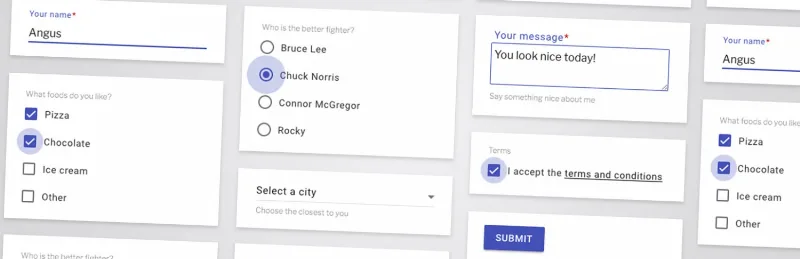
- Boxed or outlined fields, floating labels, ripple effect on buttons and Material styles for checkboxes, radios and dropdowns.
- Custom colors and fonts, icons, switches, and layouts with columns and sections.
Labels that rise as people type, and animations that guide them
The label starts inside the field, like help text. When someone clicks into the field or tabs to it, it shrinks and stays above the field while they type, so they still see what each box is for and you do not need placeholder text that disappears as soon as they start writing.
The plugin also adds an animated line under focused boxed fields and a smooth transition when validation messages appear. Everything is built with lightweight CSS and a little JavaScript, and it responds to keyboard focus too.
Comfortable fields on phones and accessible for screen readers
On phones and tablets, large touch targets and generous spacing make it easier to fill in fields, tick boxes and press submit with a thumb. Labels stay linked to their fields, focus states are clearly visible and contrast follows Material recommendations, which helps visitors with low vision or those who use screen readers.
Material Design for Contact Form 7 on any WordPress theme
You do not need a Material Design theme: the styles are built to work with almost any theme and to sit alongside the most popular page builders and block-based themes. They ship as one small stylesheet with no external fonts or CDN calls, and they load only on pages that contain a Contact Form 7 form.
Dark mode is supported and follows the visitor's system preference, with an option to force a specific palette when the theme needs it.
Frequently asked questions about Material Design for Contact Form 7
Can I use it without Contact Form 7?
No. It is a styling layer on top of Contact Form 7, so that plugin must be installed and active.
Do I have to rebuild my forms?
No. The plugin reads the tags you already use, such as text, email, select, checkbox or textarea, and wraps them in Material styling without touching your mail templates or validation rules.
What if a form looks different from what I expected?
Clear the cache of your cache plugin or CDN. That usually fixes it, because older stylesheets are often the cause.
Do date and file fields still send their data correctly?
Yes. They receive accessible custom controls that send exactly the values Contact Form 7 expects, so what happens behind the form does not change.
Topics
Version history
-
v
2.6.1 Current 16 May 2024
Customer reviews
Sign in to leave a review. Only people who have the product can review it.
No reviews for this product yet.
Frequently asked questions
-
GPL (General Public License) is the license under which WordPress and most premium plugins/themes are distributed. It grants you the right to use, modify and redistribute the software in as many projects as you want, with no domain restrictions.
-
Yes. With membership you get automatic updates via our GPLClub Updater plugin (installed on your WP, detects new versions and applies them). With individual purchase, you get one year of manual updates from your account.
-
Depends on the plan. Monthly: 3 domains. Semi-annual: 7. Annual and Lifetime: 15. Individual purchase: 1 domain.
-
GPLClub offers its own support for installation, configuration and compatibility. For direct support from the original author (feature requests, product-specific bugs), a license purchased from the author is required.