MaxiNet | Broadband & Telecom Internet Provider WordPress Theme + Elementor
Antivirus scan
Powered by ClamAV
✅ Verified clean
This product file has passed our security filters.
Want to run a fresh ClamAV scan right now? Takes a few seconds and shows scanner version, signature DB and live result.
This can take 5 to 30 seconds.
Clean file Threat detected
No threats detected in this file.
- File
- Size
- Scanned
- ClamAV
- Signature database
⚡ Powered by ClamAV
Scan could not be completed
Report product
If you detected an issue (broken file, malware, inappropriate content, etc.) let us know and we'll review it ASAP.
Sign in to report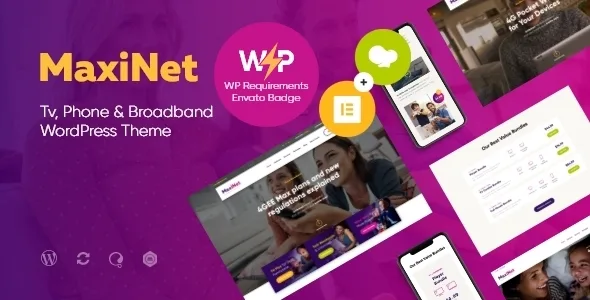
About MaxiNet | Broadband & Telecom Internet Provider WordPress Theme + Elementor
A tariff changes once and has to be corrected in many places
A package goes up in price or a promotion ends. On a provider's site that figure does not live in one place. The MaxiNet demo shows this well: prices appear in the home page banner, in the offer with a countdown, in the home page packages block and on the Packages page. If a tariff repeats and you only fix part of it, the rest will keep promising what you no longer sell.
For an internet provider, keeping the site current is largely keeping prices current, and that work grows with every block that repeats a tariff. That is why it pays to decide, before publishing, in how many places each figure will appear.
MaxiNet is a WordPress theme for internet, telecom and cable television companies, with the structure of the sector already built.
A provider's website, already structured
- Provider home page: a services grid (satellite TV, broadband, phone and TV box), an offer with a countdown and compared packages.
- Packages page for plans, and a Now Showing on TV listings block on the home page.
- Services content type, which you can disable if unused, and Testimonials for reviews.
- WooCommerce shop, with featured products on the demo home page.
- Slider Revolution and Swiper Slider, plus Essential Grid for presenting the company.
- Custom headers and footers with the page builder.
- GDPR Framework included and interactive Ajax search.
Elementor reaches only part of the theme
This is the point to be clear on before choosing it. The demo content is made with WPBakery. Elementor is compatible, but only the Elementor Home and Elementor Home 2 pages are built with it, along with their headers and footers.
If you want to work entirely in Elementor, the demo's inner pages will not reach you in that builder: you would have to rebuild them. If you work with WPBakery, you have the full demo. And in any case, each page, post or layout must use a single builder, without mixing the two.
Prices, coverage and billing are on you
Keeping one correct price. Make Packages the reference version, link to it from the other blocks and write down where each figure appears. When a promotion ends, check the countdown too.
Checking coverage. The demo has no address search. If you sell by area, that piece goes separately.
Connecting your systems. Among its features there is no connection to billing or to your customer manager: figures are edited on the pages.
Needed plugins and loading the demo
The only essential plugin is ThemeREX Addons, which also enables the header and footer layouts menu. To use the demo you will need WPBakery, and Elementor if you are going to use its two home pages. This order avoids surprises:
- Install the theme and ThemeREX Addons, along with the builder you will use.
- Install the child theme before importing: if you do it afterwards, the theme options are reset.
- Choose the import type. The whole-site one deletes and replaces existing content, and the partial one adds to what you have.
- Replace the sample packages, services and figures with your own.
Jelyco, Telnet, Starlitte and Mirasat, by priority
If Elementor is a condition, Jelyco edits its pages with that builder and covers internet, telecom, television and hosting, and Telnet offers eighteen home pages with a header builder and Elementor.
If comparing plans is central, Starlitte combines plan comparison and service pages. And for a satellite provider selling equipment, Mirasat includes a WooCommerce shop for that purpose.
Elementor, coverage and shop in MaxiNet
Can I build the whole site with Elementor?
Only two demo home pages are made with it. The rest is in WPBakery and would need rebuilding.
Can I mix the two builders?
On the same site yes, but each page, post or layout must use only one.
Does it include a coverage checker?
The demo does not show one. That function has to be solved separately.
Does the shop work for selling routers?
The demo shows a router and a phone among its products, and the shop uses WooCommerce.
Does importing the demo delete my content?
With the whole-site import, yes. The partial one adds content to what already exists.
Topics
Version history
-
v
1.2.10 Current 21 Aug 2024
Customer reviews
Sign in to leave a review. Only people who have the product can review it.
No reviews for this product yet.
Frequently asked questions
-
GPL (General Public License) is the license under which WordPress and most premium plugins/themes are distributed. It grants you the right to use, modify and redistribute the software in as many projects as you want, with no domain restrictions.
-
Yes. With membership you get automatic updates via our GPLClub Updater plugin (installed on your WP, detects new versions and applies them). With individual purchase, you get one year of manual updates from your account.
-
Depends on the plan. Monthly: 3 domains. Semi-annual: 7. Annual and Lifetime: 15. Individual purchase: 1 domain.
-
GPLClub offers its own support for installation, configuration and compatibility. For direct support from the original author (feature requests, product-specific bugs), a license purchased from the author is required.