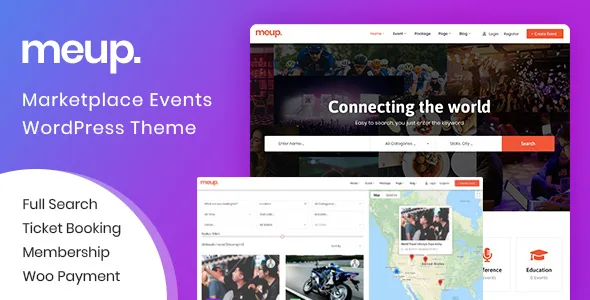
Meup – Event Marketplace WordPress Theme
Antivirus scan
Powered by ClamAV
✅ Verified clean
This product file has passed our security filters.
Want to run a fresh ClamAV scan right now? Takes a few seconds and shows scanner version, signature DB and live result.
This can take 5 to 30 seconds.
Clean file Threat detected
No threats detected in this file.
- File
- Size
- Scanned
- ClamAV
- Signature database
⚡ Powered by ClamAV
Scan could not be completed
Report product
If you detected an issue (broken file, malware, inappropriate content, etc.) let us know and we'll review it ASAP.
Sign in to reportNewer version out, or a problem?
About Meup – Event Marketplace WordPress Theme
Meup splits the revenue between you and each organizer
A site that sells tickets for many organizers has a problem a single-event website does not: how much each party keeps, who pays to publish, and who controls the sales of each event. Meup is built for that split. With it you can set up a local or global directory where organizers publish their events and you earn money in these ways:
- System fee: customers pay a small amount per completed transaction.
- Package fee: the organizer pays to register a package that lets them publish events and use more features.
- Commission: the organizer pays a percentage of each completed sale.
- Advertising: the organizer pays a fee to feature their event.
Search and in-person or online events on one site
People looking for an event want to filter by what matters to them. Meup includes three search forms: a quick one with three customizable fields, such as name, category or location; an advanced one with venue, price, duration and start and end dates; and an Ajax search that can show results on Google Maps. The same site works for concerts, conferences, sport events or bookings. Online events are run with the link and password the organizer provides for webinars on Zoom or Google Meeting, and in-person events can be sold without a seat, with a seat code or with a seat map so the customer picks their own seat.
QR check-in in Meup with a free app for the door
Access control is where the difference between selling tickets and running an event shows. Every ticket includes a QR code that staff can check in two ways: by searching the first characters of the code in the site's search form, or by installing the app included in the theme to scan the ticket from a phone. The app is free. You can give staff access so they check in guests at the door.
Tickets, coupons and payments with PayPal, Stripe or WooCommerce
Each event can have direct tickets and affiliate tickets, coupons per ticket type, single or recurring dates, a tax percentage and extra services sold with each ticket. Customers can cancel their booking if you allow it, transfer their ticket to another person, and download their tickets as PDF or their invoice. Organizer packages are set with a registration fee, publishing period, number of events and a fee per paid ticket, and you can set a default package for new organizers.
To get paid you can use PayPal, Stripe or any gateway that works with the WooCommerce plugin. That last option requires WooCommerce installed and active.
The organizer dashboard: sales, attendees and wallet
Each organizer sees per event the total before and after tax, profit, coupons used, bookings, tickets and attendees who checked in after the event. They can list and export attendees and tickets, check how many tickets remain for a specific date, and create, download and send PDF tickets to customers. In the wallet they see the balance, profit and payout history, and can withdraw money to their bank account. If you change an event's date, you can email customers about it, and confirmation and reminder emails are sent automatically.
Frequently asked questions about Meup
Is it only for concerts?
No. Meup is built for concerts, conferences, sport events, bookings and any business related to events, both in-person and online.
How is a ticket checked at the door?
With the free app, by scanning the QR code, or by searching the first characters of the code in the site's form.
Can I charge organizers in several ways?
Yes. The theme offers four ways: a system fee, a package fee, commission and advertising.
Can it be used in Arabic?
Yes, the theme supports RTL, so it works for sites in Arabic.
Elementor, RTL and the business model that fits Meup
Meup uses Elementor for headers and footers, so you need it active to build them. With the live customizer you change typography and colors, and choose a full-width or boxed layout. The calendar shows events by day, week, month or list.
It fits best if you want to charge other organizers for selling their tickets, through commission or paid packages.
Topics
Version history
-
v
2.1.5 Current 20 Jan 2026
Customer reviews
Sign in to leave a review. Only people who have the product can review it.
No reviews for this product yet.
Frequently asked questions
-
GPL (General Public License) is the license under which WordPress and most premium plugins/themes are distributed. It grants you the right to use, modify and redistribute the software in as many projects as you want, with no domain restrictions.
-
Yes. With membership you get automatic updates via our GPLClub Updater plugin (installed on your WP, detects new versions and applies them). With individual purchase, you get one year of manual updates from your account.
-
Depends on the plan. Monthly: 3 domains. Semi-annual: 7. Annual and Lifetime: 15. Individual purchase: 1 domain.
-
GPLClub offers its own support for installation, configuration and compatibility. For direct support from the original author (feature requests, product-specific bugs), a license purchased from the author is required.
Related products
Charity Hope – Non-Profit & Fundraising WordPress Charity Theme
Petie – Pet Care Center & Veterinary WordPress Theme
Istiqbal - Islamic Center & Mosque WordPress Theme
By Themeforest