Modern News Ticker
Antivirus scan
Powered by ClamAV
✅ Verified clean
This product file has passed our security filters.
Want to run a fresh ClamAV scan right now? Takes a few seconds and shows scanner version, signature DB and live result.
This can take 5 to 30 seconds.
Clean file Threat detected
No threats detected in this file.
- File
- Size
- Scanned
- ClamAV
- Signature database
⚡ Powered by ClamAV
Scan could not be completed
Report product
If you detected an issue (broken file, malware, inappropriate content, etc.) let us know and we'll review it ASAP.
Sign in to reportNewer version out, or a problem?
About Modern News Ticker
Why a headline bar gets stale when nobody updates it
On a front page, the news bar only helps if the headlines change without anyone touching the code or rebuilding the page. The usual result is a banner showing week-old news, because updating it by hand always gets postponed. Modern News Ticker is built so the bar feeds itself and fits any screen.
You can type headlines by hand, use your own WordPress posts as news items, or load RSS and JSON feeds that refresh automatically. That way, one bar can show your latest posts and, if you need, headlines from other sources.
Themes, layouts and effects so the bar fits your site
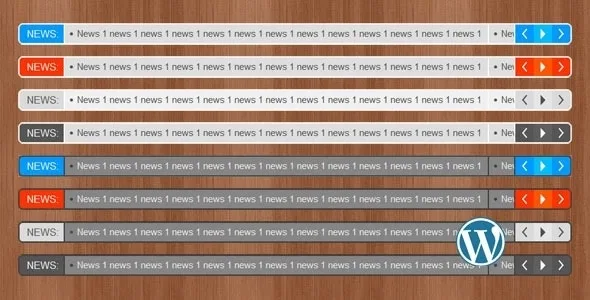
It includes 15 themes to choose from and 4 layouts that combine news items, a front label and control buttons. Corners can be round or square, and the bar is responsive, so it adapts to small screens.
The effects are scroll, fade, type and slide. If you pick any effect other than scroll, you can center the headlines, and you can show items in random order, whether they were typed by hand or come from a feed.
Settings to control content, effects and playback
There are 30 settings that control content, effects, feeds and other behaviors, and 3 methods that decide how the bar plays automatically and how the feed refreshes. Headlines typed by hand accept span tags with id, class and style, in case you want to format part of the text with your CSS. The direction setting lets you choose between LTR, the default, and RTL, which is also available.
Choose where your headlines come from before setting up the bar
If your site runs on WordPress and you publish news as posts, the most direct option is to use your own posts and filter them by category or tag. The bar is placed with a shortcode or a widget.
If your content comes from other outlets, you need an RSS or JSON feed, and the bar can refresh it automatically. For RSS feeds, if needed, you can enter an rss2json API key in the settings.
There is one limit to keep in mind: the Twitter feed has not worked since 9 February 2023, because Twitter restricted access to its API, which used to be free. If your headlines depended on Twitter, plan another source before you start.
Frequently asked questions about Modern News Ticker
Can it show tweets?
Not since February 2023. If your news depended on Twitter, you will need an RSS or JSON feed or your own posts instead.
Can I use my WordPress posts as headlines?
Yes. You can use posts as news items and also as the bar's feed source, filtering them by category or tag.
Does it work on sites read from right to left?
Yes. The direction setting lets you choose between left to right, the default, and right to left (RTL).
Do feeds update on their own?
Yes. You can set each feed to refresh automatically, and the autoplay methods also control that refresh.
Topics
Version history
-
v
1.9.0 Current 13 May 2024
Customer reviews
Sign in to leave a review. Only people who have the product can review it.
No reviews for this product yet.
Frequently asked questions
-
GPL (General Public License) is the license under which WordPress and most premium plugins/themes are distributed. It grants you the right to use, modify and redistribute the software in as many projects as you want, with no domain restrictions.
-
Yes. With membership you get automatic updates via our GPLClub Updater plugin (installed on your WP, detects new versions and applies them). With individual purchase, you get one year of manual updates from your account.
-
Depends on the plan. Monthly: 3 domains. Semi-annual: 7. Annual and Lifetime: 15. Individual purchase: 1 domain.
-
GPLClub offers its own support for installation, configuration and compatibility. For direct support from the original author (feature requests, product-specific bugs), a license purchased from the author is required.