Modern Video Player for Wordpress
Antivirus scan
Powered by ClamAV
✅ Verified clean
This product file has passed our security filters.
Want to run a fresh ClamAV scan right now? Takes a few seconds and shows scanner version, signature DB and live result.
This can take 5 to 30 seconds.
Clean file Threat detected
No threats detected in this file.
- File
- Size
- Scanned
- ClamAV
- Signature database
⚡ Powered by ClamAV
Scan could not be completed
Report product
If you detected an issue (broken file, malware, inappropriate content, etc.) let us know and we'll review it ASAP.
Sign in to report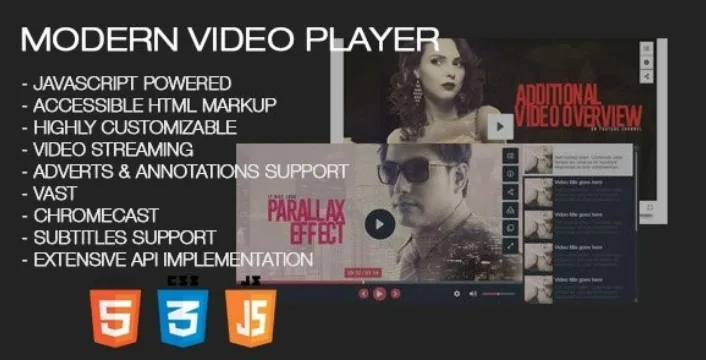
About Modern Video Player for Wordpress
One player for videos that live in different places
Anyone publishing video on WordPress usually ends up with a patch for each source: the YouTube embed on one side, the Vimeo iframe on another and self-hosted mp4 files in the browser's basic player. The result is three different looks, no shared playlist and little control over what the visitor sees before, during and after the video.
Modern Video Player starts from a simple idea: the visitor can't tell where the file comes from, they only notice whether the page behaves the same with all of them. It supports self-hosted video and audio, YouTube (single video, playlist or channel), Vimeo (video, showcase, group or channel), folders of files, Google Drive, One Drive, XML or JSON playlists, HLS and MPEG DASH live streams, 360 degree video and panoramas, and even any iframe, such as Dailymotion or Google Maps.
Mixed playlists, quality options and subtitles in Modern Video Player
Each playlist can mix sources: a self-hosted mp4, a YouTube video and a few images in the same one. You can place it to the right of or below the player, hide it to get a simple player, or show the videos in a thumbnail grid that opens the player in a lightbox.
- Different qualities for desktop and mobile, playback speed control and subtitles in several languages (vtt or srt) for video, audio, YouTube and Vimeo.
- Chapters with titles on the progress bar, a transcript in a separate window and a preview on hover, like YouTube thumbnails.
- It remembers the video and the minute where the viewer left off if the page reloads, and it supports several players on the same page.
- Compatible with Chromecast and AirPlay, with the option to show only the poster on mobile to save data.
- It can be customized with HTML and CSS, with several layouts and colors, and it is written in plain JavaScript so it doesn't interfere with other scripts.
Ads, annotations and videos only for whoever you decide
To monetize, it supports pre-roll, mid-roll and end-roll advertising with VAST, VMAP, IMA, VPAID and SIMID formats, as well as popup ads, HTML ads and AdSense. They can be global per playlist or specific to each video. Annotations overlay HTML elements (including iframes and shortcodes) at specific moments, and popup windows appear on pause, useful for a form or an image with a link. You can also measure with Google Analytics.
For access control there are password-protected videos, visible only to logged-in users or to specific roles, a viewing time limit with a custom end image, and download protection through URL encryption and blobs. That protection makes direct downloading harder, but don't treat it as an absolute guarantee. Users can also create their own playlists and mark favorites.
Own player or YouTube embed: when Modern Video Player pays off
If you only paste a YouTube video now and then, the regular embed is enough. It pays off when you manage catalogs, mix sources, want your own advertising or need to decide who sees what. It is a player, not a hosting service: self-hosted videos come from your server and use its bandwidth, and ad campaigns need you to provide the ad source. With so many options, set aside time to configure it.
Does it work with YouTube and Vimeo?
Yes. With YouTube it supports single videos, playlists and channels; with Vimeo, single videos, showcases, groups and channels.
Do I have to convert my videos to several formats?
No. To play in all browsers and devices, the mp4 format is enough.
Can I show videos only to my members or students?
Yes: you can protect videos with a password or limit them to logged-in users and specific WordPress roles.
Can I take my playlists to another domain?
Yes. Playlists and players can be imported and exported, and you can rename the domain of videos and other URLs inside playlists.
Topics
Version history
-
v
9.38 Current 8 Jan 2025
Customer reviews
Sign in to leave a review. Only people who have the product can review it.
No reviews for this product yet.
Frequently asked questions
-
GPL (General Public License) is the license under which WordPress and most premium plugins/themes are distributed. It grants you the right to use, modify and redistribute the software in as many projects as you want, with no domain restrictions.
-
Yes. With membership you get automatic updates via our GPLClub Updater plugin (installed on your WP, detects new versions and applies them). With individual purchase, you get one year of manual updates from your account.
-
Depends on the plan. Monthly: 3 domains. Semi-annual: 7. Annual and Lifetime: 15. Individual purchase: 1 domain.
-
GPLClub offers its own support for installation, configuration and compatibility. For direct support from the original author (feature requests, product-specific bugs), a license purchased from the author is required.