Moneybird API integration for WooCommerce
Antivirus scan
Powered by ClamAV
✅ Verified clean
This product file has passed our security filters.
Want to run a fresh ClamAV scan right now? Takes a few seconds and shows scanner version, signature DB and live result.
This can take 5 to 30 seconds.
Clean file Threat detected
No threats detected in this file.
- File
- Size
- Scanned
- ClamAV
- Signature database
⚡ Powered by ClamAV
Scan could not be completed
Report product
If you detected an issue (broken file, malware, inappropriate content, etc.) let us know and we'll review it ASAP.
Sign in to reportNewer version out, or a problem?
About Moneybird API integration for WooCommerce
WooCommerce orders that reach Moneybird without manual copying
When a shop invoices from Moneybird, each order often turns into double work: someone copies the customer and product details, and refunds get left out because nobody notes them down. Moneybird API integration for WooCommerce creates the invoice from the order, so the step from shop to bookkeeping doesn't depend on anyone's memory.
You decide when invoicing happens. You can set which order status generates the invoice, for example when it changes to completed, and for which payment methods. If you prefer to review first, the same invoice can be created with a single click from the WooCommerce panel.
For large volumes, bulk invoicing lets you invoice orders retroactively, in batches of more than 10,000 with a single click, or group several orders into one combined invoice.
Invoices, credit notes and shipping without leaving the order
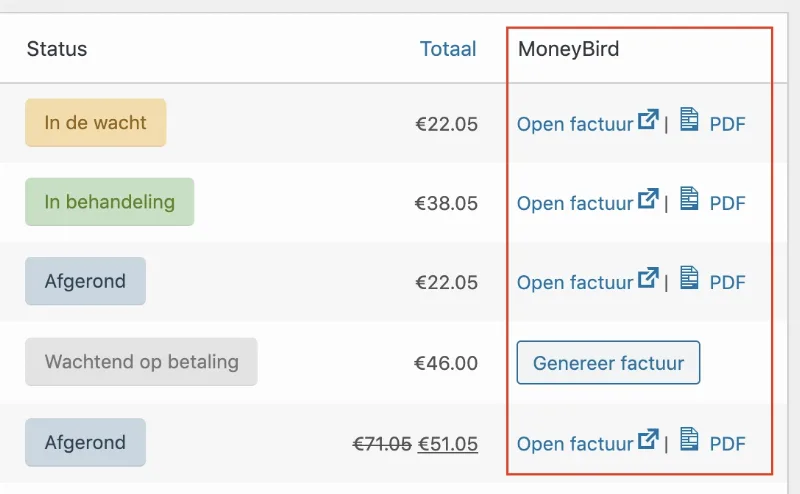
When an order already has an invoice, its number and status appear on the order page, and a note is added to the order itself. From the WooCommerce orders list, a Moneybird column takes you to the invoice, downloads the PDF of the invoice, quote or packing slip, or creates an invoice manually.
- Sending invoices and quotes from Moneybird by email or via Peppol.
- Invoice PDF attached to WooCommerce emails, such as the order confirmation.
- Invoice download button on the My Account order page, if you turn it on in the settings.
- Credit notes for full or partial refunds, created automatically or with one click and visible on the order page.
This way, whoever runs the shop can follow the invoice status from the same place where they manage orders.
Settings per product, category and payment method
Not every sale is booked the same way. You can override settings per product, per category or per payment method: assign a specific revenue category, an invoice template or an extra text that only appears on certain items. VAT rates, reverse charge and extra WooCommerce fields are also linked to invoices, quotes or contacts.
If you collect payments with Mollie, the Moneybird-Mollie integration automatically processes the payouts Mollie makes to you. The plugin supports WooCommerce Subscriptions and WooCommerce Bookings, and it can be customized with hooks and filters. Communication between your server and Moneybird is direct and encrypted, with no intermediary. Note: it requires an active Moneybird account. Product sync also sends your WooCommerce catalog to Moneybird, so when you create invoices or quotes by hand there, the items already exist.
Frequently asked questions about Moneybird API integration for WooCommerce
Is the invoice only created when the order is completed?
Yes, if you choose that status. You define which order status generates the automatic invoice and for which payment methods. If you don't want automation, the invoice is created by hand with one click.
How are refunds handled?
Credit notes are created for full or partial refunds, automatically or with one click, and they are integrated on the order page.
Can the customer download their invoice?
Yes, if you activate the download button in the settings. It appears on the order details page inside My Account.
Can invoices be sent by email?
Yes. Moneybird can send them by email or via Peppol, or you can attach the PDF to WooCommerce emails.
Which shops it fits and when automating invoices makes sense
It fits shops that already keep their bookkeeping in Moneybird and want to stop copying orders and refunds by hand. If the shop invoices only a few sales, you can keep manual invoicing and use just the button; as volume grows, it makes sense to use automation by order status and bulk invoicing.
If you sell subscriptions or bookings, check that the status chosen for invoicing matches when payment happens in your case, because that determines when each invoice goes out. The key decision is not the plugin itself but which order status marks the moment to invoice.
Topics
Version history
-
v
3.54.0 Current 14 May 2024
Customer reviews
Sign in to leave a review. Only people who have the product can review it.
No reviews for this product yet.
Frequently asked questions
-
GPL (General Public License) is the license under which WordPress and most premium plugins/themes are distributed. It grants you the right to use, modify and redistribute the software in as many projects as you want, with no domain restrictions.
-
Yes. With membership you get automatic updates via our GPLClub Updater plugin (installed on your WP, detects new versions and applies them). With individual purchase, you get one year of manual updates from your account.
-
Depends on the plan. Monthly: 3 domains. Semi-annual: 7. Annual and Lifetime: 15. Individual purchase: 1 domain.
-
GPLClub offers its own support for installation, configuration and compatibility. For direct support from the original author (feature requests, product-specific bugs), a license purchased from the author is required.