Motors Pro Plugin – Car Dealer, Classifieds & Listing Pro
Antivirus scan
Powered by ClamAV
✅ Verified clean
This product file has passed our security filters.
Want to run a fresh ClamAV scan right now? Takes a few seconds and shows scanner version, signature DB and live result.
This can take 5 to 30 seconds.
Clean file Threat detected
No threats detected in this file.
- File
- Size
- Scanned
- ClamAV
- Signature database
⚡ Powered by ClamAV
Scan could not be completed
Report product
If you detected an issue (broken file, malware, inappropriate content, etc.) let us know and we'll review it ASAP.
Sign in to report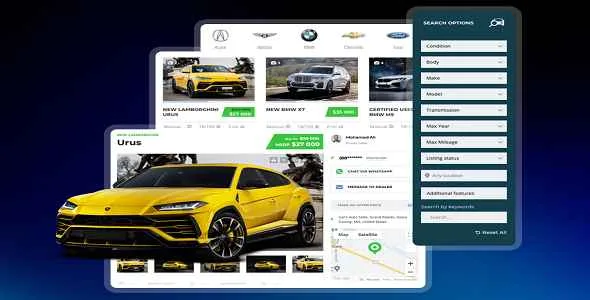
About Motors Pro Plugin – Car Dealer, Classifieds & Listing Pro
The dealership engine, kept separate from the theme
There is a decision worth taking at the start of any vehicle sales project: whether the listings system lives in the theme or lives separately. If it lives in the theme, the day you want to redesign you take the inventory down with it. If it lives in a plugin, you change the face and the cars stay.
Motors Pro is the second option: the plugin managing vehicles, searches and sellers, with the theme as a presentation layer on top.
What it manages
- Vehicle inventory with full specification sheets, image and video galleries, and location.
- Search with configurable filters: make, model, price, mileage and whichever criteria you define.
- Front-end submission, with customisable forms so sellers upload their own.
- Comparison of vehicles side by side.
- Maps, for placing each vehicle or each point of sale.
Single dealership or classifieds portal
The plugin serves both models, and being clear which is yours matters because it changes everything else.
In a dealership, the inventory is yours, your team uploads it and the goal is the phone ringing. In a classifieds portal, others upload the inventory, you charge for listing or for featuring, and the goal is having enough cars for people to come looking. The second is a two-sided business and far harder to start: without listings there are no visits, and without visits nobody lists.
Requirements
It is a plugin from the Motors theme ecosystem, by the same author. It works with WordPress and with WooCommerce where payment is involved, and the visual side is built with Elementor or WPBakery. Worth checking version compatibility between plugin and theme if you use them together: they are coupled and a large gap shows up immediately.
How to start
One. Define the vehicle fields before uploading anything. Which data you will collect and which will be filterable. Changing that with a hundred cars in place means redoing a hundred listings.
Two. Build the search with the three filters people genuinely use: make and model, price and mileage. The rest, hidden inside advanced search.
Three. Upload ten cars by hand and look at how the listing turns out before putting in two hundred.
Four. Solve importing from your management system. It is the part that decides the timeline of the whole project.
Alternatives in the catalogue
If you already use the Motors theme, the matching piece is the Motors widgets for Elementor, with more than a hundred sector modules including a finance calculator, part-exchange valuation and test drive booking.
If instead you prefer a theme with everything inside, Boxcar has advanced search and a seller dashboard, and Corify stands out for filling specification sheets by itself from a database of more than sixty-eight thousand vehicles. And Vehica is the sector's other solid option, with its own field and filter builder.
For parts rather than whole cars the approach changes completely, because what decides is fitment search: Mobex brings vehicle filtering and VIN search, and RBPazt is the alternative on that same ground.
Frequently asked questions
Does it need the Motors theme?
It belongs to its ecosystem and fits with it. Worth checking version compatibility if you use them together.
Can external sellers publish?
Yes, with front-end submission forms, which is what makes the portal model possible.
Can vehicles be compared?
Yes, with side-by-side comparison of specifications.
Does it import inventory from my management system?
Not out of the box. Automatic importing is solved separately and worth planning from the start.
Can I charge for listings?
Yes, it is one of the intended models, with WooCommerce handling payment.
Can custom fields be defined?
Yes, and worth doing before loading the inventory rather than after.
Topics
Version history
-
v
1.2.31 Current 4 Jun 2026
-
v
1.2.29 14 Apr 2026
Customer reviews
Sign in to leave a review. Only people who have the product can review it.
No reviews for this product yet.
Frequently asked questions
-
GPL (General Public License) is the license under which WordPress and most premium plugins/themes are distributed. It grants you the right to use, modify and redistribute the software in as many projects as you want, with no domain restrictions.
-
Yes. With membership you get automatic updates via our GPLClub Updater plugin (installed on your WP, detects new versions and applies them). With individual purchase, you get one year of manual updates from your account.
-
Depends on the plan. Monthly: 3 domains. Semi-annual: 7. Annual and Lifetime: 15. Individual purchase: 1 domain.
-
GPLClub offers its own support for installation, configuration and compatibility. For direct support from the original author (feature requests, product-specific bugs), a license purchased from the author is required.