MyThemeShop Ad-Sense
Antivirus scan
Powered by ClamAV
✅ Verified clean
This product file has passed our security filters.
Want to run a fresh ClamAV scan right now? Takes a few seconds and shows scanner version, signature DB and live result.
This can take 5 to 30 seconds.
Clean file Threat detected
No threats detected in this file.
- File
- Size
- Scanned
- ClamAV
- Signature database
⚡ Powered by ClamAV
Scan could not be completed
Report product
If you detected an issue (broken file, malware, inappropriate content, etc.) let us know and we'll review it ASAP.
Sign in to report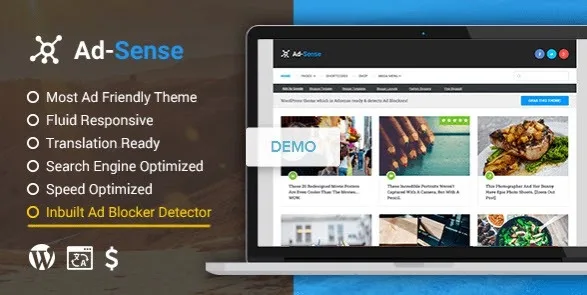
About MyThemeShop Ad-Sense
Visits that count in your stats but not in your income
You have traffic, you publish regularly, and yet your ads earn less than you expected. Part of your readers use an ad blocker and read your content without a single ad loading. On a blog that lives off advertising, you are not paid for the audience that arrives, but for the audience that actually gets to see the ad.
MyThemeShop Ad-Sense is a blog theme built around that gap: it detects the blocker, addresses the visitor and gives you defined spots to place your ads.
How MyThemeShop Ad-Sense responds to a visitor with a blocker
When you turn on detection, the theme recognizes blocking software on the device and shows a notice asking the visitor to turn it off. You can choose the notice type and write the title and description yourself, so you decide the tone: a polite request or a firmer message.
The toughest option is to hide the content until the visitor adds your site to their exceptions list. Think it over: someone arriving for the first time from a search engine may leave instead of changing their settings.
- It needs your own ads: it is a theme, not an ad network. The theme places the ads, but the contract and the code are yours to supply.
- It does not guarantee income: it reduces the visits that never see ads, but what you earn depends on your traffic and your ad network.
- It is a blog theme: do not expect store or membership features as part of its offer.
Ads in the header, menu and post
The spots come defined in the options panel:
- A header ad, which you can turn on or off.
- A navigation ad, with your own code, and a size and background color of your choice.
- An ad below the post title and another below the content.
- A clickable site background.
Those are the spots available: if you need ads inserted in the middle of the text, check the demo to see whether it works for you. Sidebars are unlimited.
Questions from people who earn from ads
Can I show only a notice without blocking the content?
Yes. The notice and hiding the content are separate options, and you can keep just the notice.
Does it work with any ad network?
The theme offers spots and, in the menu, a field for your code. Which network you use is up to you; try each format in the demo to see how it fits.
Is it suitable for a store?
It includes a WooCommerce script optimization and a setting for the number of products on the homepage, but its focus is the blog.
Is it ready for other languages?
It is marked as multilingual and supports widgets, which helps if you publish for an international audience.
Homepage, speed and style: what comes besides the ads
You can choose between 5 homepage layouts, feature categories, show post format icons and decide which details appear on each article (category, breadcrumbs). Styling is adjusted with two color schemes, parallax backgrounds, more than 60 patterns, custom CSS and more than 630 typography options.
- Speed: lazy loading of images, async JavaScript, optional prefetching and removal of the version parameter to improve browser caching.
- Navigation: AJAX search, a floating menu and several pagination options.
- Portability: theme settings can be imported and exported.
Test the notice with a blocker installed before you publish
The most useful thing at the start is to see your site as the reader with a blocker sees it: turn on detection, write the message and open the page in a browser with one installed. That way you can check whether the tone convinces you and whether the notice is annoying or clear.
Then place the ads one by one and check how they look on mobile. Once you find a setup you like, export it to keep a backup copy.
Topics
Version history
-
v
1.4.4 Current 21 Jun 2024
Customer reviews
Sign in to leave a review. Only people who have the product can review it.
No reviews for this product yet.
Frequently asked questions
-
GPL (General Public License) is the license under which WordPress and most premium plugins/themes are distributed. It grants you the right to use, modify and redistribute the software in as many projects as you want, with no domain restrictions.
-
Yes. With membership you get automatic updates via our GPLClub Updater plugin (installed on your WP, detects new versions and applies them). With individual purchase, you get one year of manual updates from your account.
-
Depends on the plan. Monthly: 3 domains. Semi-annual: 7. Annual and Lifetime: 15. Individual purchase: 1 domain.
-
GPLClub offers its own support for installation, configuration and compatibility. For direct support from the original author (feature requests, product-specific bugs), a license purchased from the author is required.