MyTicket – Ticket/Event Management System WordPress Theme
Antivirus scan
Powered by ClamAV
✅ Verified clean
This product file has passed our security filters.
Want to run a fresh ClamAV scan right now? Takes a few seconds and shows scanner version, signature DB and live result.
This can take 5 to 30 seconds.
Clean file Threat detected
No threats detected in this file.
- File
- Size
- Scanned
- ClamAV
- Signature database
⚡ Powered by ClamAV
Scan could not be completed
Report product
If you detected an issue (broken file, malware, inappropriate content, etc.) let us know and we'll review it ASAP.
Sign in to reportNewer version out, or a problem?
About MyTicket – Ticket/Event Management System WordPress Theme
Event tickets sold with WooCommerce in MyTicket
Selling tickets with a loose form or with PDFs sent by hand ends in buyer lists that are impossible to reconcile on the day of the event. Whoever organizes concerts, shows or competitions needs every ticket tied to its event and its order from the start.
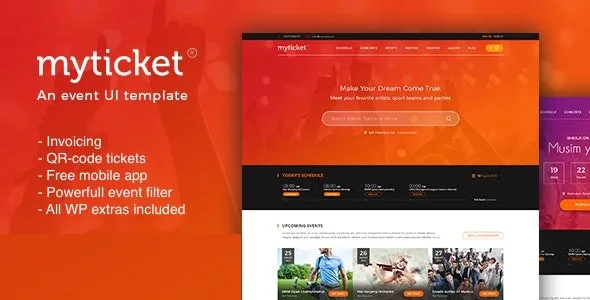
MyTicket extends WooCommerce to create events and define their features, types, categories and any other custom data. As soon as you define the event, the ticket sales system is linked to it automatically.
Event listings that filter without reloading the page
The listing widgets filter and sort with Ajax requests, so the visitor changes criteria without the page reloading and browsing feels smooth.
Schedules with many dates
If you organize many events, you can split them by dates, months, years or theme and show them with several sorting methods. The timetable elements keep the public up to date on the latest events, wherever they are on your website.
Shows and artists
You can manage each artist's performances, add call to action buttons for applications and add countdown timers to create events rich in content.
Sports events
The theme suits football, hockey, basketball, tennis, rugby, boxing, volleyball, cricket or formula events, and it includes gallery, news, blog or interview pages.
Ticket sales with seat selection on a layout
The buyer chooses the number of tickets or seats on a hall, stadium, amphitheater or stage layout, and then moves on to the checkout process. The layout is interactive: each section is clickable and changes color depending on availability or selection.
This way the public sees which areas are still free on the layout.
Access on the day of the event with the scanning app
When paying, the buyer downloads a PDF invoice with a QR code linked to their order, which also arrives by email. The free scanning app, available on Play Market, reads that code, shows the customer, order and event details, and lets you validate the ticket or change its status; the change is reflected in your website admin.
There is no intermediary: the app connects directly with your server. You can also restrict backend use to certain app IDs to keep the sales environment more controlled.
Custom seat layouts require their own design and integration
The theme includes one layout example, but each seat layout is unique and must be designed and integrated with the back-end. Quoting a custom layout requires a complete project specification.
MyTicket works on top of WooCommerce, so WooCommerce must be installed and active.
Frequently asked questions about MyTicket
What can I define for each event?
Its features, types, categories and any other custom data. Once defined, the ticket sales are linked to the event automatically.
What does the buyer receive after paying?
A PDF invoice with a QR code linked to their order, which they can download when the purchase is finished and which also arrives by email.
How is a ticket validated at the door?
With the scanning app: you read the QR code on the invoice and the app shows the order and event details. From there you can change the ticket status or simply check the customer information.
Does it work for events that are not sports or music?
Yes. Categories and custom data let you describe any type of event, and the theme also includes gallery, news and blog elements.
Pages edited by dragging blocks with SiteOrigin
MyTicket uses Page Builder by SiteOrigin as its main content editing tool. You can build pages with a simple, intuitive drag and drop interface or change content directly in the live editor.
The setup wizard installs the demo content and the settings needed so your website looks like the demo, with no extra menu or form steps.
Topics
Version history
-
v
1.0.9 Current 18 Jun 2024
Customer reviews
Sign in to leave a review. Only people who have the product can review it.
No reviews for this product yet.
Frequently asked questions
-
GPL (General Public License) is the license under which WordPress and most premium plugins/themes are distributed. It grants you the right to use, modify and redistribute the software in as many projects as you want, with no domain restrictions.
-
Yes. With membership you get automatic updates via our GPLClub Updater plugin (installed on your WP, detects new versions and applies them). With individual purchase, you get one year of manual updates from your account.
-
Depends on the plan. Monthly: 3 domains. Semi-annual: 7. Annual and Lifetime: 15. Individual purchase: 1 domain.
-
GPLClub offers its own support for installation, configuration and compatibility. For direct support from the original author (feature requests, product-specific bugs), a license purchased from the author is required.
Related products

Utouch – Multi-Purpose Business and Digital Technology WordPress Theme

Itodo – IT Solutions & Services Company WordPress

ChampionNews – Sports News WordPress Elementor Theme WordPress Theme