Newzin – WordPress Newspaper & Magazine Theme
Antivirus scan
Powered by ClamAV
✅ Verified clean
This product file has passed our security filters.
Want to run a fresh ClamAV scan right now? Takes a few seconds and shows scanner version, signature DB and live result.
This can take 5 to 30 seconds.
Clean file Threat detected
No threats detected in this file.
- File
- Size
- Scanned
- ClamAV
- Signature database
⚡ Powered by ClamAV
Scan could not be completed
Report product
If you detected an issue (broken file, malware, inappropriate content, etc.) let us know and we'll review it ASAP.
Sign in to report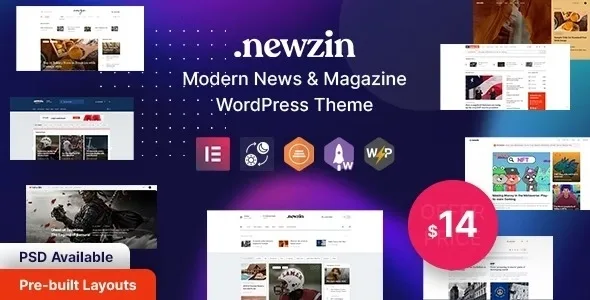
About Newzin – WordPress Newspaper & Magazine Theme
A newspaper front page gives away how much you publish
You install the news demo and it looks like a major outlet: politics, sports, tech, business, all full. Then you replace the sample content with what your team really publishes, and sports is left with a story from three weeks ago.
On a news site the design promises a pace, and each section you open is a commitment to keep filling it. That is why, at a small outlet, the size of the menu decides more than the theme does: four sections updated daily look better than twelve abandoned ones.
Newzin, by ThemesCamp, is a newspaper and magazine theme for WordPress with Elementor. Its value for an outlet just starting out is that it includes demos focused on a single topic as well as the general newspaper one, so you can start with the one covering what you publish and grow later.
One demo for each kind of newsroom
The ready-made homepages are split by topic, and that choice sets where you start from:
- General: main demo and newspaper.
- By topic: technology, gaming, food, business, politics, sports and NFT.
- Right to left: a newspaper version for RTL languages.
If you cover a single topic, start from its demo and leave the general newspaper for when you have volume in several sections. The mega menu supports nested categories, so you can organize subsections without crowding the main bar.
What you adjust without touching code
- Header, footer and side panel: designed with Elementor by drag and drop.
- Dark mode: you choose light, auto or dark in the options, decide whether the switcher shows, and can set it per page or post.
- Theme options: a Redux-based panel.
- Multi-format content: videos, audio, gifs and other embeds, with their own players.
- Live weather: a widget to show current conditions to a local audience.
- Advertising: widgets accept ads in the sidebar or footer.
- Newsletter and contact: Mailchimp and Contact Form 7.
- Languages: a .pot file for Poedit or Loco Translate, compatibility with WPML and WPGlobus, and RTL layout.
- Shop: WooCommerce on the shop, product, cart, checkout and account pages.
What is not in a newsroom running Newzin
Newzin handles presentation. Among its features there is no paywall, membership, AMP, breaking news ticker or push notifications. If your revenue plan relies on content subscribers, you will have to solve that with separate plugins or start from another theme.
Newzin on a fresh site: import and first settings
You need a PHP memory limit of 128M. If the import fails, review the time and upload size limits with your host. Work on a fresh install, because importing a demo replaces any existing menus and Customizer settings.
- Upload the newzin.zip file, already unzipped from the package: the full archive gives the missing style.css error.
- Install and activate the plugins under Appearance, Install Plugins.
- With One-Click Import active, choose a demo under Appearance, Import Demo Data.
- Update the permalinks under Settings.
- Create only the categories you will feed and remove the rest from the menu.
If the one-click import does not finish, you can do it by hand with the files in the Demo Data folder.
JNews, Herald and ColorMag Pro for another kind of outlet
JNews includes a paywall, content subscription and AMP support. Herald focuses on portals with several areas, with section blocks to build the homepage. If you do not want to tie yourself to one editor, ColorMag Pro works with Elementor, Beaver Builder, the block editor and SiteOrigin, and its paid version has more than thirty demos.
Five answers before you build your outlet
What happens to my site when I import a demo?
Menus and Customizer settings are replaced by the demo's. That is why it is best done on a fresh site.
Can I charge for reading?
Among its features there is no paywall or membership. JNews does include a paywall.
Can readers switch to dark mode?
Yes, if you leave the switcher visible in the theme options.
Does it work for right-to-left languages?
It has RTL support and a newspaper demo for those languages.
Can I sell from the same site?
Yes. It is compatible with WooCommerce on the shop, product, cart, checkout and account pages.
Topics
Version history
-
v
1.0.2 Current 12 Jun 2024
Customer reviews
Sign in to leave a review. Only people who have the product can review it.
No reviews for this product yet.
Frequently asked questions
-
GPL (General Public License) is the license under which WordPress and most premium plugins/themes are distributed. It grants you the right to use, modify and redistribute the software in as many projects as you want, with no domain restrictions.
-
Yes. With membership you get automatic updates via our GPLClub Updater plugin (installed on your WP, detects new versions and applies them). With individual purchase, you get one year of manual updates from your account.
-
Depends on the plan. Monthly: 3 domains. Semi-annual: 7. Annual and Lifetime: 15. Individual purchase: 1 domain.
-
GPLClub offers its own support for installation, configuration and compatibility. For direct support from the original author (feature requests, product-specific bugs), a license purchased from the author is required.