Oasis Workflow Pro
Antivirus scan
Powered by ClamAV
✅ Verified clean
This product file has passed our security filters.
Want to run a fresh ClamAV scan right now? Takes a few seconds and shows scanner version, signature DB and live result.
This can take 5 to 30 seconds.
Clean file Threat detected
No threats detected in this file.
- File
- Size
- Scanned
- ClamAV
- Signature database
⚡ Powered by ClamAV
Scan could not be completed
Report product
If you detected an issue (broken file, malware, inappropriate content, etc.) let us know and we'll review it ASAP.
Sign in to reportNewer version out, or a problem?
About Oasis Workflow Pro
A draft with several reviewers and no clear publish date
In a newsroom with authors, editors and approvers, the bottleneck is rarely writing. It is knowing who has the article now, who approved it and whether it can go live. When that lives in spreadsheets and loose notes, delays pile up unseen until the day of publication.
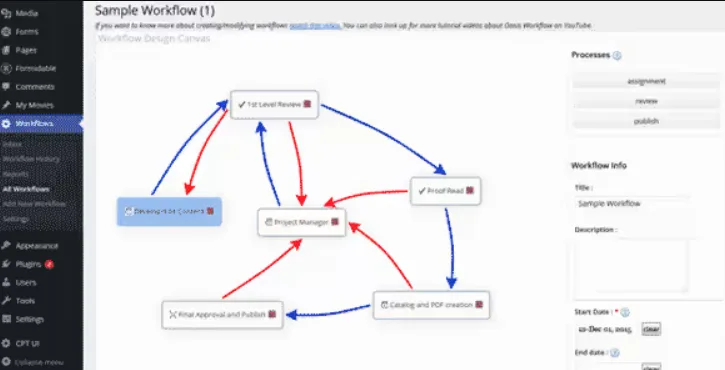
Oasis Workflow brings that process inside WordPress, so each article follows a path of tasks within the site itself.
How an article moves through the Oasis Workflow review flow
Imagine an author finishes a text and sends it for review. This is what happens at each step:
- Submission. The author sends the article to the flow from Elementor if they work with that page builder, because the integration needs Elementor active.
- Role-based assignment. The task goes to a role, not to a named person. This avoids the bottlenecks caused by using named resources in the approval process.
- Task inbox. Each reviewer sees their assignments in an inbox similar to an email inbox. They can claim a task to make it theirs and sign it off once it is finished.
- Deadlines and reminders. With due dates and email reminders, you can make sure the process runs smoothly and that articles are published on time.
- Custom statuses. Besides draft, pending review, publish and scheduled, you can define your own statuses and assign them to the success or failure path of the flow.
- History. It records who did what, with review comments, sign-off dates and the status of each step. You can download it for analysis or audits.
Automatic submission in Oasis Workflow and stopping a flow midway
Not every article needs someone to press the submit button. With automatic submission you define the conditions once, and the engine checks articles every 2 hours to start the flow. This saves time in managing the process.
If a running flow no longer makes sense, or you want to publish an article without going through it, you can terminate the process. It is a direct action.
Teams that approve already published pages and need one system
Oasis Workflow serves small sites as well as large newsrooms. It also covers the case of editing pages that are already published, but whose changes must be approved before they go live. It works on WordPress and in the usual browsers.
Doubts that usually come up before setting up the flow
Does it work for a small site?
Yes. Oasis Workflow is offered for WordPress sites of any size.
Can I see where an article is?
Yes. The task inbox shows each user's assignments, and the history keeps every action taken in the flow, with its status and the step where it stopped.
Do I need Elementor to use it?
Not for the flow itself. Only the Elementor integration, which lets you submit, assign and sign off from the Elementor editor, depends on that page builder.
Can I change the statuses of an article?
You can define your own WordPress statuses and assign them to the success or failure paths of the flow, in addition to the usual WordPress statuses.
Topics
Version history
-
v
8.5 Current 18 May 2024
Customer reviews
Sign in to leave a review. Only people who have the product can review it.
No reviews for this product yet.
Frequently asked questions
-
GPL (General Public License) is the license under which WordPress and most premium plugins/themes are distributed. It grants you the right to use, modify and redistribute the software in as many projects as you want, with no domain restrictions.
-
Yes. With membership you get automatic updates via our GPLClub Updater plugin (installed on your WP, detects new versions and applies them). With individual purchase, you get one year of manual updates from your account.
-
Depends on the plan. Monthly: 3 domains. Semi-annual: 7. Annual and Lifetime: 15. Individual purchase: 1 domain.
-
GPLClub offers its own support for installation, configuration and compatibility. For direct support from the original author (feature requests, product-specific bugs), a license purchased from the author is required.