Ollie Pro Plugin
Antivirus scan
Powered by ClamAV
✅ Verified clean
This product file has passed our security filters.
Want to run a fresh ClamAV scan right now? Takes a few seconds and shows scanner version, signature DB and live result.
This can take 5 to 30 seconds.
Clean file Threat detected
No threats detected in this file.
- File
- Size
- Scanned
- ClamAV
- Signature database
⚡ Powered by ClamAV
Scan could not be completed
Report product
If you detected an issue (broken file, malware, inappropriate content, etc.) let us know and we'll review it ASAP.
Sign in to report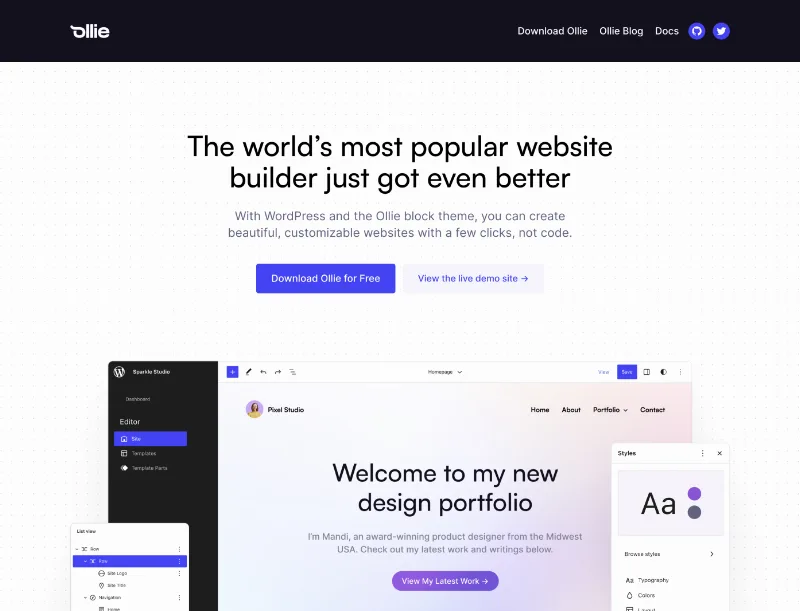
About Ollie Pro Plugin
The client asks for one change and you touch twenty blocks
Building the first version of a site is usually the easy part. What eats your hours comes afterwards: the client wants different button styles, the grid looks off on tablets, or the mobile menu looks like it belongs to another site. If you work as a freelancer or at an agency, that back and forth of tweaks is where margin disappears, not in the initial design.
Ollie Pro Plugin is built for that stretch. It adds a pattern library and its own panel of editor tools to the Ollie block theme, so you start from ready-made designs and can adjust them without going block by block.
Hundreds of patterns across five collections
The library gathers page sections and full layouts, responsive on any screen and built on Ollie's design system (consistent color, fluid typography and spacing), so mixing them doesn't clash. They are organized by theme:
- Agency: portfolios, service pages and agency sites.
- eCommerce: product grids, banners, promotional sections and pricing tables.
- Startup: feature, pricing, integration and testimonial sections.
- Studio: more editorial layouts for creative studios.
- Creator: for writers, podcasters, video creators and personal brands.
Each collection has a demo, so you can check whether the style suits your client before deciding.
Ollie Pro Plugin and its extensions inside the native editor
The extensions add controls to the blocks you already use, with no extra builder on top:
- Smart Sync: style one block and apply the change to similar blocks in the layout, instead of repeating it one by one.
- Class Manager: reusable custom classes, with control over hover, focus and active states.
- Responsive Controls: typography, spacing, padding and alignment adjustable per breakpoint.
- Advanced Grid Controls: grids with their own breakpoints.
- Animations: entrance animations, hover effects and scroll-triggered motion, with presets.
- Video Modal: a YouTube video or one from your media library in an overlay window, from the Cover and Button blocks.
Menus, setup wizard and starter sites
Menu Designer lets you create mobile menus and mega menus with blocks, with several dozen pre-designed menus. The setup wizard guides you through installing plugins, settings, branding and page creation. Starter sites import a complete site with pages, templates, styles and branding in one click, ready to customize afterwards. Everything is managed from the Ollie panel.
It needs the Ollie theme and doesn't supply the content or the store
This plugin is an add-on for the Ollie theme: without it, it has nothing to work on. And although it speeds up design, it doesn't replace other pieces:
- Already solved: page layouts, color system, typography and spacing, menus, animations, responsive controls and starter sites.
- On your own or with another plugin: the store itself (products, payments and shipping come from WooCommerce, the eCommerce patterns only provide the look).
- On your own: copy, images and the client's real photos.
- On your own: forms, SEO and hosting.
Ollie's artificial intelligence tools are announced as upcoming, so don't count on them for your current project.
Frequently asked questions about Ollie Pro Plugin
Does it work with any theme?
No. It is designed for the Ollie block theme, to which it adds the pattern library and the Pro panel.
Do I need to know how to code?
Not for the usual tasks: menus, animations and responsive settings are handled from the block editor. Custom CSS is there for those who want to go further.
Is it good for building a store?
It provides designs for a WooCommerce store, but the commercial side is handled by WooCommerce.
Can I see the designs before using them?
Yes, the collections have demos and you can preview each pattern before inserting it.
Version history
-
v
1.2.2 Current 8 Jan 2025
Customer reviews
Sign in to leave a review. Only people who have the product can review it.
No reviews for this product yet.
Frequently asked questions
-
GPL (General Public License) is the license under which WordPress and most premium plugins/themes are distributed. It grants you the right to use, modify and redistribute the software in as many projects as you want, with no domain restrictions.
-
Yes. With membership you get automatic updates via our GPLClub Updater plugin (installed on your WP, detects new versions and applies them). With individual purchase, you get one year of manual updates from your account.
-
Depends on the plan. Monthly: 3 domains. Semi-annual: 7. Annual and Lifetime: 15. Individual purchase: 1 domain.
-
GPLClub offers its own support for installation, configuration and compatibility. For direct support from the original author (feature requests, product-specific bugs), a license purchased from the author is required.