Open Swatch - Woocommerce Color Swatch
Antivirus scan
Powered by ClamAV
✅ Verified clean
This product file has passed our security filters.
Want to run a fresh ClamAV scan right now? Takes a few seconds and shows scanner version, signature DB and live result.
This can take 5 to 30 seconds.
Clean file Threat detected
No threats detected in this file.
- File
- Size
- Scanned
- ClamAV
- Signature database
⚡ Powered by ClamAV
Scan could not be completed
Report product
If you detected an issue (broken file, malware, inappropriate content, etc.) let us know and we'll review it ASAP.
Sign in to reportNewer version out, or a problem?
About Open Swatch - Woocommerce Color Swatch
When the shopper picks a color and the photo does not change
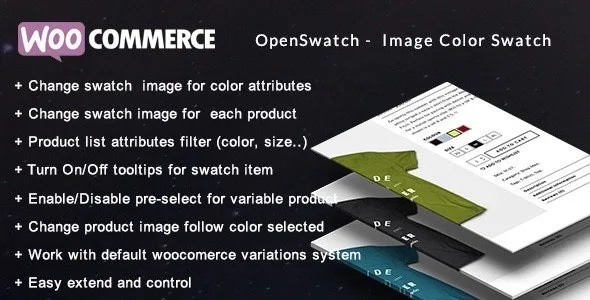
In a store with variable products, the shopper chooses a size or color from a dropdown and then has to imagine how the item looks. If the photo does not change with the option, it is easy to hesitate or end up buying the wrong variant. Open Swatch shows the variation options as visual swatches, with images or colors, and can also show them in the catalog.
The product gallery follows the selected color
When an option is selected, Open Swatch changes all the images on the product page, not only the main one as WooCommerce does by default. Each variation can have its own set of photos. You can also add several images per variation and assign a swatch image to each option of the attribute.
Swatches on the product page or in the catalog listing
The same store can use Open Swatch in two ways, and it is worth choosing according to how your audience shops:
- On the product page: the shopper picks the variant inside the product itself and the gallery changes with that selection.
- In the catalog listing: you can show the available colors in the product list and turn it on or off product by product.
Cart, order and default selection
The chosen swatch does not stay only on the product page: it also appears in the cart, the mini cart and the order details. You can preselect a default variation and turn the tooltips on or off for each option.
Turning Open Swatch on product by product
Not every product needs swatches. Open Swatch lets you turn it on or off for each product and set the default style for the whole store. For attributes you can use a color picker, custom options and a global color per attribute. It supports several variation attributes at once, so one product can have both color and size.
Needs WooCommerce and builds on its variations
Open Swatch is a WooCommerce plugin and needs it installed and active, along with WordPress. It works with the variation system that WooCommerce already has. If your theme does not follow the WooCommerce core, it may be necessary to integrate the swatch with it again. It includes support for WPML and quick view, useful if your store sells in several languages or uses that kind of pop-up window.
Frequently asked questions about Open Swatch
Do I need WooCommerce to use it?
Yes. Open Swatch is a plugin for WooCommerce and works on its variable products, so WooCommerce must be active.
Can I use a different swatch on each product?
Yes. You can turn Open Swatch on or off per product and assign images or colors to the options of each attribute.
Does it only change the main image when a variant is selected?
No. The full gallery on the product page changes with the chosen variation, and each variation can have several images.
Does it work with several attributes at once?
Yes. It supports several variation attributes on the same product, for example color and size.
Topics
Version history
-
v
6.1 Current 16 May 2024
Customer reviews
Sign in to leave a review. Only people who have the product can review it.
No reviews for this product yet.
Frequently asked questions
-
GPL (General Public License) is the license under which WordPress and most premium plugins/themes are distributed. It grants you the right to use, modify and redistribute the software in as many projects as you want, with no domain restrictions.
-
Yes. With membership you get automatic updates via our GPLClub Updater plugin (installed on your WP, detects new versions and applies them). With individual purchase, you get one year of manual updates from your account.
-
Depends on the plan. Monthly: 3 domains. Semi-annual: 7. Annual and Lifetime: 15. Individual purchase: 1 domain.
-
GPLClub offers its own support for installation, configuration and compatibility. For direct support from the original author (feature requests, product-specific bugs), a license purchased from the author is required.