Order Barcodes for WooCommerce
Antivirus scan
Powered by ClamAV
✅ Verified clean
This product file has passed our security filters.
Want to run a fresh ClamAV scan right now? Takes a few seconds and shows scanner version, signature DB and live result.
This can take 5 to 30 seconds.
Clean file Threat detected
No threats detected in this file.
- File
- Size
- Scanned
- ClamAV
- Signature database
⚡ Powered by ClamAV
Scan could not be completed
Report product
If you detected an issue (broken file, malware, inappropriate content, etc.) let us know and we'll review it ASAP.
Sign in to report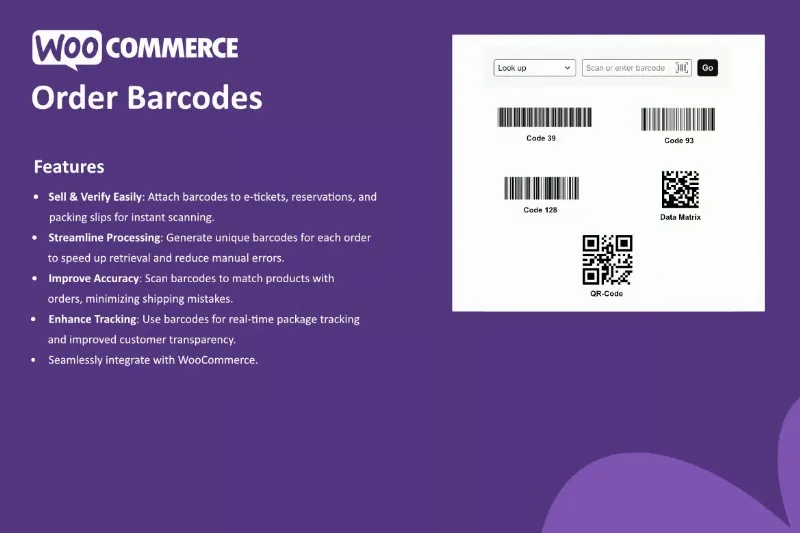
About Order Barcodes for WooCommerce
When the order number is typed by hand, the mistake is already on its way
In a small warehouse or at the door of an event, the failure is almost never in the shop: it happens when someone reads an order number on a piece of paper and types it into another screen. One wrong digit and the wrong package gets prepared, or you search for an order that never shows up. The more volume you handle, the more often that typing happens and the more each mistake costs.
Order Barcodes for WooCommerce targets exactly that point: it generates a unique barcode for every order placed in your shop, so the order can be identified by scanning it instead of copying it by hand.
One code per order, three places to put it
The code is born with the order and can go on any item that benefits from being scannable. These are the uses the plugin proposes:
- E-tickets: the ticket carries its own code and is checked by scanning it, with no hunting for a name on a list.
- Electronic reservations: the code is attached to the reservation so it can be scanned.
- Packing slips and delivery notes: the paper that travels with the package carries the code, and retrieving the order in the system takes a single scan.
Having a unique code per order is what makes the system valuable: two orders never share an identifier, so each reading points to one order only and there is no doubt which one it was.
Order Barcodes for WooCommerce identifies the order, it does not organize your warehouse
Its contribution is fast cross-checking: you scan the code, the order appears and you compare it with what is on the packing table. That reduces the shipping mistakes that come from misreading or mistyping. It is also proposed as support for tracking packages and giving customers more transparency, but understand it properly: a code identifies the order, nothing more.
It is a WooCommerce add-on and does not work without it. Stock control, shipment preparation and your relationship with the carrier still depend on what you already use. If your problem is that stock does not add up, a code per order will not fix it; if your problem is that orders get mixed up, it does help.
Is Order Barcodes for WooCommerce worth it if you already print packing slips and check orders by eye?
It is worth it if you handle enough orders for manual cross-checking to be a bottleneck, or if you sell tickets or reservations and need to validate on the spot. If you ship five packages a day, you will probably not notice the difference.
Do I need WooCommerce?
Yes. The plugin generates the codes from WooCommerce orders and makes no sense without the shop.
Is it suitable for selling event tickets?
Yes, e-tickets and electronic reservations are two of its uses. Before setting up access control with a queue, check in the demo what the scanning process is like.
Can I put it on printed packing slips?
Yes, packing slips are another of the intended uses for the code.
Do I need a special reader?
To scan you need something capable of reading barcodes. Check in the demo which devices fit the way you work before buying it.
Topics
Version history
-
v
1.1.0 Current 12 Apr 2026
Customer reviews
Sign in to leave a review. Only people who have the product can review it.
No reviews for this product yet.
Frequently asked questions
-
GPL (General Public License) is the license under which WordPress and most premium plugins/themes are distributed. It grants you the right to use, modify and redistribute the software in as many projects as you want, with no domain restrictions.
-
Yes. With membership you get automatic updates via our GPLClub Updater plugin (installed on your WP, detects new versions and applies them). With individual purchase, you get one year of manual updates from your account.
-
Depends on the plan. Monthly: 3 domains. Semi-annual: 7. Annual and Lifetime: 15. Individual purchase: 1 domain.
-
GPLClub offers its own support for installation, configuration and compatibility. For direct support from the original author (feature requests, product-specific bugs), a license purchased from the author is required.