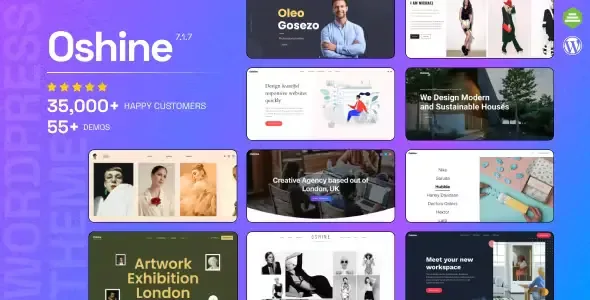
Oshine Multipurpose WordPress Theme
Antivirus scan
Powered by ClamAV
✅ Verified clean
This product file has passed our security filters.
Want to run a fresh ClamAV scan right now? Takes a few seconds and shows scanner version, signature DB and live result.
This can take 5 to 30 seconds.
Clean file Threat detected
No threats detected in this file.
- File
- Size
- Scanned
- ClamAV
- Signature database
⚡ Powered by ClamAV
Scan could not be completed
Report product
If you detected an issue (broken file, malware, inappropriate content, etc.) let us know and we'll review it ASAP.
Sign in to reportNewer version out, or a problem?
About Oshine Multipurpose WordPress Theme
Portfolios that don't look like another template
An architecture studio or a photographer risks part of a commission on the first impression of their website. Oshine is built for anyone who sells visual work.
You can build grids of 1, 2, 3, 4 and 5 columns, with variable spacing between images and variable aspect ratio, in regular, masonry or Metro layouts. There are more than 30 individual portfolio styles, filters to sort work, and more than 10 hover effects, such as 3D tilt or direction-aware. For long lists you choose between a load more button or infinite scroll.
The theme supports photos, videos and audio embeds within the same portfolio, so a videographer or a musician can show their pieces in one place.
Demos and galleries for photographers and clients
In photography the problem is usually different: showing many photos without the visitor getting lost and, sometimes, letting the client approve a selection before delivery. Oshine includes minimal and elegant photography demos, and galleries with horizontal, ribbon or center slide carousels, plus centered and fullscreen sliders.
Grid galleries can be browsed with a lightbox that responds to pinch and swipe gestures, and the theme works well on mobile. For client work, galleries and pages can be password protected, designed so the client can review their selection. There are also Instagram and Flickr galleries and a black and white effect for images.
Tatsu visual builder for assembling pages without code
Tatsu is the visual builder that comes with Oshine. It works live on the page, so there's no need to switch between the backend and the real site to see changes. You drag and drop modules, edit text directly, and use more than 50 styling modules and pre-built sections.
You can save sections and full pages as templates, cut, copy and paste modules between pages or between websites, and use keyboard shortcuts. If your project is a single page with sections you reach from the menu, Tatsu handles it by linking them from the main menu. The free version is included; the Pro version is bought as an add-on, adds extra modules and demos, and works with any theme.
Frequently asked questions about Oshine
Do I need to know how to code to build the site?
No. Oshine is designed so that beginners and advanced users both feel comfortable, and the Tatsu builder is handled visually. It also includes a one-click import to start from any of its demos.
Can it be used for an online shop?
Yes. Oshine integrates with WooCommerce, and the shop, product, cart and checkout pages have a clean design. For shops in several languages you need to add WPML separately.
Does it work well on phones?
Yes. Oshine is fully responsive, with breakpoints chosen so the website looks and works well across different screens and devices.
Can I show a selection to just one client?
Yes, galleries and pages can be password protected, so the selection is only seen by whoever has access.
Lazy loading, WPML and plugins sold separately
Oshine loads scripts asynchronously and only the ones each page uses, with lazy loading of images in portfolios, galleries and the image module. It includes options caching and conditional CSS loading, and it is compatible with caching and minification plugins such as W3 Total Cache, WP Super Cache and Autoptimize.
The theme is compatible with WPML to create multilingual websites, but that plugin is paid and not included, so you need to buy it separately. For retina images, you need to use the WP Retina plugin to generate them.
When Oshine makes sense compared with a portfolio-only theme
Oshine fits if your project mixes a portfolio website with a blog, a shop or several company sections, because it lets you build any kind of website, from simple portfolio sites to full ecommerce ones.
Before deciding, think about the extras: if your website will be multilingual, plan for WPML; if you will use retina images, plan for WP Retina; and if you use a caching plugin, check that it is one of the compatible ones. Oshine also includes eight blog layouts with gallery, video, audio and quote formats, and social sharing.
Topics
Version history
-
v
7.2.6 Current 24 Mar 2026
Customer reviews
Sign in to leave a review. Only people who have the product can review it.
No reviews for this product yet.
Frequently asked questions
-
GPL (General Public License) is the license under which WordPress and most premium plugins/themes are distributed. It grants you the right to use, modify and redistribute the software in as many projects as you want, with no domain restrictions.
-
Yes. With membership you get automatic updates via our GPLClub Updater plugin (installed on your WP, detects new versions and applies them). With individual purchase, you get one year of manual updates from your account.
-
Depends on the plan. Monthly: 3 domains. Semi-annual: 7. Annual and Lifetime: 15. Individual purchase: 1 domain.
-
GPLClub offers its own support for installation, configuration and compatibility. For direct support from the original author (feature requests, product-specific bugs), a license purchased from the author is required.