Partin – Political Campaign and Party Responsive WordPress Theme
Antivirus scan
Powered by ClamAV
✅ Verified clean
This product file has passed our security filters.
Want to run a fresh ClamAV scan right now? Takes a few seconds and shows scanner version, signature DB and live result.
This can take 5 to 30 seconds.
Clean file Threat detected
No threats detected in this file.
- File
- Size
- Scanned
- ClamAV
- Signature database
⚡ Powered by ClamAV
Scan could not be completed
Report product
If you detected an issue (broken file, malware, inappropriate content, etc.) let us know and we'll review it ASAP.
Sign in to report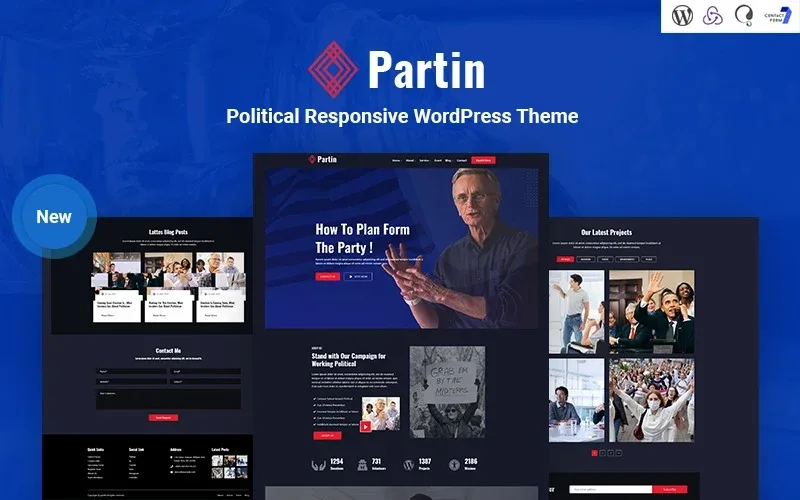
About Partin – Political Campaign and Party Responsive WordPress Theme
A campaign website is built in a hurry and expires the day after
A candidacy usually asks for its website only a few weeks before the campaign starts: you have to introduce the person, explain the proposals, announce events and collect contacts, all at once. And once the election is over, the website gets abandoned. Partin is designed for that pace: it comes with the typical structure of a political site already built, so what you contribute is your texts and photos, not the design.
What outlasts the campaign is not the slogan, but the list of people who left their email and the calendar of events. That's why it's worth looking at the newsletter, the events and the blog before the look of the homepage.
Partin inside: from the video homepage to the events calendar
The theme includes several homepages and the other pages you'd expect from a political website:
- Three homepages: a standard one, a landing page style one and one with video. They carry call-to-action buttons (contact, vote) and a button to watch the video.
- An About page with a timeline: milestones ordered by year, with a button to download the CV. It tells a career story without a never-ending text.
- Services, with an individual page: each policy area or line of action can have its own page.
- Portfolio in two or three columns: with category filtering, to show projects or events already carried out.
- Team, events, contact and search: the pieces visitors look for when they want to know who is behind this and when the next event is.
- Blog with the sidebar on the left or the right: to choose depending on how you want to present the news.
There is also a newsletter subscription block, a block of figures (donations, volunteers, projects) and social media links in the footer.
Candidate, party or association: three uses of Partin
A candidate introducing themselves
Your strongest page is the About page: the timeline and the CV button answer the voter's first question, who is this person and what have they done. It works better with dates and concrete facts than with general statements.
A party or platform with a team
Here the team page, the services (to break the program down by topic) and the events calendar matter most. The video homepage lets you put a message on screen in the most visible spot of the site.
An association or organization with projects
The filterable portfolio helps organize what you've done by type of action, and the blog keeps the site alive outside election season. It's the best way to keep the site from dying when the campaign ends.
Questions before choosing Partin
Is it responsive? Yes, it's designed as a theme that adapts to mobile and tablet. Still, check the demo from your phone, because that's where most people will see your site.
Is it useful for anything other than politics? The structure (services, portfolio, team, blog) fits an organization or a project with a team, but the design and the sample texts are clearly political. If your sector is different, consider whether that tone suits you.
Can I announce events? Yes, there is an events page and a registration button in the footer. Check in the demo how that registration works before building your event call around it.
Can I choose the position of the blog sidebar? There are versions with the sidebar on the left and on the right.
Placeholder text and sample figures in the demo
Everything you see in the demo is sample content: placeholder text, a fictitious address and contact details, and figures in the counters block that you'll have to replace with your own. If you plan to receive donations online, first check that what you need (a real payment form) is in the demo: the donations block you see is informational.
Topics
Version history
-
v
1.0.0 Current 14 Jun 2024
Customer reviews
Sign in to leave a review. Only people who have the product can review it.
No reviews for this product yet.
Frequently asked questions
-
GPL (General Public License) is the license under which WordPress and most premium plugins/themes are distributed. It grants you the right to use, modify and redistribute the software in as many projects as you want, with no domain restrictions.
-
Yes. With membership you get automatic updates via our GPLClub Updater plugin (installed on your WP, detects new versions and applies them). With individual purchase, you get one year of manual updates from your account.
-
Depends on the plan. Monthly: 3 domains. Semi-annual: 7. Annual and Lifetime: 15. Individual purchase: 1 domain.
-
GPLClub offers its own support for installation, configuration and compatibility. For direct support from the original author (feature requests, product-specific bugs), a license purchased from the author is required.