PayPal Currency Converter PRO for WooCommerce
Antivirus scan
Powered by ClamAV
✅ Verified clean
This product file has passed our security filters.
Want to run a fresh ClamAV scan right now? Takes a few seconds and shows scanner version, signature DB and live result.
This can take 5 to 30 seconds.
Clean file Threat detected
No threats detected in this file.
- File
- Size
- Scanned
- ClamAV
- Signature database
⚡ Powered by ClamAV
Scan could not be completed
Report product
If you detected an issue (broken file, malware, inappropriate content, etc.) let us know and we'll review it ASAP.
Sign in to report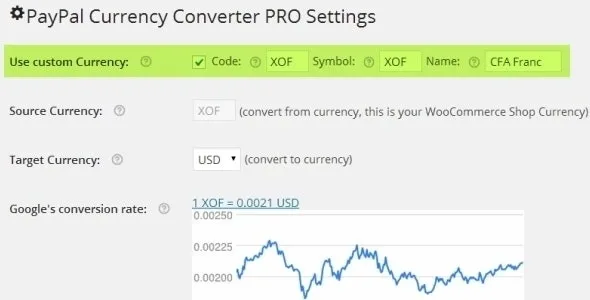
About PayPal Currency Converter PRO for WooCommerce
The exchange rate on your PayPal payment is a price too
Your WooCommerce store sells in a currency PayPal does not accept. To offer PayPal, the total has to move to an allowed currency right before payment. It looks like a technical detail until you read the statement: what reaches your account depends on the rate applied at that moment, and an old rate shows up in the margin of every sale.
The exchange rate you save is a pricing decision, just like the tag on your products, and that is why someone has to keep an eye on it.
PayPal Currency Converter PRO, by Intelligent-IT, converts the store currency to a currency PayPal allows within the WooCommerce gateway, at checkout. You decide the target currency, where the rate comes from and what handling fee you add.
What you control in the conversion
- Target currency: the one PayPal will charge.
- Exchange rate providers: Open Exchange Rates, European Central Bank through fixer.io, Xignite, APILayer, Currency Converter API or the Bank of Romania. A custom API is also supported.
- Manual rate: accept the suggested rate or set your own.
- Custom currency: define your own currency with its code, symbol and name.
- Handling fee: a percentage, a fixed amount or both, with lower and upper thresholds. It can also be a bonus subtracted from the total, carry its own title, be taxed and include shipping in the percentage.
- Tax and shipping: converted with no extra setup.
- Rounding precision you can adjust.
- Rate in view: it can be shown in the PayPal gateway description, along with the converted total and tax.
How to keep the rate from going stale
The dashboard compares the saved rate with the current one: the value appears in green when they match, and in red with a warning when they differ. That warning only helps if someone looks at it, so it makes sense to automate the update.
To do that, check Activate Scheduled Update in the settings and register the ppcc_cexr_update hook with WP Crontrol, or call the plugin Ajax URL from a server cron job. For five-digit accuracy, choose Open Exchange Rates or the European Central Bank as your data source.
It can also log activity to a file and notify you by email, which leaves a trail of the rate in force.
One currency in the catalog, and orders PayPal holds
The plugin acts on the PayPal payment: its features do not include a switcher for visitors to see prices in their own currency. In other words, the store keeps showing its currency and conversion happens at the charge.
PayPal puts orders on hold because of the difference in amount and currency. The Auto-complete option, for virtual orders, and Auto-processing override that check, and you can also suppress the on-hold email. Stock is reduced when the payment succeeds, and you can add a conversion note to the order email.
A provider, a currency and a test payment
It needs WooCommerce active, the WooCommerce PayPal gateway and cURL on the server. It must not run alongside WooCommerce All Currencies or WooCommerce Custom Currencies. If allow_url_open is off on the server, the dashboard shows a warning. Some providers ask for an API ID. To get started:
- Install and activate the plugin with WooCommerce already running.
- Choose the target currency and the rate provider.
- Save to fetch the rates, accept the suggested one and save again.
- Set the handling fee, if you plan to use it.
- Schedule the update and make a test purchase in PayPal sandbox mode to check the total that arrives.
If you want to truly sell in several currencies
Aelia Currency Switcher moves prices and transactions to the currency the customer picks, and filters payment methods by that currency.
Currency Converter Widget goes the other way: it shows converted prices for reference, and payment stays in the base currency.
Shipping, fees and gateways: answers on conversion
Are shipping and taxes converted too?
Yes, with no additional setup.
Does the rate update by itself?
You schedule it with WP Crontrol or a server cron job.
Can I cover the fee with a surcharge?
You can add a percentage, a fixed amount or both.
Do customers see the rate applied?
It can be shown in the PayPal gateway description.
Does it work with other gateways?
It is made for PayPal gateways within WooCommerce.
Topics
Version history
-
v
3.6.1 Current 16 May 2024
Customer reviews
Sign in to leave a review. Only people who have the product can review it.
No reviews for this product yet.
Frequently asked questions
-
GPL (General Public License) is the license under which WordPress and most premium plugins/themes are distributed. It grants you the right to use, modify and redistribute the software in as many projects as you want, with no domain restrictions.
-
Yes. With membership you get automatic updates via our GPLClub Updater plugin (installed on your WP, detects new versions and applies them). With individual purchase, you get one year of manual updates from your account.
-
Depends on the plan. Monthly: 3 domains. Semi-annual: 7. Annual and Lifetime: 15. Individual purchase: 1 domain.
-
GPLClub offers its own support for installation, configuration and compatibility. For direct support from the original author (feature requests, product-specific bugs), a license purchased from the author is required.