Photto – Photographer Blog WordPress Elementor Theme WordPress Theme
Antivirus scan
Powered by ClamAV
✅ Verified clean
This product file has passed our security filters.
Want to run a fresh ClamAV scan right now? Takes a few seconds and shows scanner version, signature DB and live result.
This can take 5 to 30 seconds.
Clean file Threat detected
No threats detected in this file.
- File
- Size
- Scanned
- ClamAV
- Signature database
⚡ Powered by ClamAV
Scan could not be completed
Report product
If you detected an issue (broken file, malware, inappropriate content, etc.) let us know and we'll review it ASAP.
Sign in to report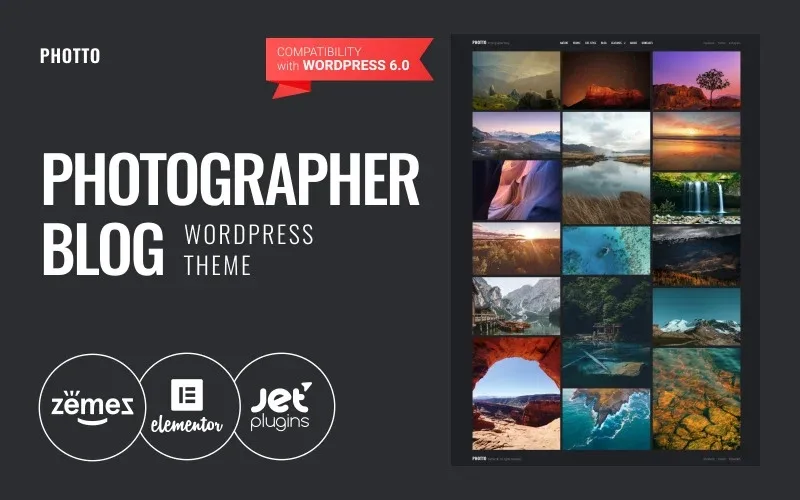
About Photto – Photographer Blog WordPress Elementor Theme WordPress Theme
A portfolio nobody finds is an album in a drawer
Many photographers set up a site with a gallery and wait for clients to arrive. But Google doesn't read photos, it reads text, and people looking for a photographer ask how much it costs, how you work and whether you'll understand what they need. Photto is a blog theme for photographers.
One thing gets overlooked: a photographer's blog is judged with the eyes first. Before reading a title, the visitor sees how your photos are cropped in the grid.
From listing to article: how a visit moves through Photto
Imagine you publish a portrait session with a text about how you planned it.
Step 1: you choose how the listing looks
The demo menu offers seven layouts: Listing, Listing 2, Grid, Grid 2, Masonry, Timeline and Justify. If you mix vertical and horizontal photos, Masonry and Justify are the first ones worth testing. Check in the demo whether the framing of your photos is respected or cropped.
Step 2: you organize by categories
The demo groups articles into Nature, People and Life Style. Yours will be different (weddings, portraits, travel), but the idea is the same: each visitor goes straight to what they want without scrolling the whole archive.
Step 3: the visitor opens the post
Here there are ten post layouts, from Post Layout 1 to 10. In the demo, the thumbnails in the listing show a zoom link.
Step 4: they decide to write to you
The demo includes About and Contacts pages and links to Facebook, TikTok and Instagram. That's as far as what you see goes: there are no session bookings, print shop or private galleries for delivering photos to clients. If you need them, you'll have to add them with other plugins and check that they fit the design.
Questions buyers ask about Photto
Does it work as a pure portfolio, without writing?
The listing can be a grid, Masonry or Justify. But it's built as a blog: if you won't publish text, you'll use only part of it.
Can I change how posts look?
Yes, with the ten post layouts and the seven listing layouts the demo shows. There's also a Typography page.
Does it include a shop or bookings?
They don't appear in the demo. To charge for sessions or sell prints you'll need other tools.
What to write so the blog brings in clients
The demo's sample articles offer a hint: they cover pricing mistakes, how to win clients, how to reply to them, lighting and cameras. They mix technique with business, and that's the right mix. Someone looking for a wedding photographer reads a pricing guide before your services page.
Photto gives you the showcase for that content, but the text is yours to write. Publish a few well-illustrated posts rather than many with loose photos, and pick the post layout according to the type of article.
Topics
Version history
-
v
1.0.1 Current 13 Jun 2024
Customer reviews
Sign in to leave a review. Only people who have the product can review it.
No reviews for this product yet.
Frequently asked questions
-
GPL (General Public License) is the license under which WordPress and most premium plugins/themes are distributed. It grants you the right to use, modify and redistribute the software in as many projects as you want, with no domain restrictions.
-
Yes. With membership you get automatic updates via our GPLClub Updater plugin (installed on your WP, detects new versions and applies them). With individual purchase, you get one year of manual updates from your account.
-
Depends on the plan. Monthly: 3 domains. Semi-annual: 7. Annual and Lifetime: 15. Individual purchase: 1 domain.
-
GPLClub offers its own support for installation, configuration and compatibility. For direct support from the original author (feature requests, product-specific bugs), a license purchased from the author is required.