Price by Formula Calculator for WooCommerce
Antivirus scan
Powered by ClamAV
✅ Verified clean
This product file has passed our security filters.
Want to run a fresh ClamAV scan right now? Takes a few seconds and shows scanner version, signature DB and live result.
This can take 5 to 30 seconds.
Clean file Threat detected
No threats detected in this file.
- File
- Size
- Scanned
- ClamAV
- Signature database
⚡ Powered by ClamAV
Scan could not be completed
Report product
If you detected an issue (broken file, malware, inappropriate content, etc.) let us know and we'll review it ASAP.
Sign in to report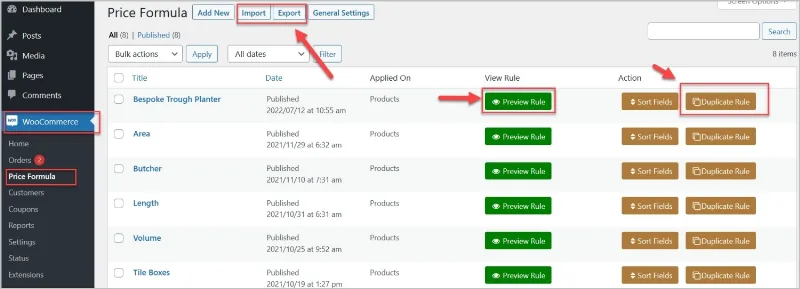
About Price by Formula Calculator for WooCommerce
When the price depends on what each customer asks for
Selling made-to-measure often ends in quotes sent by email, tiered price lists or one variable product for every possible size. The customer wants to know what their square meter of carpet or their custom-cut panel will cost, and every hour the answer takes is an hour in which they can walk away to another store.
Whoever sells this way rarely has a price: they have a rule (a price per square meter, a surcharge when the order passes a certain size, a volume discount). Price by Formula Calculator for WooCommerce lets you write that rule as a formula, so the price is calculated on its own from what the customer chooses or enters on the product page.
Fields, formulas and conditions: how the calculation is built
First you create the product options, with up to sixteen fields: numbers, text, text areas, drop-downs, checkboxes, radio buttons and multi-select. Then you use those fields inside formulas with addition, subtraction, multiplication and division.
- Several formulas per rule: useful for offers with a complex price structure.
- Conditional formulas: with AND, OR and ELSE groups, and comparisons such as equal, not equal, greater, less, empty or not empty. The formula then changes depending on what the customer types or on the result of another formula.
- Rounding: there are several options to adjust the figures to your criteria.
- Required or optional fields: you decide what the customer must fill in.
It is not limited to area, length, volume and weight. The product demos range from tile boxes, wallpaper with a discount and panels by length to a butcher calculator, and it is also meant for rentals, payment plans or service quotes.
One rule for a hundred products, with a backup
You do not have to build one calculator per product: each rule applies to several products or whole categories, and you can create different rules for different catalogs. If two nearly identical products need similar options, you duplicate the rule and change only what you need. There is also a preview of the rules you have created.
Rules export to CSV, useful as a backup or to move them to another store. On the product page you can show the calculation to the customer and hide the standard WooCommerce quantity field, which is often redundant when the customer already enters measurements. The chosen details appear in the cart, at checkout and in the order, with a detail button that shows them in a popup. Radio buttons can carry images.
For shipping, the product weight can come from a field named plugify_weight or from a formula labeled plugify_Weight, so the rate is calculated from what the customer ordered.
Are four operations enough for your catalog?
Before deciding, be clear about the scope. It is a plugin for WooCommerce and needs a store already set up. Formulas are built with basic operations, so if your price depends on huge tables or very special rules, test it with your real case. It is a price calculator: if you rent cars or sell services with dates, check in the demo how you would handle availability, because the calculation is what it offers.
Which field types does it support?
Up to sixteen, including numbers, text, text areas, drop-downs, checkboxes and radio buttons.
Can I change the formula depending on what the customer types?
Yes, with AND, OR and ELSE conditions and comparisons such as equal, not equal, greater, less and empty.
Is it only for measured products?
No. It also works for rentals, payment plans, service quotes and made-to-measure products.
Can I take my rules to another store?
Yes, they export and import as CSV.
Topics
Version history
-
v
4.0.9 Current 19 Oct 2026
-
v
4.0.6 2 Apr 2026
Customer reviews
Sign in to leave a review. Only people who have the product can review it.
No reviews for this product yet.
Frequently asked questions
-
GPL (General Public License) is the license under which WordPress and most premium plugins/themes are distributed. It grants you the right to use, modify and redistribute the software in as many projects as you want, with no domain restrictions.
-
Yes. With membership you get automatic updates via our GPLClub Updater plugin (installed on your WP, detects new versions and applies them). With individual purchase, you get one year of manual updates from your account.
-
Depends on the plan. Monthly: 3 domains. Semi-annual: 7. Annual and Lifetime: 15. Individual purchase: 1 domain.
-
GPLClub offers its own support for installation, configuration and compatibility. For direct support from the original author (feature requests, product-specific bugs), a license purchased from the author is required.