Product Input Fields for WooCommerce Pro By Tyche Softwares
Antivirus scan
Powered by ClamAV
✅ Verified clean
This product file has passed our security filters.
Want to run a fresh ClamAV scan right now? Takes a few seconds and shows scanner version, signature DB and live result.
This can take 5 to 30 seconds.
Clean file Threat detected
No threats detected in this file.
- File
- Size
- Scanned
- ClamAV
- Signature database
⚡ Powered by ClamAV
Scan could not be completed
Report product
If you detected an issue (broken file, malware, inappropriate content, etc.) let us know and we'll review it ASAP.
Sign in to reportNewer version out, or a problem?
About Product Input Fields for WooCommerce Pro By Tyche Softwares
Made-to-order stores that need customer details
When you sell products the customer personalizes, the details usually arrive after the purchase: an email with the photo, a message with the cake dedication text, or a question about the color. Every back-and-forth delays the order. This plugin lets the customer fill in that information on the product page itself.
It suits shops that sell cakes with dedications, engraved items or products made to measure, especially when those options don't need to affect stock. It needs WooCommerce installed and active.
19 field types to collect product customization details
The plugin offers 19 field types on the product page. The most used are these:
- File upload: the customer sends images or documents.
- Dropdowns, checkboxes and radio buttons: to choose among the options you define.
- Text fields: for notes or messages, such as the dedication on a cake.
- Color, range and country: to pick a shade, an interval for bulk orders, or a location that can carry an extra charge.
- Date, month or week pickers: to indicate when the customer wants the order.
Each field has its own values, restrictions and options, such as the label, the placeholder text or the maximum length.
Color, design and image samples before choosing
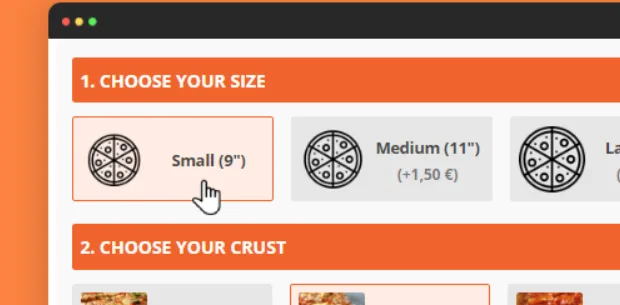
With color and image swatches, the customer compares colors, designs or finishes without having to read a text label. You can also show the matching image for each option in a dropdown, checkboxes or radio buttons: if they pick blue, they see the blue keyboard.
Each field option can carry an extra charge, so the customer knows how much each customization will cost when selecting it. Charges are set product by product.
Fields that appear only when they are needed
Conditional logic shows or hides fields based on what the customer selects in dropdowns, checkboxes, dates and other types. The condition can depend on product categories, tags or variations, and you choose whether it applies when one rule or all rules are met.
You can also show a field only when the product quantity is above a value you set. The rules work with both global fields and product-level fields.
Where each field appears and what it remembers in Product Input Fields for WooCommerce
You decide where each field appears on the product page and how it is styled. Because the plugin integrates into each product, you can have different fields for each item, and you can also include or exclude fields by category globally.
Fields can be filled from URL parameters and can keep what the customer entered before. You can also stop the date, time, week and range pickers from loading while they are not in use.
Frequently asked questions about Product Input Fields for WooCommerce Pro
Are fields set up for the whole store or product by product?
Both. You can add fields to a specific product or use global fields, and exclude whole categories when you don't want them to appear.
Can I charge an extra for each option?
Yes. You can add a charge to field values, and the customer sees it when selecting them. Charges are enabled on the product you choose.
Can the form remember what the customer entered before?
Yes. Fields can keep what the customer entered earlier and refill it, so they don't have to type it again.
Can I show an image for each option?
Yes, in dropdowns, checkboxes and radio buttons. For example, the product photo in the color the customer chooses.
Topics
Version history
-
v
2.8.0 Current 8 Apr 2024
Customer reviews
Sign in to leave a review. Only people who have the product can review it.
No reviews for this product yet.
Frequently asked questions
-
GPL (General Public License) is the license under which WordPress and most premium plugins/themes are distributed. It grants you the right to use, modify and redistribute the software in as many projects as you want, with no domain restrictions.
-
Yes. With membership you get automatic updates via our GPLClub Updater plugin (installed on your WP, detects new versions and applies them). With individual purchase, you get one year of manual updates from your account.
-
Depends on the plan. Monthly: 3 domains. Semi-annual: 7. Annual and Lifetime: 15. Individual purchase: 1 domain.
-
GPLClub offers its own support for installation, configuration and compatibility. For direct support from the original author (feature requests, product-specific bugs), a license purchased from the author is required.