Product Variation Swatches for WooCommerce (Pro)
Antivirus scan
Powered by ClamAV
✅ Verified clean
This product file has passed our security filters.
Want to run a fresh ClamAV scan right now? Takes a few seconds and shows scanner version, signature DB and live result.
This can take 5 to 30 seconds.
Clean file Threat detected
No threats detected in this file.
- File
- Size
- Scanned
- ClamAV
- Signature database
⚡ Powered by ClamAV
Scan could not be completed
Report product
If you detected an issue (broken file, malware, inappropriate content, etc.) let us know and we'll review it ASAP.
Sign in to reportNewer version out, or a problem?
About Product Variation Swatches for WooCommerce (Pro)
Shops with variable products that want colors and sizes visible at a glance
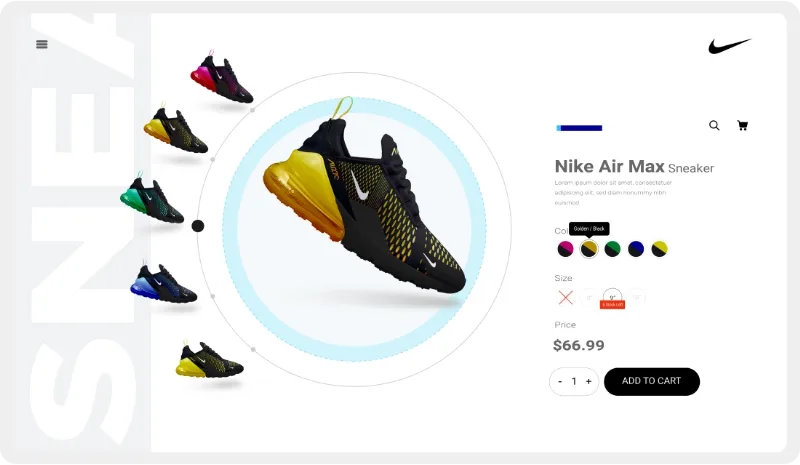
This plugin displays the product variations in a more user-friendly style, with visual swatches.
It suits you if your catalog has variations that buyers compare at a glance, such as the colors of a garment, the finishes of a piece of furniture or the designs of an accessory. It makes little sense if you only sell simple products without variations, since there would be nothing to turn into swatches.
It is a WooCommerce add-on, so WooCommerce must be installed and active for it to work.
Five swatch types
The available swatch types are:
- Label or button: shows the option text.
- Image: shows a photo of the variant.
- Color: shows a color box.
- Radio: shows the options in radio style.
- Image with label: combines a photo and a label in the same swatch.
Standard dropdown menus can also be converted automatically into text or image swatches.
How variants are displayed when there are many
Displaying a large number of variations on a single page can look clumsy and may not fit your store theme. That is why there are five display styles other than the default one: dropdown, sliding carousel, accordion, horizontal scroller and vertical scroller.
The dropdown style lists each image and color inside a menu, and adds an advanced search to find a specific variant. On the shop page you can also limit how many variants appear.
Tip: in the demo, look at how each style fits alongside your theme before you choose.
Stock visible on each variant in Variation Swatches for WooCommerce
Showing stock inside the swatch helps make the shopping experience more seamless. The plugin shows the remaining units of each variant, with a stock alert, and highlights the out-of-stock ones.
For variants without stock there are several visual behaviors: the default out-of-stock text, or the Blur, Blur with Cross, Blur with Cancel and Hide styles. Variants available for backorder show a Backorder label and can be added to the cart like a product in stock.
Reusable swatch designs and visual settings
You can create as many swatch designs as you need for a website, each with its own icons, hover effects, borders and tooltips, and choose the one that fits your store theme. A search tool helps you find attributes or designs when you already have many.
For two-color products, the bicolor mode shows both tones in a single swatch. The tooltip can be customized in color, text size and background, and the clear button can also be styled. Featured attributes let you display only the ones that matter and change the product image when you select one of them. Lazy loading shows the text first and then the swatch images, which helps the website's performance.
Where variants appear: catalog, product page, cart and direct links
Swatches do not stay only on the product page. You can show them on the shop page with the variation price and image, align them to the left, right or center below the image, and also place them in the additional information section of the product page. In the cart and at checkout, the chosen image and color are displayed during order confirmation.
If you want to send a specific variant, you can create a link that opens it already selected, useful for sharing it or for a quick purchase. The import and export function saves swatch settings together with your WooCommerce products.
Frequently asked questions about Product Variation Swatches for WooCommerce (Pro)
Do I need WooCommerce to use it?
Yes. It is a plugin for WooCommerce stores and works on their variable products, so WooCommerce must be active.
Can I show out-of-stock variants instead of hiding them?
Yes. You can keep the default out-of-stock text or use the Blur, Blur with Cross, Blur with Cancel or Hide styles.
Is it compatible with the WooCommerce bundles plugin?
Yes, it is compatible with WooCommerce Product Bundle, the plugin that lets you offer bulk discounts and personalized bundles.
Can I export my swatch settings?
Yes. The import and export function saves swatch settings together with your WooCommerce products.
Topics
Version history
-
v
2.2.2.0 Current 14 May 2024
Customer reviews
Sign in to leave a review. Only people who have the product can review it.
No reviews for this product yet.
Frequently asked questions
-
GPL (General Public License) is the license under which WordPress and most premium plugins/themes are distributed. It grants you the right to use, modify and redistribute the software in as many projects as you want, with no domain restrictions.
-
Yes. With membership you get automatic updates via our GPLClub Updater plugin (installed on your WP, detects new versions and applies them). With individual purchase, you get one year of manual updates from your account.
-
Depends on the plan. Monthly: 3 domains. Semi-annual: 7. Annual and Lifetime: 15. Individual purchase: 1 domain.
-
GPLClub offers its own support for installation, configuration and compatibility. For direct support from the original author (feature requests, product-specific bugs), a license purchased from the author is required.