Progress Map, Advanced Search
Antivirus scan
Powered by ClamAV
✅ Verified clean
This product file has passed our security filters.
Want to run a fresh ClamAV scan right now? Takes a few seconds and shows scanner version, signature DB and live result.
This can take 5 to 30 seconds.
Clean file Threat detected
No threats detected in this file.
- File
- Size
- Scanned
- ClamAV
- Signature database
⚡ Powered by ClamAV
Scan could not be completed
Report product
If you detected an issue (broken file, malware, inappropriate content, etc.) let us know and we'll review it ASAP.
Sign in to reportNewer version out, or a problem?
About Progress Map, Advanced Search
A simple search on the homepage that leads to a full listing
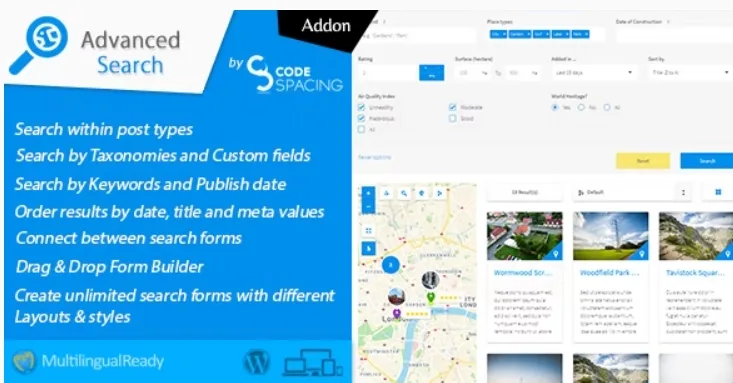
Advanced Search is an extension of Progress Map that lets you build advanced search forms. With them, visitors can find the entries or locations they are looking for on your site.
On the homepage you can place a minimal form, for example with an address field and another one to sort. The homepage form is this way the first step of a large search.
To make this work you need Progress Map installed and active.
The listing includes a second form to refine the results
When the form is submitted, the visitor lands on the listing or map page, which includes another search form with more fields and options. There they can refine the results recursively, step by step. Search forms can be connected, so the homepage search leads to the listing search.
Frequent questions before setting up the search
Can I have several search forms on the same site?
Yes. You can create as many different forms as you need.
Can I limit the search to one type of content?
Yes. Searches run within the post types you choose, using taxonomies, custom fields, keywords, publish dates and periods.
Can a visitor refine what they have already found?
Yes, because search forms can be connected and each results page can carry its own form with more options.
Filters by taxonomy, custom fields and dates
You can search with taxonomies, custom fields, keywords, publish dates and periods. All of these features can be combined into a single form.
Sorting results by date, title or a field value
You can sort results by date, by title or by the value of a custom field, and let the visitor choose the order from the form, as in the homepage example.
Forms with different layouts and styles
The form builder lets you create forms with different layouts and styles, and the possibilities are practically limitless. Start with the shortest form that answers the main question and add fields only where the visitor needs them.
Topics
Version history
-
v
1.4.4 Current 14 May 2024
Customer reviews
Sign in to leave a review. Only people who have the product can review it.
No reviews for this product yet.
Frequently asked questions
-
GPL (General Public License) is the license under which WordPress and most premium plugins/themes are distributed. It grants you the right to use, modify and redistribute the software in as many projects as you want, with no domain restrictions.
-
Yes. With membership you get automatic updates via our GPLClub Updater plugin (installed on your WP, detects new versions and applies them). With individual purchase, you get one year of manual updates from your account.
-
Depends on the plan. Monthly: 3 domains. Semi-annual: 7. Annual and Lifetime: 15. Individual purchase: 1 domain.
-
GPLClub offers its own support for installation, configuration and compatibility. For direct support from the original author (feature requests, product-specific bugs), a license purchased from the author is required.