Progress Map, Draw a Search
Antivirus scan
Powered by ClamAV
✅ Verified clean
This product file has passed our security filters.
Want to run a fresh ClamAV scan right now? Takes a few seconds and shows scanner version, signature DB and live result.
This can take 5 to 30 seconds.
Clean file Threat detected
No threats detected in this file.
- File
- Size
- Scanned
- ClamAV
- Signature database
⚡ Powered by ClamAV
Scan could not be completed
Report product
If you detected an issue (broken file, malware, inappropriate content, etc.) let us know and we'll review it ASAP.
Sign in to reportNewer version out, or a problem?
About Progress Map, Draw a Search
A visitor rarely wants the whole city, they want their area
When a visitor lands on a map with hundreds of properties or shops, they rarely search the entire city. They want the neighborhood where they would like to live, the street they walk every day, or the area they can reach without taking the car. If the map does not let them narrow that space down, they end up scrolling through markers that are of no use to them.
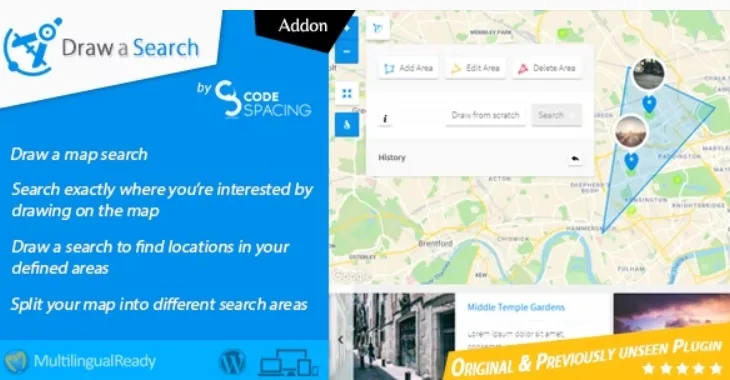
Progress Map, Draw a Search adds two ways to search on the map: drawing the area yourself on the spot or choosing between areas you define in advance. In both cases the search is limited to what falls inside the area.
Drawing the search area according to who is searching
Drawing lets you search exactly where you want. It can be traced point by point, adding vertices along the outline, or freehand. Once the area is delimited, the map starts looking for locations or properties inside it, and you can draw one or several areas at the same time.
Someone who wants to live in a specific neighborhood
They can outline the neighborhoods they are interested in and see only the properties inside them, without seeing those outside the boundary they have drawn.
Someone who is looking for something near a place they will visit
A visitor to a city can draw the area they want to visit and see the locations or properties that fall inside it.
Someone who needs something within a work area
If someone is looking for locations or properties to work in, they can draw the area where they want to do so.
Predefined zones: you divide the map and the visitor chooses
You create a list of areas and the map is divided into search zones. A dropdown appears on the map from which the visitor selects one or several areas, and the map looks for locations or properties inside them.
This mode can be used on its own or together with drawing. When both are combined, the visitor controls all the predefined areas and can handle them however they want. Cached results stay up to date: the search cache is cleared when the map cache is cleared or when posts are updated, so cached data stays in sync.
Fixing the drawing without starting over
Making mistakes while drawing is normal, which is why each area can be corrected separately. You can drag each vertex to a new position or double-click it to delete it.
If you remove a whole area by mistake, there is no need to draw it again: it stays saved and you restore it with one click. You can also resize it or hide it without deleting it from the map.
Frequently asked questions about Progress Map, Draw a Search
Can I draw more than one area at a time?
Yes. The tool supports one or several areas on the map, and each one is controlled separately.
What happens if I delete an area by accident?
The area stays saved and you can restore it with one click, without drawing it again.
Can the visitor choose between zones that I have created?
Yes. With predefined zones, a dropdown appears on the map to select one or several areas.
Can I use drawing and predefined zones at the same time?
Yes. They can be combined, and then the visitor can work with the predefined areas and with the ones they draw.
Does drawing have to be done point by point?
Not necessarily. It can be done point by point or freehand, depending on how it is configured.
Requires Progress Map installed and active
Progress Map, Draw a Search is an add-on that extends Progress Map, so that plugin must be installed and active for the search to work. Without it there is no map to draw on or zones to filter, so it is best to have it ready before adding this add-on.
Topics
Version history
-
v
1.9.1 Current 14 May 2024
Customer reviews
Sign in to leave a review. Only people who have the product can review it.
No reviews for this product yet.
Frequently asked questions
-
GPL (General Public License) is the license under which WordPress and most premium plugins/themes are distributed. It grants you the right to use, modify and redistribute the software in as many projects as you want, with no domain restrictions.
-
Yes. With membership you get automatic updates via our GPLClub Updater plugin (installed on your WP, detects new versions and applies them). With individual purchase, you get one year of manual updates from your account.
-
Depends on the plan. Monthly: 3 domains. Semi-annual: 7. Annual and Lifetime: 15. Individual purchase: 1 domain.
-
GPLClub offers its own support for installation, configuration and compatibility. For direct support from the original author (feature requests, product-specific bugs), a license purchased from the author is required.