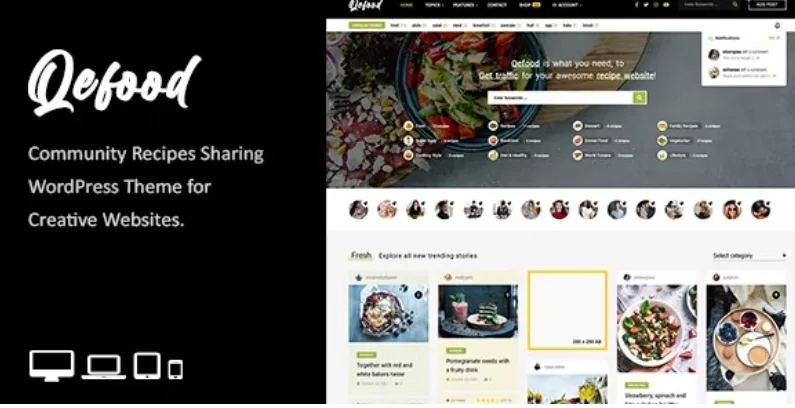
Qefood – Community Sharing WordPress Theme
Antivirus scan
Powered by ClamAV
✅ Verified clean
This product file has passed our security filters.
Want to run a fresh ClamAV scan right now? Takes a few seconds and shows scanner version, signature DB and live result.
This can take 5 to 30 seconds.
Clean file Threat detected
No threats detected in this file.
- File
- Size
- Scanned
- ClamAV
- Signature database
⚡ Powered by ClamAV
Scan could not be completed
Report product
If you detected an issue (broken file, malware, inappropriate content, etc.) let us know and we'll review it ASAP.
Sign in to reportNewer version out, or a problem?
About Qefood – Community Sharing WordPress Theme
Recipes your readers write, not just you
A recipe site lives on how many dishes it publishes, and writing every one yourself is what slows down almost every project. Qefood shares that work: it lets your users create, edit and delete their own posts from the public side of the site, and share their recipes with all visitors.
How Qefood fits depending on who writes the recipes
It helps to decide first who is going to write.
A cooking blog with a single author
If you are the only writer, Qefood gives you live search with featured categories and a layout that adapts to mobile.
A community of cooks who contribute recipes
This is where the theme works hardest. Each member publishes from the public side, can link the original source of their recipe, and you decide which roles publish instantly and which go through your review. It includes the top authors widget.
A restaurant or brand that wants more visitors
For a restaurant or brand, shared recipes are a way to get traffic to your website. Qefood lets you share them with everyone and includes the Sponsor Ads Manager (Lite) plugin, which rotates sponsor ads and accepts them through a built-in form.
Submission forms that control every field
Front-end submissions are built with a drag-and-drop form editor, and you can create unlimited forms, each with its own settings and restrictions. Security fields, such as captchas and hidden fields, filter out submissions that do not come from real people.
- Title and content with minimum and maximum word counts.
- Limit on the links a user can add, marked as follow or nofollow.
- Categories with simple or multiple selection, with categories included or excluded.
- Minimum and maximum number of tags a user can enter.
- Media button that can be turned on or off.
- Any post type and custom taxonomies, not just posts.
Check the demo to see how the form looks inside before building yours, especially the word and tag limits.
Widgets, search and layout for showing recipes
- Live search that shows the most used categories.
- Masonry or grid layout for listing recipes.
- Twelve custom widgets, including the top authors widget.
- Sticky sidebar and simple one-click color options.
- Multisite compatible, with a child theme included and compatible with Contact Form 7 and Gravity Forms.
Frequently asked questions about Qefood
Can I let readers publish without reviewing every recipe?
Yes, you choose which roles publish instantly among administrator, editor, author, contributor and subscriber. Posts from roles you do not select go through your approval.
How do I avoid recipes copied from other websites?
Qefood integrates CopyScape: every submission goes through that check to make sure the text is unique.
Can I link the original source of a recipe?
Yes, each post can include a link to its external source, shown on the article page.
Does it work with Contact Form 7 or Gravity Forms?
Yes, the theme is compatible with both.
What publishes instantly and what waits for your approval
Email notifications send contributors a thank-you message and notify you each time a submission arrives, so you can approve the ones from roles without instant publishing. Before opening submissions to the public, decide which roles publish directly, because that choice sets how much you will have to review.
Topics
Version history
-
v
1.6 Current 14 Jun 2024
Customer reviews
Sign in to leave a review. Only people who have the product can review it.
No reviews for this product yet.
Frequently asked questions
-
GPL (General Public License) is the license under which WordPress and most premium plugins/themes are distributed. It grants you the right to use, modify and redistribute the software in as many projects as you want, with no domain restrictions.
-
Yes. With membership you get automatic updates via our GPLClub Updater plugin (installed on your WP, detects new versions and applies them). With individual purchase, you get one year of manual updates from your account.
-
Depends on the plan. Monthly: 3 domains. Semi-annual: 7. Annual and Lifetime: 15. Individual purchase: 1 domain.
-
GPLClub offers its own support for installation, configuration and compatibility. For direct support from the original author (feature requests, product-specific bugs), a license purchased from the author is required.