QuickCal – Appointment Booking Calendar for WordPress
Antivirus scan
Powered by ClamAV
✅ Verified clean
This product file has passed our security filters.
Want to run a fresh ClamAV scan right now? Takes a few seconds and shows scanner version, signature DB and live result.
This can take 5 to 30 seconds.
Clean file Threat detected
No threats detected in this file.
- File
- Size
- Scanned
- ClamAV
- Signature database
⚡ Powered by ClamAV
Scan could not be completed
Report product
If you detected an issue (broken file, malware, inappropriate content, etc.) let us know and we'll review it ASAP.
Sign in to report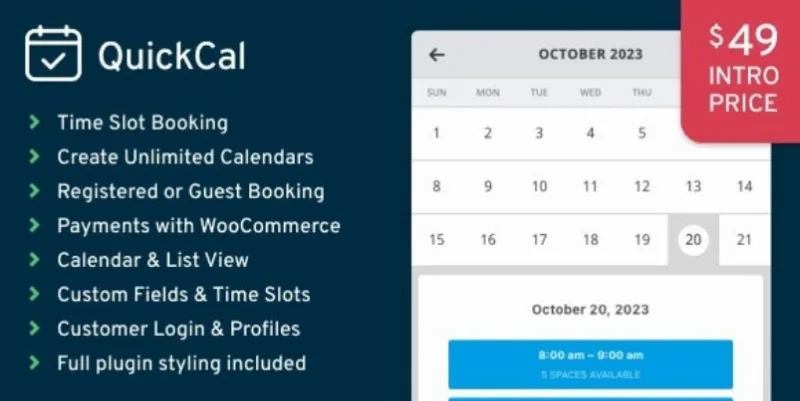
About QuickCal – Appointment Booking Calendar for WordPress
Appointments that arrive at 11:50 pm for 8:00 the next morning
People who live off appointments (a stylist, a trainer, a consultant, a tour guide) rarely lose money for lack of bookings: they lose it to badly placed bookings. A client who books for an hour from now when you are not even there yet, a loose gap between two sessions, a Saturday handled over WhatsApp that ends with two people at the same time.
QuickCal is a booking plugin for WordPress that puts the calendar on your website so clients choose only among the times you have defined. For this problem, the most useful setting is the booking buffer: it prevents bookings too close to the current date or time, so nobody shows up in the middle of the night for that same morning.
Schedules are built with flexible time slots, so it adapts to very different agendas: from consultations with fixed hours to activities that change depending on the day.
A separate calendar for each professional, room or location
If you do not work alone, a single agenda falls short quickly. In QuickCal you can create unlimited custom calendars, each with its own schedule and availability: one per team member, one per location, and so on. Each calendar can also be assigned to a different booking agent, so each person in charge sees only their own.
- Slots for closures: you can create special time slots for vacations, closed days and similar situations.
- Custom fields: you collect the information you need for each appointment (for example, what the client wants to work on or which service they are after) without asking for it later by email.
- Tailor-made emails: the notifications that you and your client receive can be customized.
The management dashboard and the front end are both responsive, so you can also review and organize appointments from your phone.
What your client sees: two calendar styles and their own appointments area
The calendar is inserted into any page with shortcodes or a widget. There are two calendar styles and color pickers so it fits your brand without touching CSS. Clients can manage their own appointments and account details, which saves you some of the «what time was my appointment?» messages.
The demos by sector help you picture the result in your case: yoga, coaching, spa and wellness, barber, consulting, healthcare, guided tours, golf and others. It is a good idea to open the one closest to your business and try the full booking journey.
The plugin can be translated into other languages. And if you are coming from the Booked plugin, QuickCal was designed to fix its issues and make the switch easier.
Is QuickCal enough if you want to charge for the booking upfront?
It depends on whether you have WooCommerce. QuickCal connects with it to accept payments for bookings and for related products or services. Without WooCommerce there is no online payment within the booking flow. If your business needs to sync the agenda with other external tools, check in the demo whether it fits the way you work before deciding.
Can I manage several professionals?
Yes. You create one calendar per professional, location or service, each with its own availability, and you can assign them to different booking agents.
Can I charge when the client books?
Yes, through WooCommerce. You will need to have it installed and set up.
Can I close specific days?
Yes, with custom time slots for vacations or closed days.
Can my clients see their appointments?
Yes, they can manage their appointments and account information from the website.
Topics
Version history
-
v
1.0.23 Current 7 Sep 2026
-
v
1.0.22 3 Aug 2026
-
v
1.0.17 28 Mar 2026
Customer reviews
Sign in to leave a review. Only people who have the product can review it.
No reviews for this product yet.
Frequently asked questions
-
GPL (General Public License) is the license under which WordPress and most premium plugins/themes are distributed. It grants you the right to use, modify and redistribute the software in as many projects as you want, with no domain restrictions.
-
Yes. With membership you get automatic updates via our GPLClub Updater plugin (installed on your WP, detects new versions and applies them). With individual purchase, you get one year of manual updates from your account.
-
Depends on the plan. Monthly: 3 domains. Semi-annual: 7. Annual and Lifetime: 15. Individual purchase: 1 domain.
-
GPLClub offers its own support for installation, configuration and compatibility. For direct support from the original author (feature requests, product-specific bugs), a license purchased from the author is required.