rtMedia View Counter
Antivirus scan
Powered by ClamAV
✅ Verified clean
This product file has passed our security filters.
Want to run a fresh ClamAV scan right now? Takes a few seconds and shows scanner version, signature DB and live result.
This can take 5 to 30 seconds.
Clean file Threat detected
No threats detected in this file.
- File
- Size
- Scanned
- ClamAV
- Signature database
⚡ Powered by ClamAV
Scan could not be completed
Report product
If you detected an issue (broken file, malware, inappropriate content, etc.) let us know and we'll review it ASAP.
Sign in to reportNewer version out, or a problem?
About rtMedia View Counter
Knowing who has seen your files in a community with many creators
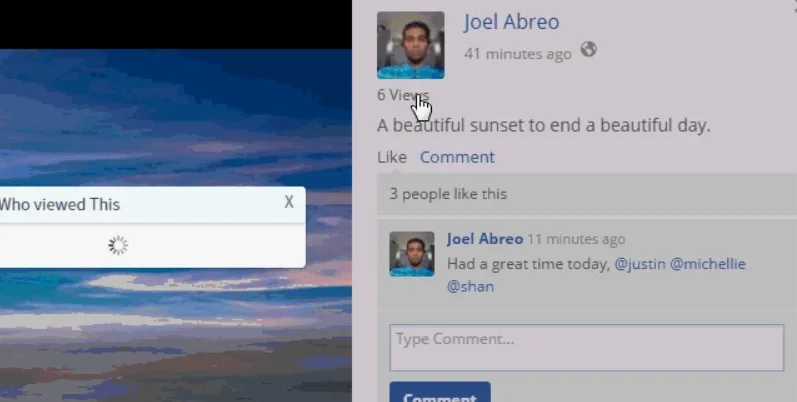
In a network with many content creators, whoever uploads a photo or video rarely knows if anyone actually saw it. This rtMedia add-on answers that question: it shows how many times each file has been viewed by registered users and lets the author see who viewed it and how long ago.
How rtMedia View Counter is turned on and what each person sees
The administrator enables the feature from rtMedia's display settings. From then on, the view count is shown to all users, including those who are not logged in. The file owner can also see who has viewed the file and how long ago, which helps them understand their audience.
How the counter counts each visit
Counts are not based on the IP addresses or cookies of viewers, but on user IDs. This way, each registered user adds one view per file, even if they open it again. The design aims for a figure that better reflects real popularity than a raw view total, which a simple script can easily fake. This is an example with 5 registered users on the site:
- User 1 uploads «media1»: the count shows 1.
- The other 4 registered users view it: the count rises to 5.
- User 1 visits it again: the count stays at 5.
Visitors without an account only add one view per file
Someone who is not logged in increases the count only once per file. Later visits from other people without an account no longer change it. In the example above, the first non-registered visitor takes the count to 6, and the second one changes nothing.
Frequently asked questions about rtMedia View Counter
Who turns the feature on?
The site administrator, from rtMedia's display settings.
Do visitors without an account show up in the count?
Everyone can see the number, but each visitor without an account adds only one view per file.
Can the author see who viewed their file?
Yes. The file owner can see which users have viewed it and how long ago.
If someone opens a file again, does the count go up?
No. Each registered user counts only once per file, no matter how many times they open it.
What to know before turning on the counter on your network
This add-on needs rtMedia installed and active, since the counter is configured from its display settings. It suits BuddyPress or WordPress sites with many content creators, where each author wants to know who is looking at their work. If your community gets mostly visits from people without an account, keep in mind that those visits add only one view per file.
Topics
Version history
-
v
1.2.3 Current 15 May 2024
Customer reviews
Sign in to leave a review. Only people who have the product can review it.
No reviews for this product yet.
Frequently asked questions
-
GPL (General Public License) is the license under which WordPress and most premium plugins/themes are distributed. It grants you the right to use, modify and redistribute the software in as many projects as you want, with no domain restrictions.
-
Yes. With membership you get automatic updates via our GPLClub Updater plugin (installed on your WP, detects new versions and applies them). With individual purchase, you get one year of manual updates from your account.
-
Depends on the plan. Monthly: 3 domains. Semi-annual: 7. Annual and Lifetime: 15. Individual purchase: 1 domain.
-
GPLClub offers its own support for installation, configuration and compatibility. For direct support from the original author (feature requests, product-specific bugs), a license purchased from the author is required.