Sell Media Magnifier
Antivirus scan
Powered by ClamAV
✅ Verified clean
This product file has passed our security filters.
Want to run a fresh ClamAV scan right now? Takes a few seconds and shows scanner version, signature DB and live result.
This can take 5 to 30 seconds.
Clean file Threat detected
No threats detected in this file.
- File
- Size
- Scanned
- ClamAV
- Signature database
⚡ Powered by ClamAV
Scan could not be completed
Report product
If you detected an issue (broken file, malware, inappropriate content, etc.) let us know and we'll review it ASAP.
Sign in to reportNewer version out, or a problem?
About Sell Media Magnifier
Anyone selling photos online can't let buyers touch them
When someone buys a photograph online, nobody can handle the file or see at a glance whether it holds up in a large enlargement or in print. Your prospects are naturally skeptical and want to know whether the quality of your photography is real. Sell Media Magnifier helps them check it.
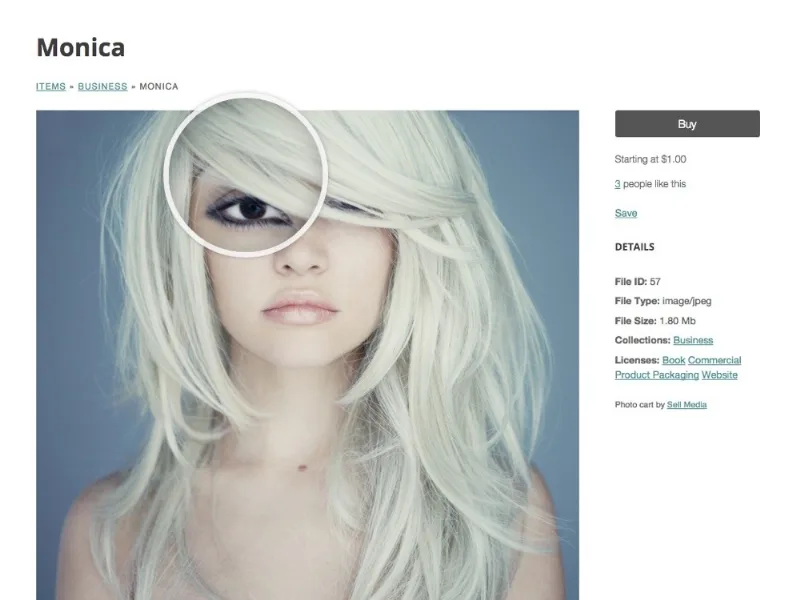
Sell Media Magnifier puts a magnifying glass over each photo to check sharpness
The extension adds a magnifying glass over the images so buyers can inspect them up close. With it they can check sharpness and the PPI (pixels per inch). The magnifier appears on the single item pages of every Sell Media item, so each photo listing includes it without you having to set it up by hand.
Magazine and newspaper editors look for images that accompany their text with good quality, graphic designers want to work with high resolution, and large organizations producing leaflets and marketing materials can see their images make a real difference to their campaign. The magnifier lets them check the quality of the images in your store.
Only in modern browsers
The magnifier only works in modern browsers. If a visitor uses an old browser, they won't be able to use it, so it's worth keeping in mind if your buyers may be on old equipment.
Frequently asked questions about Sell Media Magnifier
Where does the magnifier appear?
On all single item pages of every Sell Media item, so buyers find it when they look at each photo.
What can buyers check with it?
The sharpness of the image and its PPI (pixels per inch).
Is it only for stock photo stores?
No. It works both in a stock store and on a site where you publish images for your clients to review.
Does it help sell more?
It is an interactive tool that empowers buyers and supports sales.
Sell Media active and a stock store or client galleries
This extension needs Sell Media installed and active, because it extends that plugin. The rest of the store is handled by Sell Media: sales of photos and prints, protection of original files against illegal downloads, passwords per product or per gallery, bulk upload by drag and drop, price groups, discounts, sales reports, PayPal payments and sales commissions shared with contributors. It suits both a stock photo store and a gallery where clients review images.
Topics
Version history
-
v
2.0.1 Current 16 May 2024
Customer reviews
Sign in to leave a review. Only people who have the product can review it.
No reviews for this product yet.
Frequently asked questions
-
GPL (General Public License) is the license under which WordPress and most premium plugins/themes are distributed. It grants you the right to use, modify and redistribute the software in as many projects as you want, with no domain restrictions.
-
Yes. With membership you get automatic updates via our GPLClub Updater plugin (installed on your WP, detects new versions and applies them). With individual purchase, you get one year of manual updates from your account.
-
Depends on the plan. Monthly: 3 domains. Semi-annual: 7. Annual and Lifetime: 15. Individual purchase: 1 domain.
-
GPLClub offers its own support for installation, configuration and compatibility. For direct support from the original author (feature requests, product-specific bugs), a license purchased from the author is required.