Sigma Media Manager
Antivirus scan
Powered by ClamAV
✅ Verified clean
This product file has passed our security filters.
Want to run a fresh ClamAV scan right now? Takes a few seconds and shows scanner version, signature DB and live result.
This can take 5 to 30 seconds.
Clean file Threat detected
No threats detected in this file.
- File
- Size
- Scanned
- ClamAV
- Signature database
⚡ Powered by ClamAV
Scan could not be completed
Report product
If you detected an issue (broken file, malware, inappropriate content, etc.) let us know and we'll review it ASAP.
Sign in to report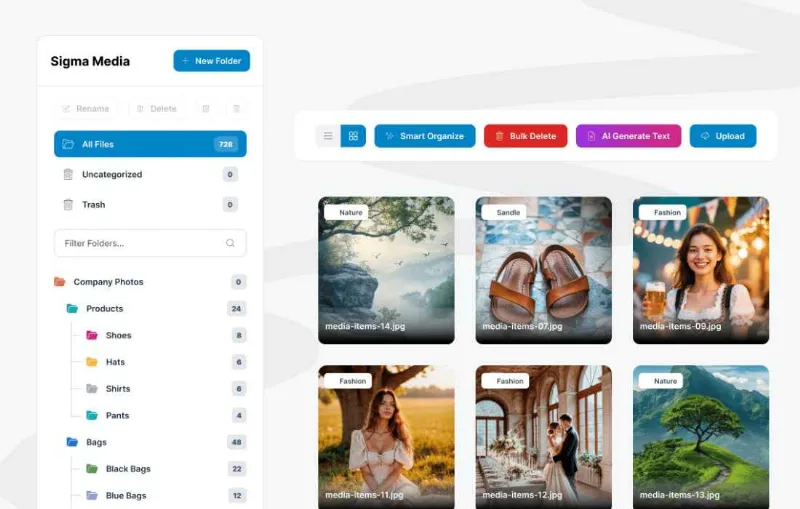
About Sigma Media Manager
Folders are labels, and that is exactly what you want
The WordPress media library has no folders, which is why after two years it is a list of nine thousand files sorted by date where finding anything is impossible. Any plugin promising folders looks like the obvious answer.
But there are two ways to give folders and they are not equivalent. One is genuinely moving the files around on the server. The other is leaving them where they are and attaching a label that behaves like a folder. This plugin does the second, and says so plainly: organising means adding folder labels, not moving physical files.
It looks like the less ambitious approach and it is the one that breaks nothing. Because your image URLs are written inside your posts, your pages and your products, and the day you genuinely move a file, every one of those links points at where nothing is any more.
What it does
- Unlimited virtual folders, nestable and colour coded, over the library you already have.
- Drag and drop to place files, and bulk operations to move, rename or delete.
- Grid or list view, depending how you prefer to look.
- Search with filters and custom tags, which is what genuinely makes a large library findable.
- Cloud offloading to Amazon S3, DigitalOcean Spaces, Google Cloud or Cloudflare R2, updating existing links.
- Bulk generation of alternative text, titles and descriptions, by analysing the image content.
- Access control on higher tiers: password per file, expiring links, download limits and role based permissions.
Generating alternative text is what saves the most time
Of everything it brings, this is the feature that handles a job nobody does. Giving images alternative text is among the things that most improve a site's accessibility and ranking, and also among the most postponed, because there are nine thousand files and starting is hard.
Generating them in bulk turns that impossible job into a review. And reviewing is doable: you read, you correct what is wrong and you move on.
The review part is worth insisting on. Generated alternative text describes what is visible, and sometimes what needs saying is something else. On a product photo, "short sleeved blue shirt" is useful; "person standing against a white background" says nothing even though it is true. And on purely decorative images, the correct thing is leaving it empty so screen readers skip them.
What happens the day you uninstall it
That is the right question to ask of any organiser plugin, and here it has a good answer precisely because the folders are virtual: your files have not moved, so they are exactly where they were and all your links still work. What you lose is the organisation, not the content.
With cloud offloading the calculation is different, because there the file's home really has changed. That part is not reversible with one click and deserves the same caution as any other migration: backup first, and check afterwards.
Requirements and what it does not do
It works on the native library, integrates with the standard media modal and with builders such as Elementor and the block editor. Multisite compatibility comes with the agency plan.
It does not physically move your files when organising, which is its design decision and its greatest virtue.
It does not edit images: no cropping, no retouching and no compression. And it is not a server file manager either: it works with what is in the media library, not with your uploads folder outside WordPress.
Alternatives in the catalogue
On the tidying side there are Media Library Organizer and Media Library Categories, more focused and simpler if all you want is folders.
If your problem is space rather than order, the specific tool is Next3 Offload, which supports many more storage destinations. And if what concerns you is accessibility beyond alternative text, it is worth reading what One Accessibility does and does not do.
Frequently asked questions
Does it move my files around?
No. Folders are labels: files stay where they are and links do not break.
What happens if I uninstall it?
You lose the organisation, not the files. Everything stays where it was.
Does it write alternative text for me?
It generates it in bulk by analysing the image. It has to be reviewed: describing what is visible is not always what needs saying.
Can it also move files to the cloud?
Yes, to four providers, updating existing links.
Does it work inside Elementor?
Yes, it integrates with the standard media modal and the usual builders.
Does it edit or compress images?
No. It organises and finds; editing belongs to another tool.
Version history
-
v
1.8.0 Current 29 Oct 2026
-
v
1.7.2 25 Aug 2026
Customer reviews
Sign in to leave a review. Only people who have the product can review it.
No reviews for this product yet.
Frequently asked questions
-
GPL (General Public License) is the license under which WordPress and most premium plugins/themes are distributed. It grants you the right to use, modify and redistribute the software in as many projects as you want, with no domain restrictions.
-
Yes. With membership you get automatic updates via our GPLClub Updater plugin (installed on your WP, detects new versions and applies them). With individual purchase, you get one year of manual updates from your account.
-
Depends on the plan. Monthly: 3 domains. Semi-annual: 7. Annual and Lifetime: 15. Individual purchase: 1 domain.
-
GPLClub offers its own support for installation, configuration and compatibility. For direct support from the original author (feature requests, product-specific bugs), a license purchased from the author is required.