Soho Hotel Booking Calendar
Antivirus scan
Powered by ClamAV
✅ Verified clean
This product file has passed our security filters.
Want to run a fresh ClamAV scan right now? Takes a few seconds and shows scanner version, signature DB and live result.
This can take 5 to 30 seconds.
Clean file Threat detected
No threats detected in this file.
- File
- Size
- Scanned
- ClamAV
- Signature database
⚡ Powered by ClamAV
Scan could not be completed
Report product
If you detected an issue (broken file, malware, inappropriate content, etc.) let us know and we'll review it ASAP.
Sign in to reportNewer version out, or a problem?
About Soho Hotel Booking Calendar
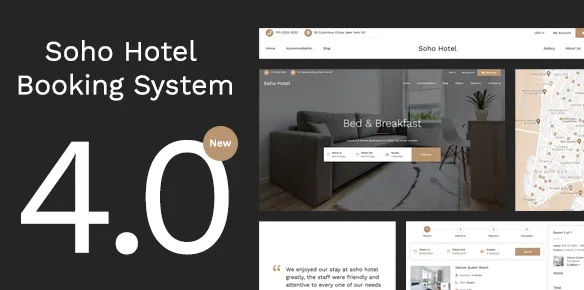
Soho Hotel Booking Calendar: availability guests can see on your website
When a hotel or hostel manages its rooms by hand, availability ends up spread across emails, phone calls and spreadsheets, and the guest has no idea which dates are free until someone replies. Soho Hotel Booking Calendar turns the accommodation website into the place where guests book, with availability up to date in one panel.
The calendar shows live which dates are free. If a date is unavailable, it appears marked with a red x. Bookings can be confirmed manually or automatically, and dates are only blocked once the booking is confirmed. The administrator and the guest both receive an email when a new booking is made.
Rates that change with the date, the length of stay and the guests
- Season: different prices for low season, high season or any time of year you define.
- Length: rates per night, per week or per month, and prices for stays of a length you set.
- Occupancy: prices by number of guests and guest type, such as adult, child or pet.
- Day of the week and lead time: one price by check-in day and another depending on whether the guest books in advance or at the last minute.
On top of these rates you can add optional extras, such as an airport transfer or breakfast, and discount coupons. You can also ask for a percentage of the total as a deposit to make sure the guest arrives.
Private rooms, shared dorms and several locations
You can define private rooms, which only one group of guests can book at a time, and shared dorm rooms, which different groups can book. If several rooms are the same in features and price, you just set the quantity instead of creating each one separately. Rooms can be grouped by location or category, so an accommodation with several sites manages each one's availability with ease. A single room can also offer several rates, such as full board or half board.
Languages with synced availability and visual editing without code
The translation plugin is custom built and included, and availability is synced across languages: if someone books a room in one language, it is blocked in all the others. The language switcher appears at the top and bottom of every page. Pages and content are edited with the WP Bakery drag and drop editor, also included, so you don't need to code to change texts or layouts. The demos can be imported as a starting point.
Online payments with WooCommerce and what depends on it
Booking payments are processed with WooCommerce, which lets you collect credit card payments in many local currencies and connect with banks in your country. Prices can also be quoted in several currencies, and guests can switch between them. WooCommerce analytics show sales in graph form month by month, and the customer database stores guest details and how much they spend on bookings.
The limit is clear: because payments go through WooCommerce, that plugin has to be installed and active for bookings to be paid online.
Frequently asked questions about Soho Hotel Booking Calendar
Can I collect part of the booking in advance?
Yes. You can take a percentage of the total price when booking, which helps make sure the guest arrives.
Can I keep availability up to date on other booking platforms?
Yes, channel management syncs the calendar with online travel agencies (OTAs) via iCal, so availability stays the same on every platform.
Does it work with shared dorm rooms?
Yes. You can have private rooms and shared dorms that different groups book.
Can guests save their details for next time?
Yes, with user accounts guests save their data and can log in to book faster.
Do I need WooCommerce to take online payments?
Yes. Card payments are processed with WooCommerce.
WooCommerce for payments and one calendar for all your locations
If you are looking for a theme for a hotel with several rooms, a hostel with shared dorms or an accommodation with several sites, this one suits that way of working well. Before deciding, be clear that you need WooCommerce to take online booking payments, and that syncing with online travel agencies works through iCal.
Check the demo to see how the calendar looks on mobile and how rates are split.
Topics
Version history
-
v
4.2.5 Current 8 Jan 2025
Customer reviews
Sign in to leave a review. Only people who have the product can review it.
No reviews for this product yet.
Frequently asked questions
-
GPL (General Public License) is the license under which WordPress and most premium plugins/themes are distributed. It grants you the right to use, modify and redistribute the software in as many projects as you want, with no domain restrictions.
-
Yes. With membership you get automatic updates via our GPLClub Updater plugin (installed on your WP, detects new versions and applies them). With individual purchase, you get one year of manual updates from your account.
-
Depends on the plan. Monthly: 3 domains. Semi-annual: 7. Annual and Lifetime: 15. Individual purchase: 1 domain.
-
GPLClub offers its own support for installation, configuration and compatibility. For direct support from the original author (feature requests, product-specific bugs), a license purchased from the author is required.