Spacio – Coworking WordPress Theme to Unite Workers
Antivirus scan
Powered by ClamAV
✅ Verified clean
This product file has passed our security filters.
Want to run a fresh ClamAV scan right now? Takes a few seconds and shows scanner version, signature DB and live result.
This can take 5 to 30 seconds.
Clean file Threat detected
No threats detected in this file.
- File
- Size
- Scanned
- ClamAV
- Signature database
⚡ Powered by ClamAV
Scan could not be completed
Report product
If you detected an issue (broken file, malware, inappropriate content, etc.) let us know and we'll review it ASAP.
Sign in to report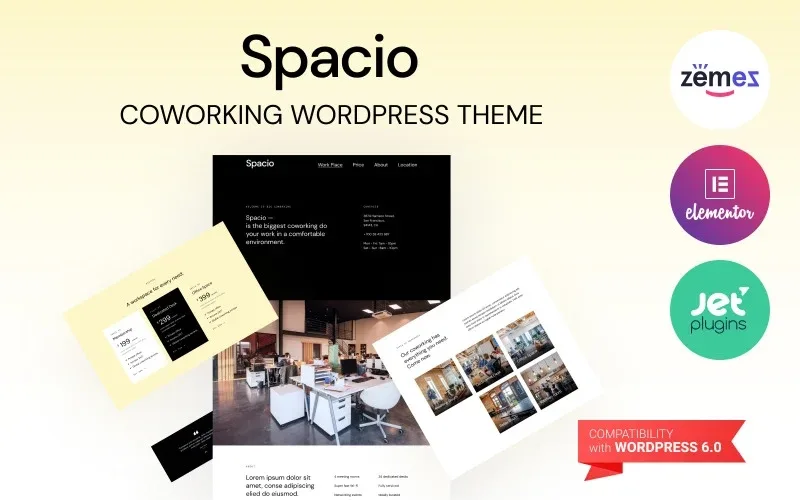
About Spacio – Coworking WordPress Theme to Unite Workers
People looking for a coworking decide on three answers, not on the slogan
Someone looking for a place to work does not read a corporate website: they want three quick answers. Where it is, until what time they can come in and which plan is meant for them. If they have to call to find out, many times they won't call. Spacio is designed so that a coworking space answers all of that on a single page.
In this business you rent a slot in someone else's day, and that person needs to picture themselves there before asking for a visit. That is why the theme focuses on workspace types, opening hours and plans rather than long company texts.
Spacio: one long page with an anchor menu and five workspace types
The demo is a single page with a menu that jumps to each block (Work, Place, Price, About and Location). This is what you will find in it:
- A front section with address, phone and opening hours, with different time slots for weekdays and weekends.
- An introduction block with highlights of the space: meeting rooms, Wi-Fi, networking events and dedicated desks.
- Three plan cards: access to the shared lounge without a fixed seat, a dedicated desk and a private office.
- A workspace types section: meeting room, dedicated desk, relax room, office and kitchen.
- A testimonial, the location block and a contact form with a type of service field, plus links to Instagram, Twitter and Facebook in the footer.
All the texts, figures, addresses and phone numbers in the demo are placeholders: you will have to replace them with those of your own space.
Three coworking buyers and what each one looks at in Spacio
The freelancer tired of working from home
They want a flexible membership and to know whether they can come in when it suits them. The access card without a fixed seat and the opening hours, clearly shown on the front section and in the location block, answer them without a call. A freelancer's testimonial reinforces that image.
The startup or small team
They want a place of their own for the team and rooms to meet clients. The private office card and the section with meeting rooms and offices help them see whether they fit. The networking point tells them they are not only renting square metres.
The person who runs the space
You need to change texts and plans without rebuilding the page. The type of service field in the form lets you know what each person is looking for before you reply.
Questions before setting up your coworking with Spacio
Is it useful for anything other than coworking? The design and the sample texts are made for coworking.
How many plans can I show? The demo shows three cards. If you need more, check in the demo whether adding a fourth means tweaking the design.
Can I set different hours for the weekend? Yes, the demo already separates Monday to Friday from Saturday and Sunday, both on the front section and in the location block.
Do my social networks appear? The footer includes links to Instagram, Twitter and Facebook.
The Buy now buttons and the form are only the front
The design shows purchase buttons on each plan and a contact form, but the demo does not show a room booking calendar, capacity control or a payment system. If you want people to book or pay on the site, you will have to add that with another tool and check where each button leads.
Nor is it a multi-page site with a blog or members area: it is a single-page presentation, built to turn visits into enquiries.
Topics
Version history
-
v
1.0.0 Current 15 Jun 2024
Customer reviews
Sign in to leave a review. Only people who have the product can review it.
No reviews for this product yet.
Frequently asked questions
-
GPL (General Public License) is the license under which WordPress and most premium plugins/themes are distributed. It grants you the right to use, modify and redistribute the software in as many projects as you want, with no domain restrictions.
-
Yes. With membership you get automatic updates via our GPLClub Updater plugin (installed on your WP, detects new versions and applies them). With individual purchase, you get one year of manual updates from your account.
-
Depends on the plan. Monthly: 3 domains. Semi-annual: 7. Annual and Lifetime: 15. Individual purchase: 1 domain.
-
GPLClub offers its own support for installation, configuration and compatibility. For direct support from the original author (feature requests, product-specific bugs), a license purchased from the author is required.