Storefront Pricing Tables
Antivirus scan
Powered by ClamAV
✅ Verified clean
This product file has passed our security filters.
Want to run a fresh ClamAV scan right now? Takes a few seconds and shows scanner version, signature DB and live result.
This can take 5 to 30 seconds.
Clean file Threat detected
No threats detected in this file.
- File
- Size
- Scanned
- ClamAV
- Signature database
⚡ Powered by ClamAV
Scan could not be completed
Report product
If you detected an issue (broken file, malware, inappropriate content, etc.) let us know and we'll review it ASAP.
Sign in to report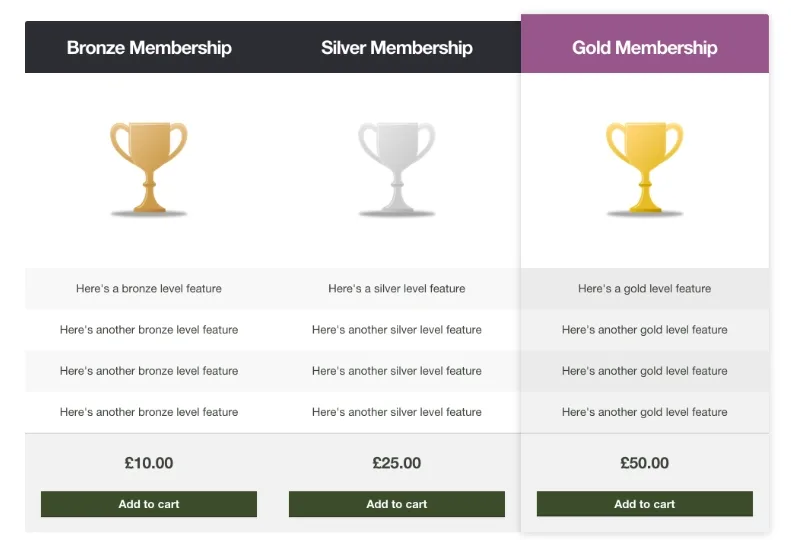
About Storefront Pricing Tables
When visitors can't tell which of your products suits them
You have three plans or three variants of one product, a page of paragraphs explaining the differences and a visitor who reads half of it, gets lost and leaves to think it over. A pricing table solves exactly that: it puts the same rows side by side and lets the eye compare.
Storefront Pricing Tables inserts those tables into any post or page, with the features of each product and a way to add the chosen one to the cart. The column you highlight draws attention to one option, so choose it with care and not out of habit.
Storefront Pricing Tables depending on what you sell
Plans or subscriptions
The classic case: one column per tier, with what each one includes. Highlight the one you most want to sell and leave the others as contrast.
A complex product with several versions
If the buyer hesitates between configurations, the table shows what changes from one to the next without making them open three separate product pages.
A small offer you want to put in order
With two or three products, one well-built table on your sales page is enough. Each column can carry different content, it doesn't have to repeat the same rows.
From the shortcode generator button to the Customizer
- Shortcode generator: a button in the post and page editor to insert the table and customize its layout and content, with any number of columns.
- Highlighted column: it is optional, and you mark it only on the columns you want to stand out.
- Customizer: there you choose heading and background colors so the table fits your brand, and you see the changes live.
- Add to cart: the table gives the visitor a way to put the product they chose into the cart.
Questions before building your first table
How many columns can I add?
As many as you need, the table accepts any number. Whether it is a good idea is another matter: past three or four, visitors stop comparing and just get tired.
Can I change the colors?
Yes, in the WordPress Customizer, with a live preview.
Does it work without WooCommerce?
It is an extension for WooCommerce and the add to cart depends on the store, so it is not a standalone table tool.
Will it look good on mobile?
Try it in the demo from your phone before deciding, especially if your table has many rows.
Built for a few columns, not for comparing a whole catalog
A pricing table works when there is a small number of products. If your store has dozens of items to compare, you need filters or well-organized product pages, not a table. And what the Customizer adjusts is the appearance, mainly heading and background colors: don't expect a table designer with full control over every detail.
Topics
Version history
-
v
1.1.1 Current 9 Sep 2026
-
v
1.1.0 28 May 2024
Customer reviews
Sign in to leave a review. Only people who have the product can review it.
No reviews for this product yet.
Frequently asked questions
-
GPL (General Public License) is the license under which WordPress and most premium plugins/themes are distributed. It grants you the right to use, modify and redistribute the software in as many projects as you want, with no domain restrictions.
-
Yes. With membership you get automatic updates via our GPLClub Updater plugin (installed on your WP, detects new versions and applies them). With individual purchase, you get one year of manual updates from your account.
-
Depends on the plan. Monthly: 3 domains. Semi-annual: 7. Annual and Lifetime: 15. Individual purchase: 1 domain.
-
GPLClub offers its own support for installation, configuration and compatibility. For direct support from the original author (feature requests, product-specific bugs), a license purchased from the author is required.