Super Interactive Maps for WordPress
Antivirus scan
Powered by ClamAV
✅ Verified clean
This product file has passed our security filters.
Want to run a fresh ClamAV scan right now? Takes a few seconds and shows scanner version, signature DB and live result.
This can take 5 to 30 seconds.
Clean file Threat detected
No threats detected in this file.
- File
- Size
- Scanned
- ClamAV
- Signature database
⚡ Powered by ClamAV
Scan could not be completed
Report product
If you detected an issue (broken file, malware, inappropriate content, etc.) let us know and we'll review it ASAP.
Sign in to report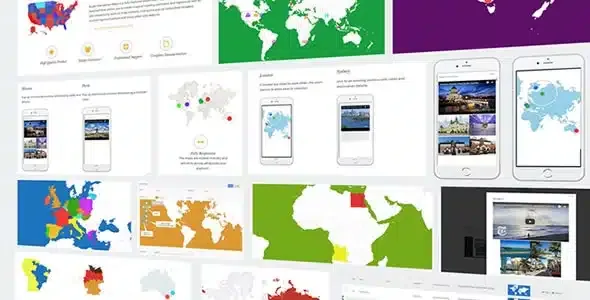
About Super Interactive Maps for WordPress
A map of countries does not answer «where can I find you?»
Putting a map of your offices, the destinations of a travel blog or the data of an infographic on your site often ends up as a static image nobody can explore, or an embedded map that does not fit your design. Super Interactive Maps generates vector maps (SVG) that look sharp on any screen and that visitors can zoom, drag and click.
It helps to be clear on one distinction before you start: coloring a country says «we operate here», while a marker says «come to this address». They are two different jobs, and many people build the first when their visitor needed the second. The plugin supports both, plus text labels, so you can decide based on what the person is looking for.
Super Interactive Maps ships with over 500 maps and three ways to display them
The catalog includes the world map, continents and subcontinents, all 195 countries and many of them divided into regions (the United States, for example, by states, regions or city areas). On any of those maps you choose how to represent the information:
- Regions: colored areas, useful for showing coverage, countries visited or data by territory.
- Markers: points with Font Awesome icons for hotels, cafes, airports, branches or any specific place.
- Text labels: names written directly on the map.
The look adapts to your brand: background color, border and hover border, color of regions, markers and labels, marker size, map width and height, and zoom and pan levels.
Windows with text, images and video, and a shortcode to place them anywhere
This is what separates a decorative map from one that informs. Each region or marker can show a tooltip with quick information, open a popup window (lightbox) with text, images and videos, or link to a URL. That window adapts to mobile, and the whole map is responsive.
In the admin you search for locations with Google-powered autocomplete and place the marker by dragging it to the exact spot. When the map is ready, you publish it with a shortcode in posts, pages or sidebar widgets.
Is showing locations enough, or do you need a store locator?
This plugin draws maps and points that you define one by one. It is not a locator where the visitor types their city and gets the nearest store: that takes a different tool, and the plugin can be integrated with Super Store Finder. It also relies on Google services: it is built on their Geochart API and the admin uses Google Maps to search for and fix locations.
Can I link each region to a page on my site?
Yes. You can add links to URLs, tooltips or popup windows to the map elements.
Does it work well on mobile?
The map is responsive and the popup with text, images and videos is designed for mobile. Even so, test in the demo how your map looks with many markers on a small screen.
Can I use it to show my company's branches?
Yes, with markers placed at their exact location and a window with each branch's details. If you have dozens of points and want visitors to search by proximity, consider a store locator.
Version history
-
v
2.4 Current 23 Sep 2025
Customer reviews
Sign in to leave a review. Only people who have the product can review it.
No reviews for this product yet.
Frequently asked questions
-
GPL (General Public License) is the license under which WordPress and most premium plugins/themes are distributed. It grants you the right to use, modify and redistribute the software in as many projects as you want, with no domain restrictions.
-
Yes. With membership you get automatic updates via our GPLClub Updater plugin (installed on your WP, detects new versions and applies them). With individual purchase, you get one year of manual updates from your account.
-
Depends on the plan. Monthly: 3 domains. Semi-annual: 7. Annual and Lifetime: 15. Individual purchase: 1 domain.
-
GPLClub offers its own support for installation, configuration and compatibility. For direct support from the original author (feature requests, product-specific bugs), a license purchased from the author is required.