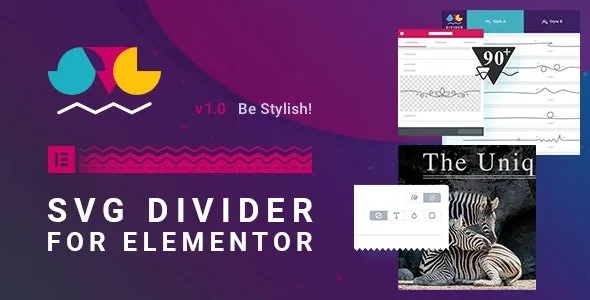
SVG Divider for Elementor
Antivirus scan
Powered by ClamAV
✅ Verified clean
This product file has passed our security filters.
Want to run a fresh ClamAV scan right now? Takes a few seconds and shows scanner version, signature DB and live result.
This can take 5 to 30 seconds.
Clean file Threat detected
No threats detected in this file.
- File
- Size
- Scanned
- ClamAV
- Signature database
⚡ Powered by ClamAV
Scan could not be completed
Report product
If you detected an issue (broken file, malware, inappropriate content, etc.) let us know and we'll review it ASAP.
Sign in to reportNewer version out, or a problem?
About SVG Divider for Elementor
Eye-catching SVG dividers to split headings and sections
A divider with unique motifs marks where a new heading starts and divides the sections of the page. And since it is an Elementor widget, you place it from the editor.
It comes in two families of dividers: simple lines (single, double or dashed) and artworks with hand-drawn motifs, from plain strokes to more ornate shapes.
What you configure in SVG Divider for Elementor: style, layers and animation
Each drawn artwork has two separately configurable layers: the primary one and an optional glitter layer. You can adjust the thickness, size and color of the lines, flip the figure on any axis or crop only its middle part.
- Drawn style: 90 hand-made designs, chosen from a pop-up selector.
- Classic style: single, double or dashed line, with control over the dash stroke and the gap between double lines. It does not use CSS borders.
- Icons: a set of over 300 Let's Go icons that you can place inside a button.
- Animations: custom reveal of the lines, a trail that loops endlessly or a twinkling glitter, with adjustable timing.
The divider is a widget in the General section of Elementor. Its colors, typography, alignment and height adjust with the same responsive options as the rest of the elements, and since it is vector artwork, it scales without losing quality.
If your site already uses Elementor, the divider fits its colors and options
It is an add-on for Elementor: it needs Elementor installed and active, and there is no standalone version. It uses Elementor's shared advanced settings and global colors.
If you already work with Elementor's native elements (icons, buttons and text), you can place an icon inside a button.
Frequently asked questions about SVG Divider for Elementor
Do the dividers follow my site's colors?
Yes, the divider uses Elementor's global colors.
Can I scale a divider without losing quality?
Yes. They are vector graphics, so they scale without loss, and you can also flip them on any axis.
What is the glitter layer for?
It is an optional effect that adds a twinkle over the artwork. You can use each divider with the primary layer alone.
Do the templates and photos from the previews come with it?
No. The Elementor layouts and the photos from the previews are not included in the downloaded ZIP. The only demo designs are the SVG artworks bundled with the plugin.
Topics
Version history
-
v
1.0.0 Current 17 May 2024
Customer reviews
Sign in to leave a review. Only people who have the product can review it.
No reviews for this product yet.
Frequently asked questions
-
GPL (General Public License) is the license under which WordPress and most premium plugins/themes are distributed. It grants you the right to use, modify and redistribute the software in as many projects as you want, with no domain restrictions.
-
Yes. With membership you get automatic updates via our GPLClub Updater plugin (installed on your WP, detects new versions and applies them). With individual purchase, you get one year of manual updates from your account.
-
Depends on the plan. Monthly: 3 domains. Semi-annual: 7. Annual and Lifetime: 15. Individual purchase: 1 domain.
-
GPLClub offers its own support for installation, configuration and compatibility. For direct support from the original author (feature requests, product-specific bugs), a license purchased from the author is required.