Team Grid – Team Member Showcase WordPress Plugin & Team Editor
Antivirus scan
Powered by ClamAV
✅ Verified clean
This product file has passed our security filters.
Want to run a fresh ClamAV scan right now? Takes a few seconds and shows scanner version, signature DB and live result.
This can take 5 to 30 seconds.
Clean file Threat detected
No threats detected in this file.
- File
- Size
- Scanned
- ClamAV
- Signature database
⚡ Powered by ClamAV
Scan could not be completed
Report product
If you detected an issue (broken file, malware, inappropriate content, etc.) let us know and we'll review it ASAP.
Sign in to report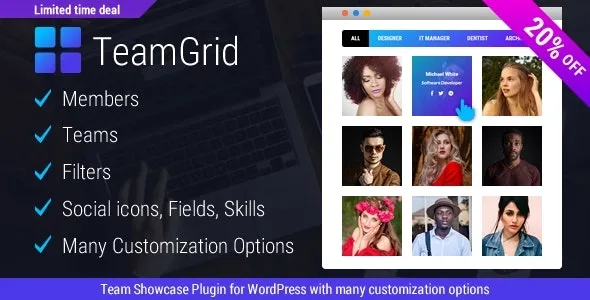
About Team Grid – Team Member Showcase WordPress Plugin & Team Editor
The team page that is always out of date
Someone who left the company is still on the site six months later, the new hire has no photo, and nobody remembers who last touched the page. In businesses where people are the service (studios, clinics, law firms, academies), the team page is one of the most visited and one of the least owned.
What Team Grid does not solve is who keeps it up to date: assign someone responsible from day one.
Team Grid: members, teams and 17 grid layouts
The plugin lets you create unlimited members and teams. For each member you can add:
- Social icons, such as Facebook, Twitter or Linkedin.
- Additional fields, such as email, phone or address.
- Skills, with time and percentage. You can hide the % symbol or leave a skill at 0%.
- Photo size: square, vertical or horizontal.
For presentation there are 17 team layouts with more than 100 predefined styles, filters with more than 20 styles, mobile adaptation and a live preview in the admin area while you adjust.
It helps to be clear about its limits. It is a team showcase, not a user system: it does not create private areas or accounts for members, even though it appears in the memberships category. Skills are measured only with time and percentage. And you prepare the photos yourself: if you mix studio portraits with phone snapshots, no layout will hide it.
Questions from people about to build their team page
Can I have several teams on the same site? Yes, teams are unlimited.
Can I choose which filters are shown? Yes. You can show only specific filters, sort them or hide them all.
Can each person have their own page? Yes, the profile can open on the member's own link, among other ways.
Can I stop Google from indexing individual member pages? There is an option to prevent Google from indexing member pages.
Does it look good on mobile? The plugin is fully responsive, but check the layout you choose on your own phone, especially if you have many members.
Popup, side panel or own page for each profile
Visitors do not always want to leave the page to read about someone. Team Grid offers five ways to open a profile: popup, expanded on the same page, a panel sliding in from the left, a panel sliding in from the right, or the member's own link.
Member images carry an alt attribute.
If you publish your employees' email, phone or address, make sure each person agrees to have them shown.
Complete the members first, then pick the layout with the preview
With 17 layouts and more than 100 styles, it is easy to lose an afternoon trying combinations. Save time: load all members first, with photos in the same format, job titles and only the fields you will really show. With real data, the admin preview quickly tells you which layout copes with long names or profiles with little information.
Then decide the image format (square, vertical or horizontal), the profile viewer and whether you want filters. If the team is small, you probably will not need them.
Topics
Version history
-
v
1.3.5 Current 10 Sep 2025
Customer reviews
Sign in to leave a review. Only people who have the product can review it.
No reviews for this product yet.
Frequently asked questions
-
GPL (General Public License) is the license under which WordPress and most premium plugins/themes are distributed. It grants you the right to use, modify and redistribute the software in as many projects as you want, with no domain restrictions.
-
Yes. With membership you get automatic updates via our GPLClub Updater plugin (installed on your WP, detects new versions and applies them). With individual purchase, you get one year of manual updates from your account.
-
Depends on the plan. Monthly: 3 domains. Semi-annual: 7. Annual and Lifetime: 15. Individual purchase: 1 domain.
-
GPLClub offers its own support for installation, configuration and compatibility. For direct support from the original author (feature requests, product-specific bugs), a license purchased from the author is required.