Telegram Chat Support Pro WordPress
Antivirus scan
Powered by ClamAV
✅ Verified clean
This product file has passed our security filters.
Want to run a fresh ClamAV scan right now? Takes a few seconds and shows scanner version, signature DB and live result.
This can take 5 to 30 seconds.
Clean file Threat detected
No threats detected in this file.
- File
- Size
- Scanned
- ClamAV
- Signature database
⚡ Powered by ClamAV
Scan could not be completed
Report product
If you detected an issue (broken file, malware, inappropriate content, etc.) let us know and we'll review it ASAP.
Sign in to report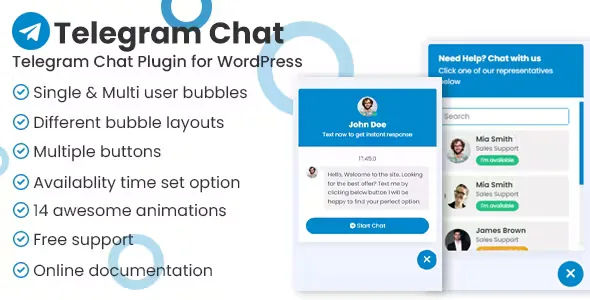
About Telegram Chat Support Pro WordPress
When your customers already live on Telegram and your website asks for a form
Many businesses get better replies through messaging than email, but the website forces visitors to fill in a form, wait for an email and then go back to look for the answer. Telegram Chat Support Pro places a floating button on your site that opens a Telegram conversation with your account or your team's, without the visitor having to sign up for a separate chat.
It helps to understand what it is: a bridge to Telegram, not a support system with an inbox. The conversation happens in the Telegram app, not inside your WordPress dashboard. That is an advantage if you already answer from your phone, and a limit if you need a centralized history or ticket assignment.
One agent or several: how support is shared on Telegram
You have two ways of working:
- Single support: one bubble tied to a single Telegram account, which receives every message.
- Multiple agents: you can add as many Telegram accounts as you want, and the visitor chooses who to talk to.
Keep in mind that the visitor makes the choice: there is no automatic assignment or round-robin distribution.
Schedules, timezone and offline notice
You can set an availability window for one agent, for several, or for each button. Outside that schedule, the plugin shows that you are offline, so nobody expects an instant reply on a Sunday night.
There is a detail that is easy to miss: if you do not set your timezone in the settings, the schedule is calculated from the visitor's computer clock. For a business serving customers in other countries, setting it should be the first thing you do, otherwise your office hours shift depending on who visits the page.
Floating bubble, buttons and per-device display
Besides the floating bubble, with several animations to catch attention, the plugin includes a set of call-to-action buttons that you can place anywhere on the site, each with its own settings. There is also a buttons block for the Gutenberg editor.
You can show the widget only on desktop, only on mobile or only on tablet. That is useful because Telegram usually opens better from a phone, and you may prefer not to show the bubble on desktop if your customers do not use the app on that device. You can adapt the widget's appearance to your brand.
Conversations are not stored in WordPress
This is what the plugin solves and what you will have to cover another way:
- It solves: chat button, multiple agents, schedules, timezone, offline notice, animations and visibility by device.
- You cover: saving or exporting chat histories, assigning conversations between agents, measuring response times.
- You cover: each agent needs their own Telegram account, and the visitor must also be able to use Telegram (app or web).
- You cover: a chatbot that replies on its own. Automatic welcome messages are part of the plugin, but check in the demo how they are displayed before relying on them.
If you are looking for live chat inside the website itself, with an agent panel, this is not that kind of tool.
Frequently asked questions about Telegram Chat Support Pro
Do my customers need to have Telegram?
Yes. The button takes them to a conversation on Telegram, so they need the app or access to its web version.
Can I add more than one agent?
Yes, with no limit on agents. The visitor chooses which agent to write to.
Can I show it only on mobile?
Yes, the plugin lets you limit it to desktop, mobile or tablet.
Do I need to know how to code?
Not for the usual setup. Deeper customization involves editing JavaScript, CSS and HTML code.
Does it work with the block editor?
Yes, it includes a buttons block for Gutenberg.
Topics
Version history
-
v
1.0.2 Current 17 Jan 2025
Customer reviews
Sign in to leave a review. Only people who have the product can review it.
No reviews for this product yet.
Frequently asked questions
-
GPL (General Public License) is the license under which WordPress and most premium plugins/themes are distributed. It grants you the right to use, modify and redistribute the software in as many projects as you want, with no domain restrictions.
-
Yes. With membership you get automatic updates via our GPLClub Updater plugin (installed on your WP, detects new versions and applies them). With individual purchase, you get one year of manual updates from your account.
-
Depends on the plan. Monthly: 3 domains. Semi-annual: 7. Annual and Lifetime: 15. Individual purchase: 1 domain.
-
GPLClub offers its own support for installation, configuration and compatibility. For direct support from the original author (feature requests, product-specific bugs), a license purchased from the author is required.