TF Header Footer Addon For Elementor
Antivirus scan
Powered by ClamAV
✅ Verified clean
This product file has passed our security filters.
Want to run a fresh ClamAV scan right now? Takes a few seconds and shows scanner version, signature DB and live result.
This can take 5 to 30 seconds.
Clean file Threat detected
No threats detected in this file.
- File
- Size
- Scanned
- ClamAV
- Signature database
⚡ Powered by ClamAV
Scan could not be completed
Report product
If you detected an issue (broken file, malware, inappropriate content, etc.) let us know and we'll review it ASAP.
Sign in to reportNewer version out, or a problem?
About TF Header Footer Addon For Elementor
Headers designed to the pixel in TF Header Footer Addon For Elementor
On a site with several pages, the header is the part people see most and the part that gets redone most often: the monthly campaign changes, the menu changes, and the notice bar is left with a date that has already passed. If every change means touching the theme, the work drags on and ends up in the hands of whoever has the least time. TF Header Footer Addon For Elementor brings the header, the menu, the mobile menu and the footer together into templates designed with Elementor.
Four situations in which the header changes
One single identity for the whole site
If you want the same header and footer on every page, you design the template once and it displays across the whole site. For a top bar, a single topbar is enough, and it appears across the entire website.
A campaign with a page that needs a different header
When a landing page or a specific page needs a different header, you convert it to the Canvas template and design its own header and footer. The general header keeps displaying on the rest of the pages of your site.
A designer who needs precision
Each element is adjusted separately: typography, padding, margin, line height and background of the menu, and the same for the dropdown. It is built for designs that have to match the mockup pixel for pixel.
A site that lives mostly on mobile
The mobile menu button lets you change its icon, colors, padding, icon size and hover effect. The panel can carry your logo, a custom background with an overlay, and adjustable left padding and border.
Desktop menu and mobile menu, designed separately
The menu widget lets you choose the menu, its alignment and turn on single-page navigation, and adjust its typography, padding, margin and background, just like the dropdown. On mobile, the button and the panel have their own settings, so both menus are designed separately. There is also a search widget and a dropdown menu widget.
Needs Elementor installed and active
It is an addon for Elementor, so the page builder has to be installed and active to create and edit the header and footer templates. Once it is available, it works with any theme, so you do not need to change your site's theme to use it.
Frequently asked questions about TF Header Footer Addon For Elementor
Can I have a different header on each page?
Yes. For pages that need a different header, you convert them to the Canvas template and design their own header and footer. The others keep the general header.
What is the difference between the top bar and the header?
The top bar, or topbar, is built once and appears across the whole site. The header includes the menu and the logo, and it can be set as a general template or for a specific page.
Does it come with ready-made designs?
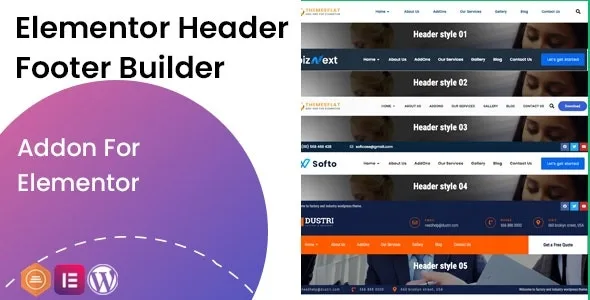
It includes eight header styles in the live demo and a package of JSON files. When you import them into the Elementor page template, you get a header and footer like the demo, which you can then adjust.
Does it work with any theme?
Yes. The only requirement is Elementor being active, and the theme can be any theme.
Does mobile have its own menu?
Yes. The mobile menu button, its icon, the panel and the background are designed separately from the desktop menu, and the panel accepts your logo.
Eight header styles to start from a real design
The live demo shows eight header styles, and the package includes the JSON files to load them into Elementor. It is a useful starting point: you choose the style closest to what you want and adjust its typography, colors and spacing.
Version history
-
v
1.0.3 Current 17 May 2024
Customer reviews
Sign in to leave a review. Only people who have the product can review it.
No reviews for this product yet.
Frequently asked questions
-
GPL (General Public License) is the license under which WordPress and most premium plugins/themes are distributed. It grants you the right to use, modify and redistribute the software in as many projects as you want, with no domain restrictions.
-
Yes. With membership you get automatic updates via our GPLClub Updater plugin (installed on your WP, detects new versions and applies them). With individual purchase, you get one year of manual updates from your account.
-
Depends on the plan. Monthly: 3 domains. Semi-annual: 7. Annual and Lifetime: 15. Individual purchase: 1 domain.
-
GPLClub offers its own support for installation, configuration and compatibility. For direct support from the original author (feature requests, product-specific bugs), a license purchased from the author is required.