The7 — Ultimate Website & Online Store Builder for WordPress and WooCommerce
Antivirus scan
Powered by ClamAV
✅ Verified clean
This product file has passed our security filters.
Want to run a fresh ClamAV scan right now? Takes a few seconds and shows scanner version, signature DB and live result.
This can take 5 to 30 seconds.
Clean file Threat detected
No threats detected in this file.
- File
- Size
- Scanned
- ClamAV
- Signature database
⚡ Powered by ClamAV
Scan could not be completed
Report product
If you detected an issue (broken file, malware, inappropriate content, etc.) let us know and we'll review it ASAP.
Sign in to report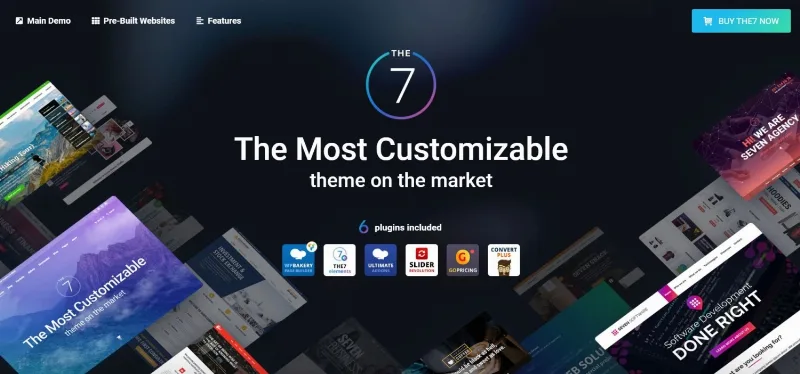
About The7 — Ultimate Website & Online Store Builder for WordPress and WooCommerce
A multipurpose theme for people who already have a site to maintain
Choosing a multipurpose theme usually ends in one of two problems: paying for hundreds of options you will never touch, or finding out too late that the theme falls behind when WordPress, WooCommerce or your page builder gets updated. With The7 Classic it helps to be clear from the start: it is the legacy version of the theme, the one sold on ThemeForest, not the current generation of the product.
The uncomfortable truth for anyone building stores and business websites with a theme like this is that the work does not end at launch: the maintenance afterwards is what costs. That is why what matters about The7 is not only what it lets you design, but where it stands in its life cycle.
Elementor, WPBakery or Custom mode: you decide how to edit
The7 Classic supports building pages with Elementor, with WPBakery or with Custom mode. That is useful if you inherit a site built with one of them and do not want to redo it, or if your team already masters one of the tools.
- Its own Elementor widgets: includes elements designed for WooCommerce, such as a mini cart, an add to cart button and a masonry product grid.
- Its own shortcodes: such as the banner and simple login form ones, for use on pages built with WPBakery.
- Library of pre-made websites: demo sites you import to start from a ready-made structure instead of a blank page.
- Theme Options: a theme settings panel that is preserved when updating between versions of the series.
What you cannot expect from The7 Classic
It is a legacy version: it is no longer tested against new major versions of WordPress, PHP, Elementor, WPBakery or WooCommerce. It keeps working and receives security and essential maintenance patches, but if you update something major, do it first in a staging environment. It is also not a block theme: the available editing modes are Elementor, WPBakery and Custom, and the modular block architecture belongs to the new generation, The7 15.
Frequently asked questions about The7 Classic
Can I use it to build an online store?
Yes, it is designed for WordPress and WooCommerce, and it includes Elementor widgets specific to stores. You need WooCommerce installed to sell: the theme provides the design, not the store engine.
Do I need Elementor or WPBakery?
Not necessarily: Custom mode exists. If you want to use the Elementor widgets, you do need Elementor.
Can I move to The7 15 later?
Migration from the classic version is one click and does not require rebuilding the website. Existing child themes remain compatible.
Is it translated into Spanish?
Its language files have included es_ES among the updated ones, but check in the demo that the texts on your website appear the way you expect.
Recent security patches: what they say about maintenance
The latest versions in the series fix vulnerabilities in Elementor widgets, shortcodes and the content import system. It is a good sign that the code is still being reviewed, but also a reminder: a theme with many widgets and shortcodes has more surface to check. If you do not manage the site daily, make sure someone applies the updates.
Demo pages are imported with an environment that can handle it
Importing a pre-made website downloads content and bundled plugins, and that process can exhaust PHP execution time on modest hosting. The theme itself includes a system status screen that shows the required PHP modules and warns about the maximum execution time. Check it before importing.
- Import first on a test site and check how your real content looks.
- Choose the editing mode (Elementor, WPBakery or Custom) before importing, because the demo depends on it.
- If you use an existing website, keep a backup at hand: importing a demo can replace content.
Topics
Version history
-
v
15.0.7 Current 17 Oct 2026
-
v
15.0.6 9 Sep 2026
-
v
15.0.5 21 Aug 2026
-
v
14.3.2 1 May 2026
Customer reviews
Sign in to leave a review. Only people who have the product can review it.
No reviews for this product yet.
Frequently asked questions
-
GPL (General Public License) is the license under which WordPress and most premium plugins/themes are distributed. It grants you the right to use, modify and redistribute the software in as many projects as you want, with no domain restrictions.
-
Yes. With membership you get automatic updates via our GPLClub Updater plugin (installed on your WP, detects new versions and applies them). With individual purchase, you get one year of manual updates from your account.
-
Depends on the plan. Monthly: 3 domains. Semi-annual: 7. Annual and Lifetime: 15. Individual purchase: 1 domain.
-
GPLClub offers its own support for installation, configuration and compatibility. For direct support from the original author (feature requests, product-specific bugs), a license purchased from the author is required.
Related products
Globaly – Business Multipurpose Modern WordPress Elementor Theme WordPress Theme
Deef – App Landing WordPress Theme

Horsieside – Equestrian Center Responsive WordPress Theme