User Registration Customize My Account Addon
Antivirus scan
Powered by ClamAV
✅ Verified clean
This product file has passed our security filters.
Want to run a fresh ClamAV scan right now? Takes a few seconds and shows scanner version, signature DB and live result.
This can take 5 to 30 seconds.
Clean file Threat detected
No threats detected in this file.
- File
- Size
- Scanned
- ClamAV
- Signature database
⚡ Powered by ClamAV
Scan could not be completed
Report product
If you detected an issue (broken file, malware, inappropriate content, etc.) let us know and we'll review it ASAP.
Sign in to report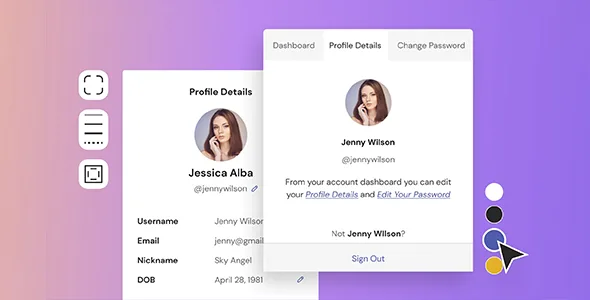
About User Registration Customize My Account Addon
The page your members see most is the one you care for least
A member signs up or pays and, from then on, lives on their account page: checking their subscription, changing their password and looking for what they have bought. It is often the most neglected part of the site, with the default menu and a design that looks nothing like the rest of the website. User Registration Customize My Account Addon turns that page into a dashboard of your own, with your tabs, your order and your colors.
It is an add-on for User Registration & Membership: it works on its My Account page, which comes with four default tabs.
Unlimited tabs, with their own endpoint or as a simple link
You can add as many tabs as you want. It helps to tell two types apart:
- Tab (endpoint): it has its own URL and its own content area, for example private notes for the member.
- Link: it points to another WordPress page or an external URL, without creating new content inside the account.
Choosing well saves you from building an empty tab when all you needed was a shortcut to your help page.
Slug, icon, content and who can see it
Each tab, whether default or custom, is adjusted separately:
- Edit the slug, label, icon and URL.
- Restrict it to specific user roles or leave it open to everyone.
- Replace the endpoint's default content with your own.
- Use smart tags to pull dynamic content into the tab.
Role restriction is handy if you have different profiles, for example students and collaborators, and you don't want everyone to see the same menu.
User Registration Customize My Account Addon sorts and styles without touching code
All tabs are managed from a single screen, with no reload: you reorder them by dragging, temporarily hide or disable the ones you don't need, and delete your own with one click.
The design customizer covers background color, border width and content padding, several navigation styles for the menu with their hover state, and the color, margin and padding of the buttons. You see the changes in a real-time preview, so you don't need to write CSS to make the account match the rest of the site.
It needs User Registration & Membership and does not change the WooCommerce account
Before deciding, separate what it solves from what you will have to cover yourself:
- It solves: new tabs, ordering, icons, role-based access, your own content and styling of the My Account page.
- You cover: having User Registration & Membership installed, because the add-on does not work on its own.
- You cover: writing or preparing the content of each new tab.
- You cover: WooCommerce's own My Account page is not modified. The add-on customizes the User Registration & Membership one, to which you can add WooCommerce's default tabs and fields.
Frequently asked questions
What is an endpoint?
It is a tab of the My Account page, such as the dashboard or the password change. Each one has its own URL segment, which is why you can edit its slug, label, icon and content separately.
Do I need it if I already have a My Account page?
The page already exists with User Registration & Membership. This add-on adds unlimited tabs, role-based access control, content overrides and styling.
Does it work with WooCommerce's My Account page?
It does not customize it: it works on the User Registration & Membership one, although you can bring WooCommerce's default tabs and fields into it.
Can I remove the four default tabs?
One-click deletion is for your own tabs. The default ones can be hidden or disabled if you don't need them.
Topics
Version history
-
v
1.2.18 Current 14 Oct 2026
-
v
1.2.17 27 Jul 2026
-
v
1.2.15 31 Mar 2026
Customer reviews
Sign in to leave a review. Only people who have the product can review it.
No reviews for this product yet.
Frequently asked questions
-
GPL (General Public License) is the license under which WordPress and most premium plugins/themes are distributed. It grants you the right to use, modify and redistribute the software in as many projects as you want, with no domain restrictions.
-
Yes. With membership you get automatic updates via our GPLClub Updater plugin (installed on your WP, detects new versions and applies them). With individual purchase, you get one year of manual updates from your account.
-
Depends on the plan. Monthly: 3 domains. Semi-annual: 7. Annual and Lifetime: 15. Individual purchase: 1 domain.
-
GPLClub offers its own support for installation, configuration and compatibility. For direct support from the original author (feature requests, product-specific bugs), a license purchased from the author is required.