Vango – Elementor WooCommerce WordPress Theme
Antivirus scan
Powered by ClamAV
✅ Verified clean
This product file has passed our security filters.
Want to run a fresh ClamAV scan right now? Takes a few seconds and shows scanner version, signature DB and live result.
This can take 5 to 30 seconds.
Clean file Threat detected
No threats detected in this file.
- File
- Size
- Scanned
- ClamAV
- Signature database
⚡ Powered by ClamAV
Scan could not be completed
Report product
If you detected an issue (broken file, malware, inappropriate content, etc.) let us know and we'll review it ASAP.
Sign in to report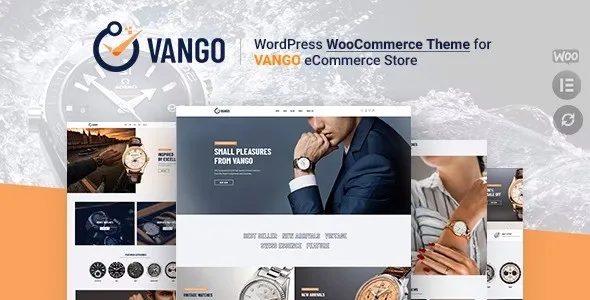
About Vango – Elementor WooCommerce WordPress Theme
Comparing two watches only works if both have the same data
Someone torn between two watches wants to see them side by side, and a shop with a compare button seems to solve that. The problem shows up later: if you entered the material for one and not the other, the table shows a gap right where the customer expected an answer. The button is there and the decision is still not made.
Vango is a WooCommerce theme with Elementor, designed for watch stores, and product comparison is among its features. But that comparison is only worth as much as your attributes. That is why the first thing to prepare here is each model's technical sheet, ahead of the home page.
What Vango brings to a watch store
- Home pages: five styles or more, with sliders made with Revolution Slider.
- Catalog: more than ten shop layouts and more than ten product page layouts, with grid or list view.
- Choosing a model: compare, quick view, wishlist and color swatches for attributes.
- Buying: AJAX add to cart and a buy now button on the product page.
- Finding: live search with autocomplete.
- Header and footer: more than four layouts of each, created with their own builder, plus a mega menu and multi-level dropdown menu.
- Content: four blog styles, in grid or list form.
- Translation: .pot file or WPML.
The overall look is controlled in Theme Options, with sections for header, footer, blog, shop, 404 page and style. Header and footer are set for the whole site, and each page can change them in its own settings. Mega menus are built with Elementor and assigned to a menu item.
How to prepare the catalog so the comparison answers
Among the theme's recommended plugins is YITH WooCommerce Compare. It places the chosen products in a table, and what it shows for each one is defined with WooCommerce attributes in the product configuration. That is where the work comes from:
- Decide the attribute list before uploading products. Choose the ones your customer really looks at when torn between two models.
- Fill them in on every product. An attribute present on half the catalog leaves half the table empty.
- Use the same values. If one product says steel and another says stainless, the table does not present them as equal.
- Choose and sort the fields. The plugin lets you decide which fields appear and in what order, so keep the weightiest ones at the top.
Warranties and engraving stay outside the theme
Its features do not include warranty registration, custom engraving or booking a watch to see in store. If your business needs them, you will have to solve them with other plugins.
Several features also rely on separate plugins: thirteen are recommended, among them WooCommerce, Elementor, Revolution Slider, YITH WooCommerce Wishlist and YITH WooCommerce Compare.
Installing Vango with its plugins and sample data
At least 64 MB of PHP memory and a 20 MB upload limit are recommended. That limit depends on your host, so check it before importing. Then follow this order:
- Upload vango_theme.zip from Appearance, Themes, Add New, and activate it. If a stylesheet error appears, you have probably uploaded another file from the package.
- Accept the prompt shown on activation, then select and install the recommended plugins.
- In Appearance, Import Demo Data, click Download Demos and then the import button.
- Define your attributes and load a couple of real models.
- Compare those models in the shop and review which fields are missing before loading the rest.
Alukas and Reprizo, for display cases that also hold jewelry
When jewelry weighs more than watches, Alukas also uses WooCommerce and Elementor, and adds pieces inside the product page such as estimated delivery time, a size guide and a form for asking questions. Reprizo is another option in the catalog for jewelry and watches.
Questions about Vango and your watch store
Do I need Elementor?
It is the builder used to edit pages and create mega menus, and it is one of the recommended plugins.
Can I change the header on just one page?
Yes. Theme Options sets the global layout and each page can change it in its settings.
Does it work for a multilingual shop?
It supports translation with a .pot file or with WPML.
Can I change fonts without touching code?
Yes. System and Google fonts, like colors and backgrounds, are adjusted from the theme options.
Do I need a child theme?
Only if you are going to customize the code.
Topics
Version history
-
v
1.4.9 Current 26 Oct 2026
-
v
1.4.8 16 Sep 2026
-
v
1.0.1 15 Jun 2024
Customer reviews
Sign in to leave a review. Only people who have the product can review it.
No reviews for this product yet.
Frequently asked questions
-
GPL (General Public License) is the license under which WordPress and most premium plugins/themes are distributed. It grants you the right to use, modify and redistribute the software in as many projects as you want, with no domain restrictions.
-
Yes. With membership you get automatic updates via our GPLClub Updater plugin (installed on your WP, detects new versions and applies them). With individual purchase, you get one year of manual updates from your account.
-
Depends on the plan. Monthly: 3 domains. Semi-annual: 7. Annual and Lifetime: 15. Individual purchase: 1 domain.
-
GPLClub offers its own support for installation, configuration and compatibility. For direct support from the original author (feature requests, product-specific bugs), a license purchased from the author is required.