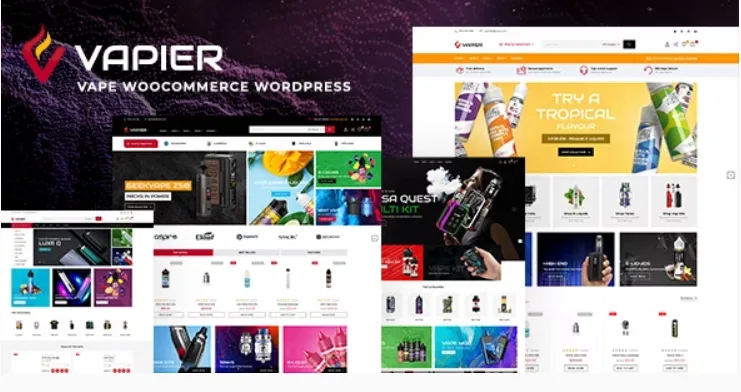
Vapier – Vape Store WooCommerce WordPress Theme
Antivirus scan
Powered by ClamAV
✅ Verified clean
This product file has passed our security filters.
Want to run a fresh ClamAV scan right now? Takes a few seconds and shows scanner version, signature DB and live result.
This can take 5 to 30 seconds.
Clean file Threat detected
No threats detected in this file.
- File
- Size
- Scanned
- ClamAV
- Signature database
⚡ Powered by ClamAV
Scan could not be completed
Report product
If you detected an issue (broken file, malware, inappropriate content, etc.) let us know and we'll review it ASAP.
Sign in to reportNewer version out, or a problem?
About Vapier – Vape Store WooCommerce WordPress Theme
Selling vape products with a catalog customers can browse without getting lost
In a vape store, customers rarely search by exact name: they compare power, colors and sizes, and if they have to open twenty product pages to find what they want, they leave for another shop. Vapier puts the emphasis on organizing products by category, so each item appears where the buyer expects it.
Search and filters matter most when the catalog grows. Customers can narrow results by category, availability, product condition, brand, price range, sizes, colors and other custom specifications. Instant search is included, and Ajax filtering works on the shop and the homepage.
Three types of store that Vapier handles in different ways
Large catalog with many variants
Color, size or image variations appear as visual swatches. Product pages support sticky details that stay in view while scrolling and a full-width layout.
Store with several vendors
Vapier is compatible with MultiVendorX, WC Vendors and Dokan to build a multi-vendor store. None of them is required to install and use the theme, so you add them only if you need them.
Homepage that changes with each campaign
The theme offers more than eight homepage layouts, banner sliders for featured and trending products, and twelve banner effects. Widgets display the top-selling products. Vapier is built on Elementor, so that plugin needs to be installed and active to edit the design with drag and drop.
Managing the catalog with natural language commands
Vapier includes Wpbingo AI Commander for WooCommerce, a plugin that lets you manage the store by typing commands in natural language. You can generate or update titles, descriptions, prices, categories, attributes and stock status with simple instructions, which helps whether you manage a few products or thousands.
The plugin works with several AI providers, including OpenAI, Claude, Gemini, Groq and OpenRouter. You choose the service you prefer and use it within your WooCommerce workflow.
Layout, menus and typography you design yourself
Vapier comes with eight headers and three footers, plus a footer builder and a mega menu builder to shape navigation your way. The header can stay fixed while scrolling, and the mobile menu is designed to be comfortable on a phone.
- More than 500 Google Fonts with live preview.
- Right-to-left language support and multilingual sites with WPML.
- Smooth animations, rollover effects on products and inner image zoom.
- Ajax product loading with lazy load, and add to cart and wishlist buttons also powered by Ajax.
On the blog you can choose list, grid or masonry layouts, and the 404 page can also be customized.
Frequently asked questions about Vapier
How many homepage layouts does it include?
More than eight different homepage layouts.
Can I use Vapier without multi-vendor plugins?
Yes. MultiVendorX, WC Vendors and Dokan are optional, and the theme works without them.
Which criteria can customers use to filter?
Category, availability, product condition, brand, price range, sizes, colors and other custom specifications.
What can the AI assistant do?
Wpbingo AI Commander generates or updates titles, descriptions, prices, categories, attributes and stock status with simple commands, and works with OpenAI, Claude, Gemini, Groq or OpenRouter, depending on the service you choose.
Vendor properties are edited in their plugin, not in the theme
With a multi-vendor plugin installed, both run together without errors and keep working. However, the properties that plugin adds can only be managed in its own settings, because they are stored in separate databases that plugin developers do not have access to.
Topics
Version history
-
v
1.3.1 Current 9 Dec 2025
Customer reviews
Sign in to leave a review. Only people who have the product can review it.
No reviews for this product yet.
Frequently asked questions
-
GPL (General Public License) is the license under which WordPress and most premium plugins/themes are distributed. It grants you the right to use, modify and redistribute the software in as many projects as you want, with no domain restrictions.
-
Yes. With membership you get automatic updates via our GPLClub Updater plugin (installed on your WP, detects new versions and applies them). With individual purchase, you get one year of manual updates from your account.
-
Depends on the plan. Monthly: 3 domains. Semi-annual: 7. Annual and Lifetime: 15. Individual purchase: 1 domain.
-
GPLClub offers its own support for installation, configuration and compatibility. For direct support from the original author (feature requests, product-specific bugs), a license purchased from the author is required.