VicHax – Designer Portfolio WordPress Theme
Antivirus scan
Powered by ClamAV
✅ Verified clean
This product file has passed our security filters.
Want to run a fresh ClamAV scan right now? Takes a few seconds and shows scanner version, signature DB and live result.
This can take 5 to 30 seconds.
Clean file Threat detected
No threats detected in this file.
- File
- Size
- Scanned
- ClamAV
- Signature database
⚡ Powered by ClamAV
Scan could not be completed
Report product
If you detected an issue (broken file, malware, inappropriate content, etc.) let us know and we'll review it ASAP.
Sign in to report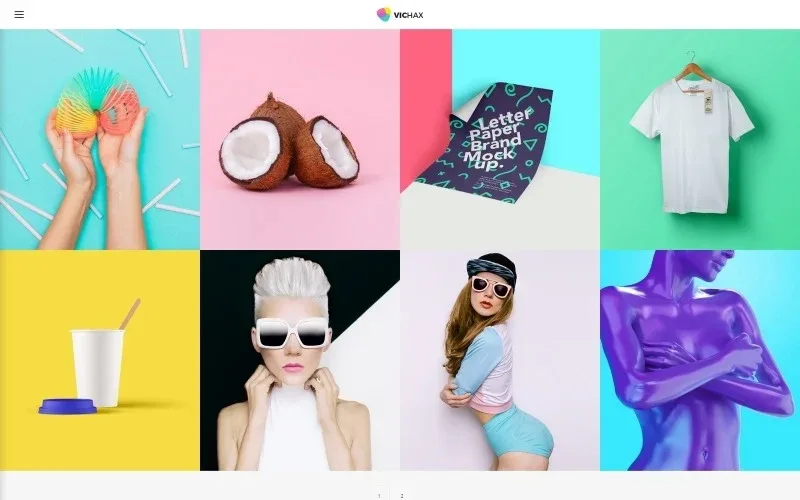
About VicHax – Designer Portfolio WordPress Theme
VicHax: a portfolio that also answers what clients ask next
A designer often spends weeks choosing which projects to show and almost no time on what the client looks for right after seeing them: what services you offer and what it costs to work with you. A portfolio that is only an image gallery forces people to write to you to find out, and many never do.
VicHax is a WordPress theme with a portfolio, and its demo shows it: besides the projects section, it includes services and pricing pages and a blog. That lets the same website show, explain and guide.
Three ways to use VicHax depending on how you work
The demo structure adapts to different profiles. These are the clearest ones:
Freelancer who sells by project
You care about the portfolio, the services and the pricing. You can show your work, describe what you do and make clear where the conversation starts. The visitor arrives with a more realistic idea.
Designer who also writes
If you share processes, references or case studies, the VicHax blog supports several post formats and several layouts. You can alternate long texts with video, audio or galleries without changing theme.
Small studio that wants order
With several header and footer styles, you can test which one fits the studio's tone and the number of links you need in the menu, without rebuilding the site.
Seven headers, two footers and a typography page
The VicHax demo clearly shows the pieces used to build the overall look:
- Seven header styles: you can try them in the demo.
- Two footer styles: you can compare them in the demo.
- Typography elements page: the demo includes a page with this name.
- Social icons: the demo includes links to Facebook, Twitter, Instagram, YouTube and LinkedIn, which is handy if your work circulates on several platforms.
The VicHax blog: six post formats and several ways to list it
The post formats shown are image, gallery, video, audio, quote and link. For the listing there are four layouts: classic, grid, masonry and justified. And you can choose a left sidebar, a right sidebar or none.
You can choose the layout according to the kind of content you publish.
Questions before choosing VicHax
How many header and footer styles does it have?
The demo shows seven header styles and two footer styles. You can review them in the demo itself before deciding.
Can I use it if I don't plan to publish a blog?
The blog appears as one more section of the demo menu. Check in the demo how the navigation looks and build your menu with the pages you will actually use.
Is it good for linking my social networks?
Yes: the demo includes icons for Facebook, Twitter, Instagram, YouTube and LinkedIn.
Showing prices is not charging them: you solve that with another plugin
The VicHax pricing page is for presenting your rates, not for handling payments. If you want to charge online, book appointments or sell files, you will need an additional plugin. Before deciding, check in the demo how your kind of project looks in the portfolio and whether the format you use fits the layout you prefer.
Topics
Version history
-
v
1.0.0 Current 13 Jun 2024
Customer reviews
Sign in to leave a review. Only people who have the product can review it.
No reviews for this product yet.
Frequently asked questions
-
GPL (General Public License) is the license under which WordPress and most premium plugins/themes are distributed. It grants you the right to use, modify and redistribute the software in as many projects as you want, with no domain restrictions.
-
Yes. With membership you get automatic updates via our GPLClub Updater plugin (installed on your WP, detects new versions and applies them). With individual purchase, you get one year of manual updates from your account.
-
Depends on the plan. Monthly: 3 domains. Semi-annual: 7. Annual and Lifetime: 15. Individual purchase: 1 domain.
-
GPLClub offers its own support for installation, configuration and compatibility. For direct support from the original author (feature requests, product-specific bugs), a license purchased from the author is required.