VisualNews Pro Theme
Antivirus scan
Powered by ClamAV
✅ Verified clean
This product file has passed our security filters.
Want to run a fresh ClamAV scan right now? Takes a few seconds and shows scanner version, signature DB and live result.
This can take 5 to 30 seconds.
Clean file Threat detected
No threats detected in this file.
- File
- Size
- Scanned
- ClamAV
- Signature database
⚡ Powered by ClamAV
Scan could not be completed
Report product
If you detected an issue (broken file, malware, inappropriate content, etc.) let us know and we'll review it ASAP.
Sign in to report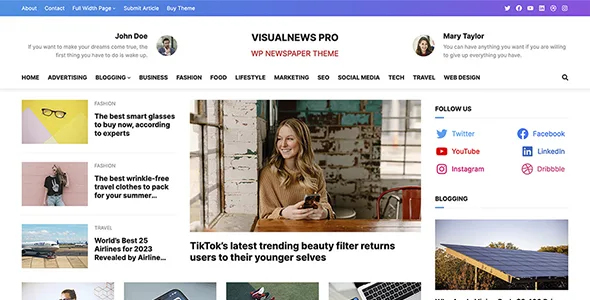
About VisualNews Pro Theme
VisualNews Pro and the front page you should not rebuild by hand every morning
Building a news website often ends with a hand-built front page nobody dares to touch, or a blog theme that cannot tell today's story from an article published three years ago. VisualNews Pro is a block theme designed for newspapers and magazines, built on the WordPress site editor: header, footer, templates and sidebars are edited visually, without writing code.
There is something worth understanding before you start: in a news outlet, the front page is not a page you design once, it is a rule that repeats. What changes every day are the posts; what must stay fixed is what fills the main slot, how many go in the secondary strip and which category each block pulls from. That is why the real work with this theme is in the Query Loop block (the maker has a video dedicated to setting it up) and not in dragging things around by eye.
VisualNews Pro patterns cover the typical sections, and that is it
It comes with more than 15 block patterns for the sections that repeat on a news website: front page with a featured area (hero), featured articles, author profiles and social media feeds. They are not closed pages: you combine them like pieces to build your own layout.
Set your expectations: they are starting points, not a catalog of hundreds of front pages. If your outlet needs ad management, paid subscriptions or newsletters, check in the demo what is covered and what you will have to solve with other plugins. Do the same with the social media pattern: see how it is fed before counting on it.
Typography, header and posts: what you can adjust
In a magazine the visual hierarchy comes from the headlines, so it matters that you can choose them carefully. These are the options it offers:
- Theme options panel: colors, fonts and layout to adapt the look to your brand.
- More than 1000 Google Fonts: to tell headlines, standfirsts and body text apart.
- Sticky header: navigation stays visible on long articles.
- Header search and back to top button: they help readers move around a large archive.
- Single post options: you control how each article is presented, useful for special reports or categories with a different format.
- Custom code editor: for those who can code and want to fine-tune; you do not have to use it.
- Settings import and export: you carry your configuration to another site and keep your sites consistent.
Frequently asked questions about VisualNews Pro
Do I need to know how to code?
Not for the basics: the design is done from the site editor with blocks. The code editor is optional and meant for people who already have experience.
Does it look good on mobile?
It has a responsive design. Even so, check your front pages on mobile after combining patterns, because that is where you notice whether a block carries too much content.
Is it suitable for a personal blog?
Yes. It is designed for newspapers and magazines, but also for bloggers, and the single post options work just as well for a blog.
Can I reuse my configuration on another website?
Yes, you can export and import the theme options, so you do not repeat the color and font settings on every site.
The demo imports with one click, but your front page is rebuilt with Query Loop
The one-click demo import gives you a complete site to see what the theme can do. Try it first on a test installation, not on a website with visitors, and treat it as working material, not as a final result.
After that, the order that works best is this: set colors and fonts in the options panel, review each Query Loop block so it takes the categories and number of posts you want, and finally adjust the single post template. When something works for you, export the settings and keep them.
Topics
Version history
-
v
1.0.4 Current 9 May 2024
Customer reviews
Sign in to leave a review. Only people who have the product can review it.
No reviews for this product yet.
Frequently asked questions
-
GPL (General Public License) is the license under which WordPress and most premium plugins/themes are distributed. It grants you the right to use, modify and redistribute the software in as many projects as you want, with no domain restrictions.
-
Yes. With membership you get automatic updates via our GPLClub Updater plugin (installed on your WP, detects new versions and applies them). With individual purchase, you get one year of manual updates from your account.
-
Depends on the plan. Monthly: 3 domains. Semi-annual: 7. Annual and Lifetime: 15. Individual purchase: 1 domain.
-
GPLClub offers its own support for installation, configuration and compatibility. For direct support from the original author (feature requests, product-specific bugs), a license purchased from the author is required.