Waitlist Woocommerce Premium ( Back in stock notifier )
Antivirus scan
Powered by ClamAV
✅ Verified clean
This product file has passed our security filters.
Want to run a fresh ClamAV scan right now? Takes a few seconds and shows scanner version, signature DB and live result.
This can take 5 to 30 seconds.
Clean file Threat detected
No threats detected in this file.
- File
- Size
- Scanned
- ClamAV
- Signature database
⚡ Powered by ClamAV
Scan could not be completed
Report product
If you detected an issue (broken file, malware, inappropriate content, etc.) let us know and we'll review it ASAP.
Sign in to reportNewer version out, or a problem?
About Waitlist Woocommerce Premium ( Back in stock notifier )
WooCommerce stores that lose the sale when a product sells out
A sold-out product usually means a lost sale and a customer who never comes back, unless someone tells them when stock returns. Waitlist For WooCommerce creates a waiting list for out-of-stock or backordered products, with the people who want the unavailable item.
Every sold-out item is also information: if many people are waiting for the same product, you know what customers want more than you have available. It is a good fit if your catalog has products that sell out or arrive in batches. If you always keep stock and never take backorders, you won't find a need here that this solves. The plugin needs WooCommerce active to work.
Automatic alerts when the product is available again
When the product regains stock, the plugin sends an email to the people on the list so they can buy it. You don't have to remember to check by hand who was waiting, and the customer gets the alert at the moment the item can be bought.
The email can be customized, and the plugin keeps a log of the emails sent.
Waitlist form in a popup or built into the page
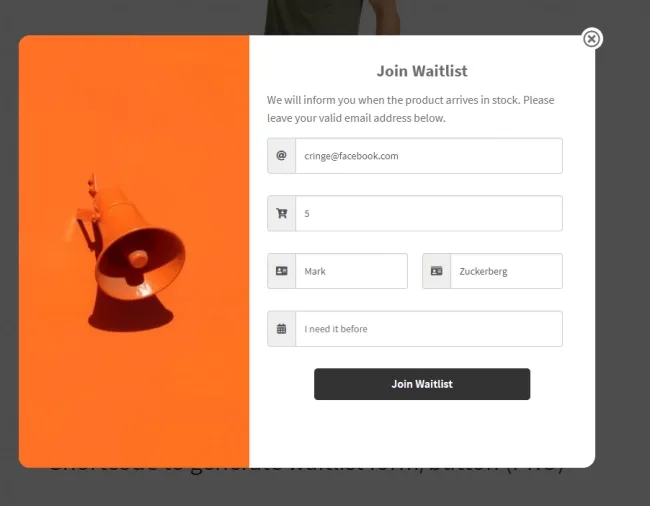
The sign-up form can appear in two designs: as a popup or as an inline form. If you prefer to place it somewhere else, a shortcode generates it wherever you need it.
The form fields can also be customized, so you decide which details you ask of anyone who signs up. The plugin also tracks the list of users and the number of people waiting.
Waitlist For WooCommerce add-ons for managing the list
Some advanced administration features are separate add-ons that extend the plugin. Waitlist Manager adds unsubscribe links to the emails and a dedicated view where each user sees and manages their waitlisted products, which makes opting out simple for anyone who no longer wants alerts.
The other add-ons cover specific needs:
- Export/Import: exports and imports the waitlist users and their data as a CSV or Excel file.
- Email Booster: sends an email to the customer and the admin, or to an address you specify, when someone joins the waitlist, and automatically sends the back-in-stock email when the stock status changes to "in stock".
- Custom Form Fields: adds extra fields to the form to collect more data from users and lets you change its appearance from the fields page.
Frequently asked questions about Waitlist For WooCommerce
Can customers unsubscribe from the list?
Yes. With the Waitlist Manager add-on, the emails include an unsubscribe link, and each user can see and manage their waitlisted products from their own view.
Can I export the waitlist to a spreadsheet?
Yes. With the Export/Import add-on you can export the list of users and their data as CSV or Excel, and also import them.
Is the admin notified when someone joins?
Yes. With Email Booster you can send an alert to the customer and the admin, or to a specific address, every time someone joins the waitlist.
Where can I place the form?
It can be shown as a popup or built into the page, and with the shortcode it can be inserted on any page where you need it.
Topics
Version history
-
v
3.1 Current 13 May 2024
Customer reviews
Sign in to leave a review. Only people who have the product can review it.
No reviews for this product yet.
Frequently asked questions
-
GPL (General Public License) is the license under which WordPress and most premium plugins/themes are distributed. It grants you the right to use, modify and redistribute the software in as many projects as you want, with no domain restrictions.
-
Yes. With membership you get automatic updates via our GPLClub Updater plugin (installed on your WP, detects new versions and applies them). With individual purchase, you get one year of manual updates from your account.
-
Depends on the plan. Monthly: 3 domains. Semi-annual: 7. Annual and Lifetime: 15. Individual purchase: 1 domain.
-
GPLClub offers its own support for installation, configuration and compatibility. For direct support from the original author (feature requests, product-specific bugs), a license purchased from the author is required.