WhatsApp Chat Support Pro Plugin
Antivirus scan
Powered by ClamAV
✅ Verified clean
This product file has passed our security filters.
Want to run a fresh ClamAV scan right now? Takes a few seconds and shows scanner version, signature DB and live result.
This can take 5 to 30 seconds.
Clean file Threat detected
No threats detected in this file.
- File
- Size
- Scanned
- ClamAV
- Signature database
⚡ Powered by ClamAV
Scan could not be completed
Report product
If you detected an issue (broken file, malware, inappropriate content, etc.) let us know and we'll review it ASAP.
Sign in to report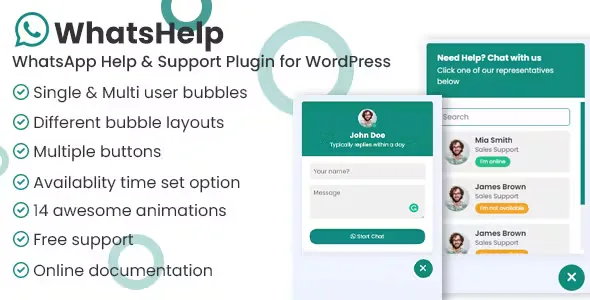
About WhatsApp Chat Support Pro Plugin
Anyone who gets enquiries through WhatsApp tends to have the same problem: the number is buried in the footer, the visitor hesitates, copies it by hand and forgets. A floating button that opens the conversation directly removes that friction. This plugin does that, and also lets you decide who answers, when, and on which devices it appears.
The chat a small business runs is not the one a team runs
The usual mistake is installing a WhatsApp button and leaving it visible 24 hours a day, when the person answering is one individual who sleeps, eats and sometimes does not check their phone. The visitor writes, gets no reply and walks away with a bad impression. That is why the most useful part of this plugin is not the button but the schedule control: you can define when you are available and show an offline status outside those hours.
What WhatsApp Chat Support Pro does depending on who uses it
If you handle support on your own
With single agent mode you add a bubble with one WhatsApp number to receive messages or calls. You can set your timezone, so your schedule is calculated from your time and not from each visitor's computer clock.
If you have a team of several people
Multiple agents mode lets you add unlimited agents and the visitor chooses who to talk to. Each agent can have their own availability, so nobody shows up as online when they are not.
If you want the link in several places on the site
It comes with a set of WhatsApp buttons to place wherever you like, and each one accepts its own configuration. There is also a WhatsApp button editor block and a shortcode to insert them. You can also include or exclude the bubble on specific pages, for example to hide it on the cart or on a landing page that already has its own form.
If you care about mobile versus desktop
You can show the chat only on desktop, only on mobile or only on tablet. On mobile WhatsApp is usually installed and opens the app; on desktop the behaviour depends on the chosen URL option (API or WhatsApp Web).
Details that help day to day
- Prefilled message: the visitor lands in WhatsApp with text already written, useful to know which page or product they are writing from.
- Consent checkbox (GDPR): you can require the user to accept it before being able to chat. It is a plugin option, not a guarantee of legal compliance: review your privacy policy.
- Bubble animations: several options to display the button.
- Pre-chat form: text, textarea, email, phone and select fields, whose values are included in the WhatsApp message.
- New tab: you can make WhatsApp open separately so the visitor does not leave your site.
It only replaces live chat if your team answers from a phone
This is not an embedded chat with its own inbox: the conversation happens in WhatsApp, not inside your site. The person writing needs WhatsApp or WhatsApp Web, and you reply from your account. It is not a ticketing system or a bot, and if you need automatic replies or several operators on the same number, WhatsApp alone does not solve that. Check in the demo how multiple agents mode and the offline notices behave before deciding.
Frequently asked questions
Can I add more than one agent?
Yes, multiple agents mode has no limit on the number and the visitor chooses who to talk to.
Can I show that I am offline?
Yes. You define your availability schedule, for one agent, for several or for each button, and outside it you appear as offline.
Can it be hidden on some pages?
Yes, with the include and exclude options you can show or hide the bubble on specific pages.
Do I need to know how to code?
Not for normal use: it is configured from the admin panel. If you want to tweak styles, the code is JS, CSS and HTML.
Does it work for WooCommerce stores?
It includes a settings screen for WooCommerce, which requires WooCommerce to be active. Check in the demo which options it offers.
Topics
Version history
-
v
3.1.4 Current 16 Jan 2026
Customer reviews
Sign in to leave a review. Only people who have the product can review it.
No reviews for this product yet.
Frequently asked questions
-
GPL (General Public License) is the license under which WordPress and most premium plugins/themes are distributed. It grants you the right to use, modify and redistribute the software in as many projects as you want, with no domain restrictions.
-
Yes. With membership you get automatic updates via our GPLClub Updater plugin (installed on your WP, detects new versions and applies them). With individual purchase, you get one year of manual updates from your account.
-
Depends on the plan. Monthly: 3 domains. Semi-annual: 7. Annual and Lifetime: 15. Individual purchase: 1 domain.
-
GPLClub offers its own support for installation, configuration and compatibility. For direct support from the original author (feature requests, product-specific bugs), a license purchased from the author is required.