WooCommerce Cart Share & Save
Antivirus scan
Powered by ClamAV
✅ Verified clean
This product file has passed our security filters.
Want to run a fresh ClamAV scan right now? Takes a few seconds and shows scanner version, signature DB and live result.
This can take 5 to 30 seconds.
Clean file Threat detected
No threats detected in this file.
- File
- Size
- Scanned
- ClamAV
- Signature database
⚡ Powered by ClamAV
Scan could not be completed
Report product
If you detected an issue (broken file, malware, inappropriate content, etc.) let us know and we'll review it ASAP.
Sign in to reportNewer version out, or a problem?
About WooCommerce Cart Share & Save
The cart one person builds and another has to finish
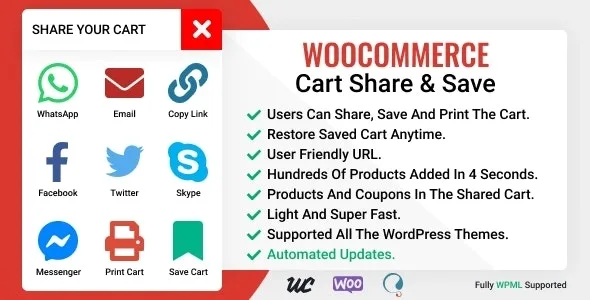
In many purchases, the person who picks the products is not the one who pays: a gift the family organizes, an order a manager approves, or a request someone prepares for another person. If the store only offers the cart to whoever is in front of the browser, that conversation ends up in screenshots and hand-copied lists. WooCommerce Cart Share & Save turns the cart into a link that can be shared, with its products and coupons inside. It also suits the customer who wants to leave a cart ready and pick it up later.
Saving a cart and coming back to it when needed
The customer can save their cart and restore it at any time. If they have an account in the store, they can also find their saved carts from the my account section. As an administrator, you decide which page the customer goes to after restoring a shared cart, so the next step is the one you want. There is also an option to periodically delete old shared carts.
Printing and emailing the cart
Besides the link, the cart can be printed and it can also be sent by email. The administrator controls these options: whether the print button appears in the cart and whether the printed version or the email show links to the products. Shared and saved carts are listed in the dashboard, and the saved cart list has an email column.
Works on top of WooCommerce
This is what the plugin already covers and the condition it sets to do so:
- Sharing the cart through a link, with products and coupons included.
- Saving carts and restoring them later, also from the customer account.
- Printing the cart and sending it by email.
- Needs WooCommerce installed and active, because it extends it.
Role permissions and buttons wherever you put them
You decide which user roles can use the feature. Shared carts are stored in their own table, the interface is responsive and customizable, and the URLs are user friendly. If you want the buttons somewhere else on the page, the shortcode wcss_share_cart_buttons places them wherever you add it, and there is a Web Share method.
Frequently asked questions about WooCommerce Cart Share & Save
Are coupons shared too?
Yes. The cart coupons travel together with the products inside the shared cart.
Can I limit who uses the feature?
Yes. With role-based access you decide which roles can share and save carts.
What happens to old shared carts?
You can turn on the option to delete them periodically from the settings, and review the list of shared and saved carts from the dashboard.
Can the cart be printed?
Yes. The administrator decides whether the print button appears in the cart and whether the printed version shows links to the products.
Where does the customer go after restoring a shared cart?
To the page you choose in the redirection settings, so the next step is up to you.
Topics
Version history
-
v
3.0.2 Current 13 May 2024
Customer reviews
Sign in to leave a review. Only people who have the product can review it.
No reviews for this product yet.
Frequently asked questions
-
GPL (General Public License) is the license under which WordPress and most premium plugins/themes are distributed. It grants you the right to use, modify and redistribute the software in as many projects as you want, with no domain restrictions.
-
Yes. With membership you get automatic updates via our GPLClub Updater plugin (installed on your WP, detects new versions and applies them). With individual purchase, you get one year of manual updates from your account.
-
Depends on the plan. Monthly: 3 domains. Semi-annual: 7. Annual and Lifetime: 15. Individual purchase: 1 domain.
-
GPLClub offers its own support for installation, configuration and compatibility. For direct support from the original author (feature requests, product-specific bugs), a license purchased from the author is required.