WooCommerce Extra Product Options Pro
Antivirus scan
Powered by ClamAV
✅ Verified clean
This product file has passed our security filters.
Want to run a fresh ClamAV scan right now? Takes a few seconds and shows scanner version, signature DB and live result.
This can take 5 to 30 seconds.
Clean file Threat detected
No threats detected in this file.
- File
- Size
- Scanned
- ClamAV
- Signature database
⚡ Powered by ClamAV
Scan could not be completed
Report product
If you detected an issue (broken file, malware, inappropriate content, etc.) let us know and we'll review it ASAP.
Sign in to report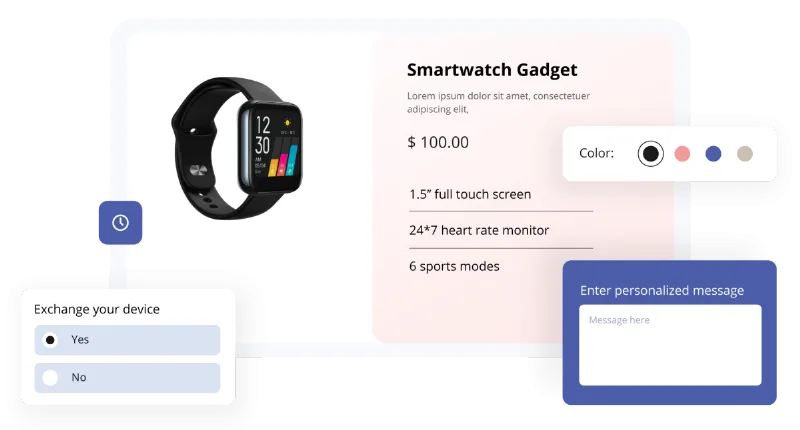
About WooCommerce Extra Product Options Pro
When customers need to ask for something your product page won't let them type
Engraving a name on a mug, choosing the color of a cord, uploading an image or giving a made-to-measure size. What ends up happening is that the customer emails you after buying, you reply, and the order is delayed. With WooCommerce Extra Product Options Pro that information is collected before payment, inside the product page itself.
The underlying idea is that every piece of data you ask for after the purchase is an order that stalls.
28 field types and seven ways to charge for each extra
The plugin includes 28 field types: text, textarea, number, email, URL, telephone, password, hidden field, select, multiselect, radio, checkbox, checkbox group, switch, slider, date picker, time picker or date and time range picker, color picker, color palette, file upload, image group, label swatches, product group, and layout elements such as paragraph, HTML, heading and separator.
Each extra can have its own price, with seven calculation methods:
- Fixed: an amount added when the option is chosen.
- Percentage: a percentage of the product price.
- Per units: a price for every n units, with or without the base price.
- By character count: useful for engravings or custom text.
- Custom: the customer enters the amount, designed for tips or donations.
- Custom formula: for charges that don't fit the others.
You can also show a pricing table that explains the base price and the surcharge for each option, so customers get no surprises in the cart.
Fields that appear only when needed, and data that arrives correctly typed
A product page with fifteen visible fields scares buyers off. That's why fields and sections can be shown or hidden based on the product, category, tag, user role, variation, quantity or the value of another field. That way, the engraving field only appears on products that can be engraved.
Fields are grouped into sections, which are placed before or after the add to cart button, or before the variation price, and can be displayed as a standard block, tabs or an accordion. In addition, the data entered can be displayed in the cart, the checkout, the customer's order detail and the administrator's order detail.
To prevent mistakes there are confirm validators (for example, email and confirm email must match) and custom validators using regular expressions, useful for phone numbers, serial codes or color values.
Other useful features
- Add custom fields to the cart through URL parameters.
- Edit products already added from the cart.
- Import and export fields and sections, duplicate them and copy them between sites.
- Backup and transfer of settings between sites.
- Custom styling with CSS, dropdown customization and hooks for developers.
- WPML compatibility to translate the fields.
Decide whether an extra fields plugin is enough or you need something more
This plugin adds fields and surcharges to products you already have; it doesn't create bundled products or manage stock per option. If each combination needs its own inventory, work out beforehand how you will handle it.
Can I charge for engraving per letter?
Yes, with pricing by character count.
Does it work for multilingual stores?
It has WPML compatibility to translate the fields.
Can I reuse my fields on another store?
Yes, you can export and import fields and sections, as well as the plugin settings.
Topics
Version history
-
v
7.5.7.2 Current 15 May 2026
-
v
7.5.7.1 27 Apr 2026
Customer reviews
Sign in to leave a review. Only people who have the product can review it.
No reviews for this product yet.
Frequently asked questions
-
GPL (General Public License) is the license under which WordPress and most premium plugins/themes are distributed. It grants you the right to use, modify and redistribute the software in as many projects as you want, with no domain restrictions.
-
Yes. With membership you get automatic updates via our GPLClub Updater plugin (installed on your WP, detects new versions and applies them). With individual purchase, you get one year of manual updates from your account.
-
Depends on the plan. Monthly: 3 domains. Semi-annual: 7. Annual and Lifetime: 15. Individual purchase: 1 domain.
-
GPLClub offers its own support for installation, configuration and compatibility. For direct support from the original author (feature requests, product-specific bugs), a license purchased from the author is required.