WooCommerce Gift Manager
Antivirus scan
Powered by ClamAV
✅ Verified clean
This product file has passed our security filters.
Want to run a fresh ClamAV scan right now? Takes a few seconds and shows scanner version, signature DB and live result.
This can take 5 to 30 seconds.
Clean file Threat detected
No threats detected in this file.
- File
- Size
- Scanned
- ClamAV
- Signature database
⚡ Powered by ClamAV
Scan could not be completed
Report product
If you detected an issue (broken file, malware, inappropriate content, etc.) let us know and we'll review it ASAP.
Sign in to report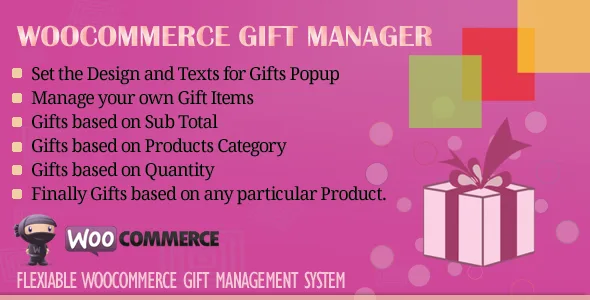
About WooCommerce Gift Manager
Giving away a product above a certain order value often ends in manual coupons, gifts customers never know exist, or discounts that eat into your margin without growing the cart. This plugin automates one thing: the gift with purchase, using rules you define in the admin.
The thing almost nobody calculates: the gift is an acquisition cost
A store that gives away product is paying to raise its average order value. That is why the rule matters more than the gift: if the threshold is too low, you reward people who were going to buy anyway; if it is too high, nobody reaches it and the notice becomes noise. WooCommerce Gift Manager gives you five ways to set that rule, and you decide which one fits your margin.
A full walkthrough: from the rule to the customer's cart
Picture a store with several categories that wants to raise the value of each order. Here is how it plays out:
- Step 1, choose the gift: the gift comes from products you have already created in WooCommerce. There is no separate catalog: you pick one or several existing products. If you tag them with "gift", the admin list shows them filtered.
- Step 2, set the condition: you can base it on subtotal ranges (add as many ranges as you like, each with its own gift), on products from a category, on a number of products from a category, on the total quantity of items, or on one specific product.
- Step 3, announce it in the shop: a offer message you can word as you like appears at the top of the shop page. Without that notice, customers do not know what they are missing to reach the gift.
- Step 4, show the gift in the cart: the available gifts are shown in a popup on the cart page. You can change its title, size and color, and write your own message for that page.
Five rules, five different strategies
By subtotal ranges
Useful for tiering: a small gift at one amount and a better one above a higher amount.
By category and by number of products in a category
For example, giving something away when a customer takes a set number of products from the same category.
By total quantity or by a specific product
The product option ties the gift to one item.
What you should know before setting up the promotion
The plugin handles gifts as free products, not as gift cards or wish lists. It is not a system for a customer to send a present to someone else with a message: the store provides the gift. It does not include any profitability report either, so you work out the cost of your promotions yourself. Check in the demo how the gift behaves with your variable products and with stock, because that is what most often raises questions.
Frequently asked questions
Can I offer more than one gift at a time?
Yes, you can select several products as gifts from those already in your store.
Can I change the texts customers see?
Yes: the offer message on the shop page, the cart message and the popup title (with its size and color) can be customized from the admin.
Do I have to create new products for the gifts?
No. They are chosen from existing WooCommerce products.
Can I turn promotions off without uninstalling?
Yes, the plugin includes an option to disable the gift manager.
Is it available in my language?
It includes English, French, German and Arabic. If your store uses another language, check how the texts display before launching.
Topics
Version history
-
v
2.6 Current 26 Aug 2024
Customer reviews
Sign in to leave a review. Only people who have the product can review it.
No reviews for this product yet.
Frequently asked questions
-
GPL (General Public License) is the license under which WordPress and most premium plugins/themes are distributed. It grants you the right to use, modify and redistribute the software in as many projects as you want, with no domain restrictions.
-
Yes. With membership you get automatic updates via our GPLClub Updater plugin (installed on your WP, detects new versions and applies them). With individual purchase, you get one year of manual updates from your account.
-
Depends on the plan. Monthly: 3 domains. Semi-annual: 7. Annual and Lifetime: 15. Individual purchase: 1 domain.
-
GPLClub offers its own support for installation, configuration and compatibility. For direct support from the original author (feature requests, product-specific bugs), a license purchased from the author is required.