WooCommerce Login & Account Pages for Elementor
Antivirus scan
Powered by ClamAV
✅ Verified clean
This product file has passed our security filters.
Want to run a fresh ClamAV scan right now? Takes a few seconds and shows scanner version, signature DB and live result.
This can take 5 to 30 seconds.
Clean file Threat detected
No threats detected in this file.
- File
- Size
- Scanned
- ClamAV
- Signature database
⚡ Powered by ClamAV
Scan could not be completed
Report product
If you detected an issue (broken file, malware, inappropriate content, etc.) let us know and we'll review it ASAP.
Sign in to report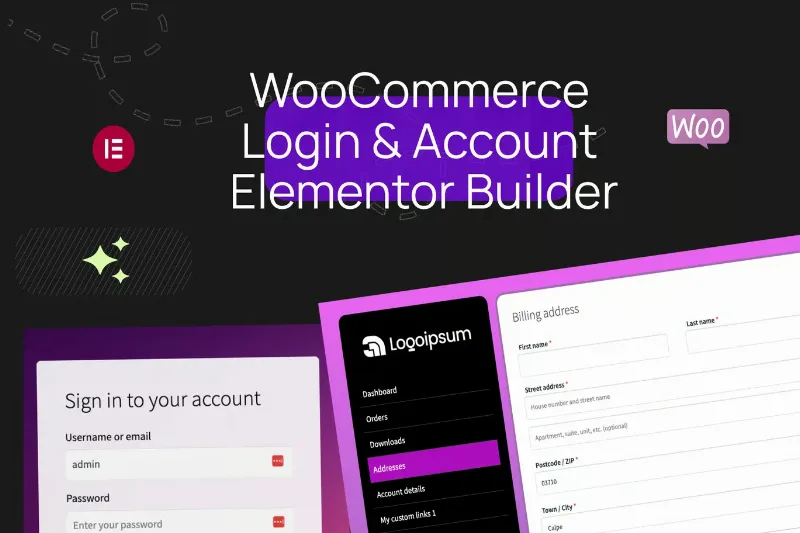
About WooCommerce Login & Account Pages for Elementor
You install WooCommerce, work on the catalog until it matches your brand, and then the customer who wants to check an order lands on a generic login page that looks like any other store. That visual jump is exactly what this plugin aims to remove.
The customer area is where the store stops looking like your brand
Most of the design effort in an online store goes into the homepage, product pages and cart. The customer area (login, registration, orders, addresses) usually keeps its default look, and it is the one visited by people who have already bought from you or are about to. WooCommerce Login & Account Pages for Elementor lets you design those screens with Elementor, instead of relying on the [my_account] shortcode.
Separate widgets for logging in, registering and recovering a password
The plugin comes with three independent access widgets: a login form, a registration form and a lost password form. Each one is customized on its own.
It also includes the option to enable Gmail login.
A My Account navigation that is no longer a mandatory vertical list
This is the most useful part of the plugin. The My Account navigation widget lets you:
- Turn on or off the sections WooCommerce offers by default.
- Change the order of the items and decide which ones are shown.
- Add your own links, for example to a help page or a returns policy.
- Put icons on each item, to the left or right of the text.
- Adjust orientation, spacing, alignment, dividers and colors on hover or for the active item.
A separate widget, the My Account content container, is the one that displays the customer's information, so you can lay out the rest of the page as you like.
What does not change
The plugin rearranges and styles the customer area, but it does not add new sections with their own functions: custom links point to other pages that you provide. It also requires Elementor to work, and it is a WooCommerce add-on, not a store in itself. Besides the login and account widgets, it includes a logout button and a back-to-home button.
Questions buyers ask before choosing this
Does it work if I do not use Elementor?
No. The whole plugin works as Elementor widgets.
Do I have to start from scratch?
Not necessarily: Elementor page templates are included, which you can use as a starting point and adapt.
Can I hide My Account sections I do not use?
Yes. Each menu item has its own visibility and order controls, so you can remove downloads, for example, if you only sell physical products.
Can it be translated?
It is translation-ready, following WordPress standards.
Does it slow down the site?
CSS loading is modular: you can enable or disable modules.
Navigation and content first, forms afterwards
To avoid surprises, start from the included templates and review the My Account page with a test customer account that has orders. Check that the content widget displays each section properly (orders, addresses, account details) and that the menu looks right on mobile. Then adjust the login and registration forms. If you plan to use Gmail login, test it with a real account before publishing.
Topics
Version history
-
v
1.0.1 Current 10 Dec 2025
Customer reviews
Sign in to leave a review. Only people who have the product can review it.
No reviews for this product yet.
Frequently asked questions
-
GPL (General Public License) is the license under which WordPress and most premium plugins/themes are distributed. It grants you the right to use, modify and redistribute the software in as many projects as you want, with no domain restrictions.
-
Yes. With membership you get automatic updates via our GPLClub Updater plugin (installed on your WP, detects new versions and applies them). With individual purchase, you get one year of manual updates from your account.
-
Depends on the plan. Monthly: 3 domains. Semi-annual: 7. Annual and Lifetime: 15. Individual purchase: 1 domain.
-
GPLClub offers its own support for installation, configuration and compatibility. For direct support from the original author (feature requests, product-specific bugs), a license purchased from the author is required.