WooCommerce Product Barcode Labels Printer
Antivirus scan
Powered by ClamAV
✅ Verified clean
This product file has passed our security filters.
Want to run a fresh ClamAV scan right now? Takes a few seconds and shows scanner version, signature DB and live result.
This can take 5 to 30 seconds.
Clean file Threat detected
No threats detected in this file.
- File
- Size
- Scanned
- ClamAV
- Signature database
⚡ Powered by ClamAV
Scan could not be completed
Report product
If you detected an issue (broken file, malware, inappropriate content, etc.) let us know and we'll review it ASAP.
Sign in to report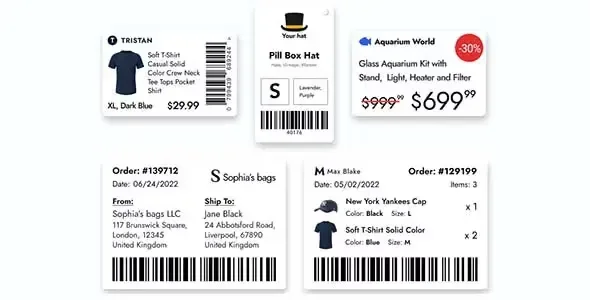
About WooCommerce Product Barcode Labels Printer
A printed code is only worth something where someone recognizes it
Printing a label with a barcode is easy. What is not easy is for that code to mean anything outside your warehouse. A code the plugin draws from your SKU is read by any scanner, but it does not have to exist in anyone else's catalog.
Before choosing the label format, decide who is going to read it: your own warehouse or a third party.
Print Barcode Labels for WooCommerce generates and prints barcode labels for your store's products. It does not invent the codes: it uses the ones you already have, and it does not create SKUs or product codes. For internal use, CODE128 and QR are enough, and both are free. UPC-A, UPC-E, EAN-13 and EAN-8 call for codes that are purchased.
Codes and paper it supports
- Code types: CODE128, QR, UPC-A, UPC-E, EAN-13, EAN-8, CODE39 and Data Matrix. CODE128 accepts any length and is a good option for your own SKUs; QR can encode SKU, name, price, attributes or links. When you pick EAN, the plugin detects UPC codes.
- Label data: name, price, SKU, UPC or EAN, fixed text and other fields. It can also be generated from stock. The price can be printed with or without tax.
- Source: products, categories, orders, users, promo codes or manual entry, with WooCommerce variations, attributes and custom fields.
- Batches: you add labels from product lists to a preview and print them together.
- Paper and printers: Letter, A4 and P4 sheets, and rolls or thermal printers from brands such as DYMO, Zebra, Brother, Arkscan, MFLABEL, ROLLO, BCL and TEROW. You define your own paper and sheet sizes in millimeters or inches.
- PDF: labels are saved as PDF by choosing that option in the print dialog.
Label templates
The basic template accepts up to four lines of text and the code. Each line is matched to a product data field in the Match Fields tab, and the matching is saved between sessions. With the code height at 0%, the code is hidden and the label is text only. Two attributes or custom fields are shown by default.
Custom templates, on the Business and Premium plans, are written in HTML in the template editor: logo, images, text, unlimited fields and attributes, and several codes on one label. Five examples are included: code and logo, QR, QR with product image, vertical code and custom fields with attributes. With the basic template two codes do not fit on one label, and the alternative is to print two labels.
Depending on the plan, there is also a PHP API, with WordPress filters, and a JavaScript one for generating labels from your own code.
A batch of labels for the shelf
A use case: a batch of products from one category, printed on an A4 sheet with the name, the SKU as CODE128 and the price. Margin-free printing depends on the printer. Use it only as a reference and adapt it to your store.
Limits and requirements
Among its functions there are no barcodes on invoices, emails or order details, and the plugin does not generate SKUs either. You need WordPress and WooCommerce. Printing uses the browser dialog, and a Chrome-compatible one is recommended.
- Install and activate the plugin on a store with WooCommerce.
- Open the product list and select the ones you want to label, turning on variations if you need them.
- Add them to the preview and choose the code type, the sheet or roll and the template.
- Match the text lines in Match Fields.
- Print the batch.
Alternatives for labels and codes
For barcodes that also serve to move stock, look at YITH Barcodes and QR Codes. For order documents in PDF, check WooCommerce PDF Invoices and Packing Slips Pro.
Answers about Print Barcode Labels
Which codes are free?
CODE128 and QR. The UPC and EAN types call for purchased codes.
Does it work with any scanner?
It works with any barcode scanner or scanning app, on iOS, Android and Windows.
Can I print on a roll?
Yes, on thermal roll printers such as DYMO or Zebra, and also on Letter, A4 and P4 sheets.
Does it generate SKUs?
No. It uses the codes that already exist on your products.
Topics
Version history
-
v
3.4.13 Current 31 Mar 2026
Customer reviews
Sign in to leave a review. Only people who have the product can review it.
No reviews for this product yet.
Frequently asked questions
-
GPL (General Public License) is the license under which WordPress and most premium plugins/themes are distributed. It grants you the right to use, modify and redistribute the software in as many projects as you want, with no domain restrictions.
-
Yes. With membership you get automatic updates via our GPLClub Updater plugin (installed on your WP, detects new versions and applies them). With individual purchase, you get one year of manual updates from your account.
-
Depends on the plan. Monthly: 3 domains. Semi-annual: 7. Annual and Lifetime: 15. Individual purchase: 1 domain.
-
GPLClub offers its own support for installation, configuration and compatibility. For direct support from the original author (feature requests, product-specific bugs), a license purchased from the author is required.